Introduction
Most advice on ranking a video repeats one checklist: put a keyword in the title, fill the tag box, write a long description. Part of that checklist is sound and part of it is folklore, and YouTube’s own Help pages show which is which. This guide checks each popular tip against YouTube Help and Google Search Central, adds what changed up to October 2026, and shows how to test a change on your own channel instead of trusting a rule. Use it as a working procedure: read the section you need, apply the numbered steps, and measure the result.
Quick Answer
YouTube SEO is the work of matching a video to what people search for, then earning viewer behaviour that keeps it ranking. YouTube Help says search weighs relevance, engagement and quality, so matching titles and descriptions get a video considered, while engagement such as watch time decides whether it stays visible.
Key Takeaways
YouTube ranks search results on relevance, engagement and quality, so metadata alone cannot rescue a video that viewers abandon.
Tags play a minimal role according to YouTube Help, so the time spent on tag research belongs in the title, thumbnail and opening of the video.
A keyword is worth targeting only when the results show a format you can match and channels no larger than yours already win, because an intent mismatch loses viewers in the opening seconds.
YouTube’s own A/B test chooses winners by watch time instead of clicks, which protects a video from a title that wins the click and disappoints the viewer.
Timestamps in the YouTube description feed Google’s key moments, so chapters serve two search engines at once, although Google makes no promise of a video result.
Public view counters rise from 24 August 2026 without any change in audience attention, so judge video optimization by retention and search traffic rather than by the counter.
How Does YouTube Search Rank Videos?
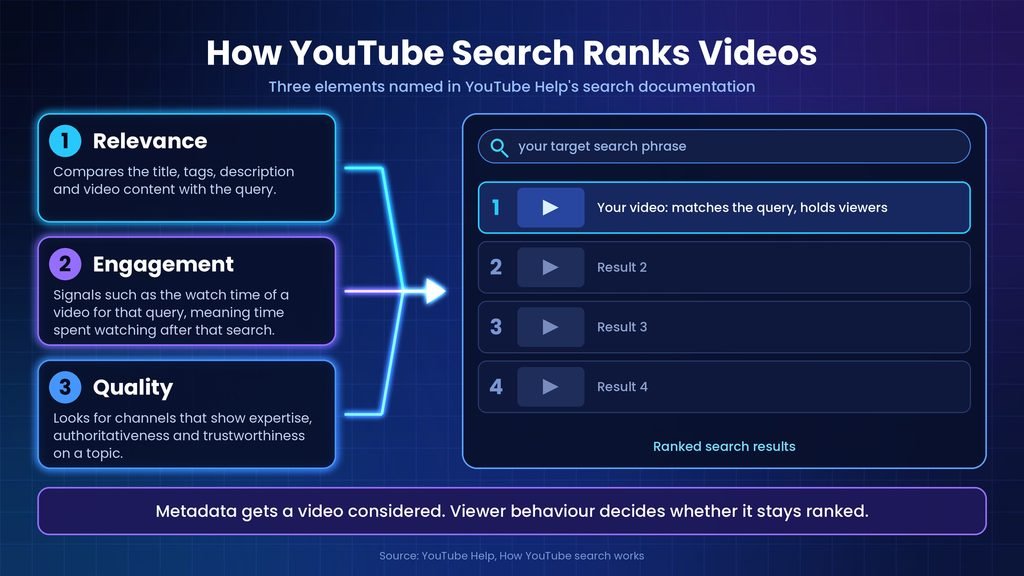
According to YouTube’s search documentation, the ranking system prioritizes three elements: relevance, engagement and quality. Relevance compares the title, tags, description and video content with the query. Engagement includes signals such as the watch time of a video for that query, meaning the time viewers spend watching it after that search. Quality looks for channels that show expertise, authoritativeness and trustworthiness on a topic.
The same page says the importance of the three elements varies by search type, that results may reflect a viewer’s own search and watch history, and that YouTube does not accept payment for better organic placement. Two viewers can therefore see different orders for one query, so a rank checked from your own signed-in account is one data point rather than a universal position.
Search is also only one route to viewers. YouTube Help’s recommendations page lists the homepage, Up Next, the Shorts player, destination pages and channel pages, and says Up Next relies mainly on the video being watched while the homepage relies primarily on watch history. The same page says satisfaction surveys help the system understand satisfaction, not just watch time, so watch time is not the only measure of a good video.
YouTube publishes no weights for these signals. Semrush’s guide, published on 28 October 2025, reports a YouTube growth and discovery executive saying there is no single answer on whether click-through rate (CTR), the share of impressions that become clicks, or watch time matters most. Any guide that quotes exact ranking percentages is therefore guessing. Metadata gets a video considered for a search; viewer behaviour decides whether it stays ranked.
Does YouTube SEO 2025 Advice Still Hold in 2026?
Mostly yes, because the Help pages still describe the same three search elements as of 6 October 2026, and tags still play a minimal role according to YouTube Help’s tags page. A guide framed as YouTube SEO 2025 advice can therefore still teach the fundamentals. Several details have moved since those guides were written, though.
Four details are worth checking before you follow an older checklist.
- A/B testing covers titles. YouTube Help’s A/B testing page describes tests of title only, thumbnail only, or both, while some guides still describe a thumbnail-only Test & compare tool.
- Shorts can run longer. YouTube Help’s A/B testing page says uploads up to three minutes that are square or taller count as Shorts, so older references that quote a shorter limit need checking.
- Views count from the first frame. A YouTube Help Community announcement, reported by PPC Land on 17 August 2026, says views count from the first frame of playback in Shorts, long-form video and live streams from 24 August 2026, and that Partner Program earnings and eligibility are unaffected.
- YouTube Studio has an AI assistant. YouTube Help describes Ask Studio as an AI creative partner for video ideas and performance questions, available on desktop browsers only and not to creators under 18, so check whether it appears in your account.
When a 2025 guide disagrees with a YouTube Help page, follow the Help page.
How Do You Choose a Keyword Worth Targeting?
Choose a phrase that people type, that the current results treat in a format you can match, and that channels of your size already win. Volume estimates come from third-party tools, so use them to compare shortlisted phrases rather than to promise results.
For example, a spreadsheet channel gains more from the phrase “Excel VLOOKUP not working” than from “Excel tips”, because the first names a problem one video can solve. If the channel’s niche is still undecided, how topics earn matters as much as how they rank.
Work through these checks in order and stop at the first phrase that passes all of them.
- Type the topic into YouTube search and note the autocomplete suggestions, which are phrases people actually enter.
- Open the top results and note the format and angle: tutorial, comparison, list, review or full course. Match the format the results already reward.
- Search the same phrase on Google and note whether video results appear, because those queries can bring viewers from both platforms.
- Pro tip: in YouTube Studio, open Analytics, then the Reach tab, and review the YouTube search traffic source for terms that already bring viewers to your channel.
- Compare the channels that rank. If each is far larger than yours, narrow the phrase until the results include channels of your size.
- Use a tool such as vidIQ, TubeBuddy, Semrush’s Keyword Analytics for YouTube or Ahrefs’ Keywords Explorer to compare volume estimates between shortlisted phrases, and check each vendor’s pricing page for the plan, currency and regional price that apply to you.
Keep one primary phrase per video, so the title, the opening lines and the description all answer the same query.
How Should You Approach Video Optimization Element by Element?
Spend effort in this order: title and thumbnail for the click, the opening of the video and the description for relevance, chapters and captions for navigation, and tags last. YouTube Help’s tags page says the title, thumbnail and description are more important pieces of metadata than tags for a video’s discovery.
The table below separates what YouTube documents from what practitioners advise, using YouTube Help’s search, tags and chapters pages as the documented sources. The priority column is an editorial judgment.
| Element | Job in discovery | Evidence | Priority |
| Title | Matches the query and earns the click | YouTube Help lists it as a relevance input | High |
| Thumbnail | Earns the click and sets expectations | YouTube Help ranks it above tags | High |
| Description | Adds context, links and chapters | YouTube Help lists it as a relevance input | Medium |
| Chapters | Navigation and Google key moments | YouTube Help and Google Search Central | Medium |
| Captions | Gives accurate text of spoken words | Practitioner advice, no stated ranking role | Medium |
| Tags | Covers common misspellings | YouTube Help: minimal role | Low |
Titles and thumbnails
Write the title for a person first. Place the target phrase near the start, state a clear promise, and promise nothing the video does not deliver. An overpromising title earns a click and loses watch time, which is why YouTube’s own A/B tool picks winners by watch time rather than clicks. For the VLOOKUP example, “Excel VLOOKUP Not Working? Fix It Step by Step” names the problem and the outcome, while “My Excel Struggle” names neither.
A thumbnail should show one idea that supports the title instead of repeating it. Titles are shortened on small screens, so read yours on a phone after publishing.
Descriptions and chapters
Put the clearest summary of the video in the opening lines, because only the start of the description shows before viewers choose Show more. Guides disagree on the exact cut-off, with different character and word counts, and it varies by screen, so lead with the sentence that matters instead of counting characters.
Add manual chapters. YouTube Help’s Video Chapters page requires at least three timestamps in ascending order, each chapter at least 10 seconds long, and says manual chapters override automatic ones. Name chapters with the phrases viewers search, such as “Why VLOOKUP returns #N/A” and “Fix an exact-match error”, not “Part 2”. Google Search Central says it prioritizes key moments set through YouTube description timestamps.
Captions and spoken keywords
YouTube Help lists video content among the inputs for relevance. Spoken words become searchable text through captions, and automatic captions can misspell product names and jargon. Upload or correct captions so the transcript matches what was said, and say the target phrase naturally in the opening lines. No YouTube page reviewed for this guide names captions as a ranking factor, so treat them as low-cost insurance for accuracy and accessibility rather than a proven boost.
Pro tip: read the automatic transcript of your last video. Every misspelled term is a place where a viewer could have been misled and where a search could have missed the video.
Tags
YouTube Help’s tags page says tags can help when a topic is commonly misspelled and otherwise play a minimal role, and that adding excessive tags breaks its spam policies. Vendor guides still tell creators to fill the tag box or copy competitors’ tags. Add a few accurate tags, include common misspellings of the topic, and stop.
The pick: put the first hour of any edit into the title, thumbnail and opening, because those three decide both the click and whether the viewer stays.
How Do You Keep Viewers Watching Long Enough to Rank?
Keep viewers watching by delivering the promise of the title early and in a clear order. YouTube Help’s search page counts the watch time of a video for a query as an engagement signal, and its recommendations page adds that satisfaction surveys help the system understand satisfaction, not just watch time. Retention therefore matters for search position and for recommendations.
Audience retention is the share of a video that viewers watch, shown second by second in YouTube Analytics. These six habits improve it.
- State the payoff in the opening lines and cut long logos or recaps before it.
- Order the content by what the query wants: the answer path for a how-to, the verdict early for a comparison.
- Open the audience retention report for each video, find where viewers leave, and rewrite or cut that section next time.
- Add manual chapters so viewers can jump to what they need instead of leaving the video.
- End with a related next video through an end screen, card or playlist, because Semrush’s guide lists session duration among the signals that contribute positively.
- Set length by the topic. Backlinko’s analysis of 1.3 million YouTube search results found longer videos had an edge, yet that is a correlation, and length that only fills time loses viewers.
Retention is the part of YouTube SEO that metadata cannot supply, so fix it before polishing anything else.
How Do You A/B Test a Title and Thumbnail in YouTube Studio?
Open YouTube Studio on a computer, select the video, click A/B Testing in the Title box or under Thumbnail, choose what to test, add up to three options and click Done, according to YouTube Help’s A/B testing page. The option with the highest watch time is then shown to all viewers, and the page says a test should complete within two weeks.
The feature is desktop only and needs advanced features enabled. It does not cover Shorts, scheduled lives or Premieres that have not ended, and it excludes videos made for kids, mature audiences or private videos.
Follow these steps to run a test.
- Sign in to YouTube Studio on a computer.
- Click Content in the left menu, then click the video.
- Click A/B Testing in the Title box or under Thumbnail.
- Select Title only, Thumbnail only or Title and thumbnail.
- Upload or type up to three options that differ clearly from each other.
- Click Done. The test then runs for up to two weeks.
- To check progress, click Analytics, then the Reach tab, then Manage test under How your A/B test is going.
- Read the result when it ends: Winner, Performed Same or Inconclusive.
Pro tip: YouTube Help recommends testing older videos first, because a weaker variant then costs less in channel views.
Where the test usually goes wrong
Three failure points account for most confusion.
- The A/B Testing option is missing. Advanced features may be off, the video may be a Short, scheduled live, unfinished Premiere, made for kids or private, or you may be on a phone instead of a computer.
- The test stops early. YouTube Help says changing the title or thumbnail during a test stops it automatically, so you must restart. The same page says any test thumbnail below 720p (1280 x 720) causes all test thumbnails to be downscaled to 480p (854 x 480).
- No winner appears. YouTube Help lists Performed Same and Inconclusive as normal results, and when no option clearly wins the first option you uploaded becomes the default, so test options that differ clearly.
Low impressions slow every test, so a video with few views may never reach a clear result.
Third-party testing tools exist, but YouTube Help says many run tests one after another and often optimize for click-through rate, so their winner can differ from the native watch-time result. The native test is the better default because it runs all variants at the same time and rewards the viewer who stays.
How Can a YouTube Video Also Rank on Google?
A YouTube video can appear in Google video results from its own YouTube page, and Google Search Central says it prioritizes key moments that creators set through timestamps in the YouTube description. The same guidance says no markup or setting guarantees a specific video feature, so treat Google visibility as a bonus to check rather than a promise. The guidance page shows a last-updated date of 18 December 2025.
Four checks decide whether Google visibility is realistic for a given video.
- Search the target phrase on Google. Backlinko lists how-to, review and tutorial queries as typical triggers for video results, but only the live results page confirms it for your phrase.
- Add chapters. Google Search Central says it prioritizes key moments set through the YouTube description, so manual timestamps with descriptive labels serve both platforms.
- Embed the video in a post written for the same phrase, following the steps in optimizing a blog post for search. Google Search Central says a blog post reviewing an embedded video is not a watch page, yet the post can still appear as a text result or an image result with a video badge.
- Monitor the result. In Search Console, the Performance report has a Videos search appearance filter, and the video indexing report lists reasons a video was not indexed.
Hosting video on your own site adds requirements, including a dedicated watch page and a valid thumbnail at a stable URL, which the Search Central page lists in full.
How Should You Optimize YouTube Shorts?
Optimize a Short as its own format. YouTube Help’s A/B testing page defines a Short as an upload up to three minutes long that is square or taller, and the recommendations page describes the Shorts player as a personalized stream. Semrush’s guide, published on 28 October 2025, adds that completion and replays are the fast engagement signals the Shorts system measures.
Four checks cover the parts of Shorts optimization that YouTube documents.
- Confirm the upload qualifies: up to three minutes and square or taller, according to YouTube Help’s A/B testing page.
- State the payoff in the first moments, because completion and replays are the signals Semrush’s guide highlights for Shorts.
- Name the topic in the title and description in plain words, since metadata still tells YouTube what the video is about.
- Read results in YouTube Analytics, Advanced mode, where engaged views are reported, because PPC Land’s report of YouTube’s announcement says public Shorts views have counted from the first play since 31 March 2025.
Shorts cannot be A/B tested, so change one thing per upload and compare across uploads.
Shorts or long-form first? For a channel that wants search traffic, the stronger first move is long-form video aimed at specific queries, with Shorts used to feed the same topics, because long-form titles and thumbnails can be A/B tested and search responds to query matching. A channel built on fast entertainment reverses that order.
How Can You Tell Whether Changes Increase Video Views?
Compare retention and YouTube search traffic before and after each change in YouTube Studio Analytics, instead of watching a single rank or the public view counter. YouTube Help says search results can differ between viewers, and a YouTube announcement reported by PPC Land says views count from the first frame in every format from 24 August 2026, so counters are likely to rise faster for reasons unrelated to optimization.
Use these checks after every change.
- Change one element per video, the title, the thumbnail or the opening, and write down the date.
- Open Analytics, then the Reach tab, and note impressions, CTR and the YouTube search traffic source before and after.
- Open the audience retention report and compare where viewers leave in the new version against the previous video.
- Wait for enough impressions. YouTube Help says an A/B test can take a few days up to two weeks, and the search documentation gives no ranking timeline for ordinary changes.
- Compare periods that straddle 24 August 2026 on retention and watch time, not on view counts, because the counting rule changes on that date.
- Use Ask Studio for summaries of comments or performance, then verify its figures in Analytics, because YouTube Help says its responses may vary in accuracy.
A change counts as an improvement only when retention or search traffic moves, not when the counter does.
Which YouTube SEO Claims Should You Ignore?
Ignore any claim that states an exact ranking weight, a required tag count, a fixed description length or a rule that one video length always wins, because YouTube’s documentation names signals but publishes no ranking weights, tag counts or length targets.
These five mistakes appear in popular guides.
- Treating tags as a ranking lever. YouTube Help’s tags page says tags play a minimal role and that excessive tags break its spam policies.
- Chasing clicks alone. YouTube Help says its A/B tests favour overall watch time over click-through rate, and Semrush’s guide says broader reach and total satisfied viewers matter more than a high CTR alone.
- Padding for length. Backlinko’s study found a correlation between longer videos and ranking, but YouTube documents no length target.
- Changing titles repeatedly to chase rank. YouTube Help says a test stops when the title or thumbnail changes, and repeated edits make it hard to know which change moved results.
- Trusting a single rank check. YouTube Help says results differ per viewer, so one search proves little.
When a claim carries no named YouTube or Google source, test it on one video before changing a channel.
Where to Start With Your Next Upload
Treat the YouTube SEO 2025 playbook as a starting checklist: match the query, write for the viewer, and let retention decide the rest. Video optimization pays when each change is tested alone and measured against retention instead of the view counter. To increase video views from search, start with one existing video: open YouTube Studio, choose an older video that earns impressions but holds viewers poorly, and run an A/B test on its title and thumbnail. Read the result when the test finishes, then apply the lesson to the next upload.
Frequently Asked Questions
- How long does it take for a YouTube video to rank?
YouTube publishes no timeline for search ranking. Its A/B testing page says a title or thumbnail test can take a few days up to two weeks because of differences in impressions and how recently the video was published, which shows how long one change needs to gather evidence. Judge a change across several uploads rather than hours after publishing.
- Is YouTube SEO different from Google SEO?
Yes. YouTube Help says its search ranking weighs relevance, engagement and quality, with viewer behaviour on the video itself, such as watch time for a query, feeding the result. Google ranks web pages and can also show YouTube videos as video results. The shared principle is intent: both reward the result that answers what the searcher meant.
- Can a new channel rank on YouTube?
Nothing in YouTube’s documentation excludes new channels, but its quality element looks for channels that show expertise, authoritativeness and trustworthiness on a topic, so a new channel starts with less evidence. Narrow phrases where the ranking videos come from channels of similar size are the realistic target, and consistent topics help build that evidence.
- How many tags should a YouTube video have?
YouTube Help sets no target count. It says tags can help when a topic is commonly misspelled and otherwise play a minimal role, and that adding excessive tags breaks its spam policies. Add a few accurate tags, include common misspellings of the topic, and spend the saved time on the title, thumbnail and opening of the video.
- Should you use AI to write YouTube titles and descriptions?
AI can draft options, but the title and description must describe what the video delivers, because a mismatch costs watch time. YouTube Help says Ask Studio responses do not reflect YouTube’s views and that accuracy may vary. Check any suggestion against the search results for your phrase, then A/B test the finalists.