Introduction
An agentic browser does more than display the web. It reads pages, emails and calendar invites, then clicks, types and buys on your behalf while you stay signed in. That access is exactly what attackers want to borrow. This guide explains how hijacking works, walks through the cases researchers have documented from Perplexity Comet to Claude in Chrome, shows where vendor defences stop, and ends with a ranked way to decide what to hand over.
Quick Answer
Yes. The security risks of AI browsers include hijacking: attackers hide instructions in a web page, email, calendar invite or document, and the built-in agent may obey them using your logged-in accounts. Researchers have demonstrated this against several products, and security agencies expect the problem to be reduced rather than eliminated.
Key Takeaways
An agentic browser acts with your signed-in identity, which is why one hijacked task can reach email, files and payments in a single step.
Patching one exploit path does not close the class of attack, because a language model has no hard boundary between instructions and the content it reads, as the UK National Cyber Security Centre explains.
Hijacking arrives by more routes than hidden text: documented cases include calendar invites, fake shops, phishing emails and malicious extensions, so defences must cover the whole session and not only the page.
Confirmation prompts are a brake and not a lock, because Zenity Labs researchers advise against relying on ask-before-acting pop-ups alone.
The safer pattern is to limit what the agent can reach, using logged-out or separate-profile sessions and narrow tasks, because an attacker inherits whatever access the agent holds.
Organisations should treat an agentic browser as a new insider with user-level permissions, which is why Gartner advised blocking AI browsers until enterprise-ready versions exist.
What is an agentic browser, and how does it differ from a normal one?
An agentic browser is a browser, or a browser extension, with a built-in AI agent that reads pages and then acts on them: it clicks, fills in forms, sends messages and completes purchases inside your signed-in sessions. A normal browser only displays pages and waits for you to act. The agent makes its own decisions about what to do next.
Not every AI feature in a browser carries the same risk: a sidebar that summarises the current page is a read-only assistant, while an agentic browser performs multi-step tasks. Examples include Perplexity Comet, ChatGPT Atlas in agent mode, Opera Neon, Fellou, Gemini in Chrome, Edge with Copilot and the Claude in Chrome extension.
The agent borrows your identity, and that is the core of the problem. Browsers normally keep websites apart with the same-origin policy, the rule that stops one site from freely reading another site’s data. An agent that reads one site and acts on another cuts across that rule, which is why Zenity Labs says agentic browsers fundamentally break it. A normal browser shows you the web; an agentic browser acts on the web as you.
Can hackers really hijack an AI browser?
Yes. Researchers have hijacked the agents in Perplexity Comet, ChatGPT Atlas, Claude in Chrome, Gemini in Chrome and Edge with Copilot, according to Dark Reading’s report on the Zenity Labs session at Black Hat USA 2026, published on 5 August 2026. An agentic browser attack of this kind needs no malware on your device. The attacker places instructions where the agent will read them, and AI agent hijacking follows when the agent obeys.
Hidden instructions in pages, emails and documents
Indirect prompt injection is an attack in which instructions are planted in content the agent processes, such as a web page, email or shared document, instead of being typed by the user.
Brave’s security team showed the pattern against Comet in August 2025: a hidden comment on a public forum post was enough once the user asked the assistant to summarise the page, and the proof of concept went on to reach account details and a one-time passcode. A common mistake is to assume that read-only tasks such as summaries are safe. This demonstration began with exactly that request.
OpenAI’s own red-team demonstration of 22 December 2025 shows the pattern. A planted email told the agent to send a resignation letter; when the user later asked for a routine out-of-office reply, the agent read that email, followed it and never wrote the reply. No software flaw was involved. Ordinary content became a command, and OpenAI reports that its security update now flags this particular attempt.
Zero-click hijacking through invites and links
A zero-click attack is one where the victim does nothing beyond asking the agent for a routine task. Zenity Labs, as reported by Help Net Security on 4 March 2026, showed a malicious calendar invite hijacking Perplexity Comet this way, with the agent reaching local files and sending data to the attacker while still giving the user the answer they expected.
Dark Reading’s 5 August 2026 coverage of the Black Hat session adds an ordinary-looking link on X steering ChatGPT Atlas into sending phishing messages from the victim’s WhatsApp account, and a request to summarise an email steering Claude in Chrome toward Gmail data theft and account takeover. Patch status differs by product and changes quickly, so check each vendor’s current security notes.
Agents that fall for scams
Not every failure needs hidden text. Guardio Labs, in research published in August 2025, pointed Comet at a fake shopping site, a phishing email posing as a bank and a page carrying hidden instructions. In some runs the agent filled in saved card details at the fake shop without asking, and it treated the phishing email as genuine and helped with the login form. Results varied between runs, and a control that works only sometimes is not a control.
Hijacking the assistant through a malicious extension
BragJack, disclosed by Forever Security researcher Gal Weizman and reported by BleepingComputer on 19 September 2026, took a different route. A single malicious extension, already installed, could seize the channels that connect the AI model to its privileged browser component in Chrome, Edge, Opera Neon, Comet and Claude in Chrome, and then hand the agent a full prompt of the attacker’s choosing. The researcher argues this matters for endpoint defences, because the final action is carried out by legitimate software. BleepingComputer reports that Google and Microsoft have fixed the flaws assigned to them.
Why can’t vendors simply patch AI agent hijacking?
Because the weakness sits in how language models read text, not in one faulty feature. A model processes instructions and content as a single stream, so no hard line separates what the user asked from what a page says. The UK National Cyber Security Centre (NCSC) concluded on 8 December 2025 that prompt injection may never be fully mitigated the way SQL injection was.
SQL injection became manageable because parameterised queries stop a database from treating input as a command. Language models offer no equivalent. The NCSC calls them inherently confusable deputies and advises designers to cut impact with deterministic safeguards that limit what a system can do, instead of hoping to stop every malicious input. It also tells buyers to be wary of any product that claims to stop prompt injection rather than reduce it.
OpenAI says the same in browser terms: its 22 December 2025 post describes prompt injection as unlikely to ever be fully solved, much like scams and social engineering. Zenity’s researchers add a structural point: the agent must read untrusted web content to do its job, so the exposure comes with the product. A patch closes one path into the agent; the class of attack stays open.
Which AI browser security risks go beyond hijacking?
The AI browser security risks beyond hijacking mostly come from what the product collects and what it can do unsupervised. Gartner, Cyberhaven and HALock describe these six.
- Data leaves the device: Gartner notes that page content, browsing history and open tabs are often sent to a cloud AI back end.
- Credential and session exposure: an agent working inside signed-in accounts can be steered into password-manager workflows, as Zenity Labs showed with Comet.
- Honest mistakes: Gartner warns that faulty reasoning alone can make an agent book the wrong flight or order the wrong equipment.
- Silent adoption: Cyberhaven notes that staff install AI browsers without approval, so security teams cannot control tools they do not know exist.
- Audit gaps: Cyberhaven reports that actions taken inside a page are often invisible to existing browser security logs.
- Cross-app aggregation: HALock warns that an agent seeing HR, CRM and document systems at once can join up data an organisation meant to keep apart.
Items four to six mostly affect organisations, but they are why shadow AI in the workplace deserves its own policy.
How do vendors defend agentic browsers, and where do those defences stop?
Vendors combine permissions, confirmation prompts, attack-detection classifiers, model training and, in some designs, hard architectural limits, and all three vendors compared here describe the work as unfinished. Google adds a separate critic model and per-task site limits, while OpenAI trains Atlas against automated attackers.
The table summarises what each vendor says publicly, based on Google’s Chrome security post of 8 December 2025, OpenAI’s Atlas post of 22 December 2025 and Anthropic’s Claude in Chrome announcement of August 2025. It records published design claims, not test results, so it does not rank the three.
| Agent | Design-level defence described | User-side controls described | Limit the vendor states |
| Gemini in Chrome | Separate critic model vets each action; agent limited to task-relevant sites | Confirmation for sensitive sites, sign-in and purchases; work log with take-over | Calls agent security an emerging domain |
| ChatGPT Atlas | Adversarially trained agent model; automated red-teaming loop | Logged-out mode; confirmation for purchases and emails | Expects prompt injection to stay open for years |
| Claude in Chrome | System prompt changes; classifiers for suspicious instructions; blocked high-risk site categories | Site permissions; action confirmations; admin allow and block lists | Reports residual attack success in its own tests |
Read the limits as carefully as the layers. In Anthropic’s research preview announcement of August 2025, Anthropic reported a 23.6 percent attack success rate without mitigations across 123 test cases covering 29 attack scenarios, and 11.2 percent with mitigations in autonomous mode. That is a snapshot of an early preview, not the rate for any current release, and it shows how far from zero a mitigated agent can sit.
Layers also fail at the seams. Dark Reading reported on 5 August 2026 that Zenity’s Black Hat research demonstrated hijack chains against all three products in the table. BleepingComputer reported on 19 September 2026 that a race condition defeated the Think and Do split Microsoft built into Edge to stop the agent taking arbitrary instructions and actions together. A common mistake is to treat confirmation prompts as the defence, and Zenity’s researchers advise against relying on an ask-before-acting pop-up alone.
This article’s position is to trust deterministic limits most: which sites the agent may touch, which actions it may take and when it must ask. Treat training and classifiers as a bonus. That ordering follows the NCSC’s advice to constrain what a system can do instead of trying to filter every hostile input.
Which tasks should you hand to an AI browser?
Hand over tasks where the worst outcome is cheap and reversible, and keep anything involving money, messages or credentials in your own hands. The agent’s access, not its intelligence, sets the damage a hijack can do, so rank each task by what the agent would need to reach to finish it.
Pro tip: ask what the most hostile text on the destination page could make the agent do, and keep that part manual.
- Public research and price comparison while logged out: lowest exposure and a sensible starting point.
- Form filling on low-stakes sites: moderate exposure, so review every field before the final submit.
- Anything that reads or sends email, calendar entries or messages: high exposure, and the OpenAI resignation demonstration and the Zenity invite attack both started here.
- Payments, banking, health, tax, password managers and work administration: highest exposure, so do these yourself.
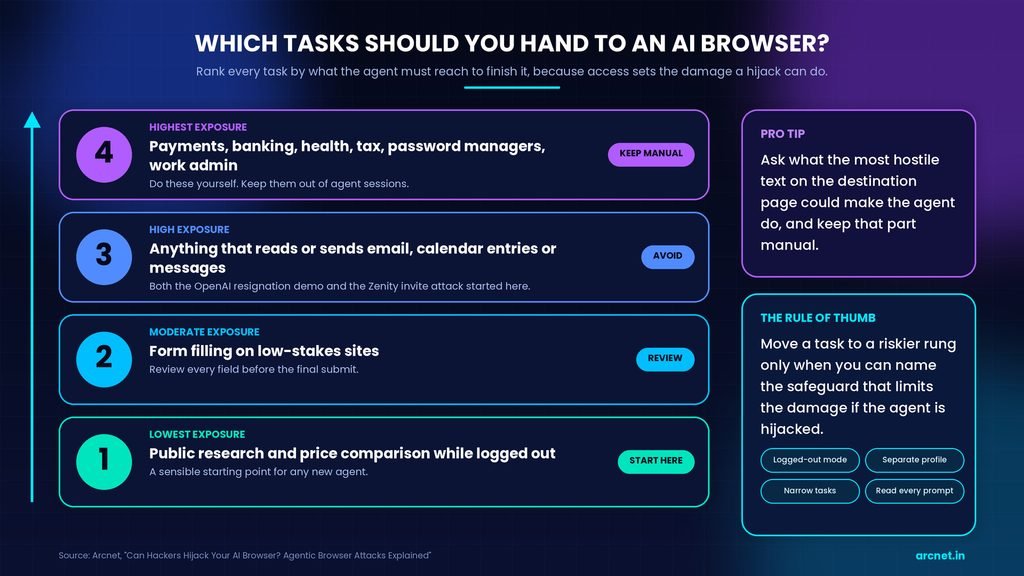
Move a task to a riskier rung only when you can name the safeguard that limits the damage if the agent is hijacked.
How can you use an AI browser more safely?
Limit what the agent can reach and what it can do without you. Use logged-out or separate-profile sessions, give narrow tasks, read every confirmation, and keep email, banking and password-manager access away from agent sessions. The attacker inherits whatever the agent holds, so less access means less damage.
Habits for individuals
These habits draw on vendor safety guidance and Zenity’s recommendations, and they pair with the wider account hygiene in cybersecurity tips for remote workers.
- Use logged-out mode, where the product offers it, for tasks that do not need an account.
- Create a separate browser profile for agent work with no saved cards, no password manager and no work accounts.
- Write narrow tasks such as comparing three named products, not open-ended ones such as handling your inbox.
- Read each confirmation and check the recipient, amount and content before you approve.
- Keep banking, health, legal and tax sites out of agent sessions, as Anthropic’s preview guidance advised.
- Pro tip: check sent mail, shared files and connected-app activity after any agent session that touched email or calendar, because a hijacked agent may still hand you the answer you expected.
- Update the browser and remove extensions you do not recognise or no longer use.
Each habit removes something a hijacker could borrow, which matters more than any single detection feature.
Controls for teams and security leads
For organisations, the agent is a new insider that holds the user’s permissions, so controls start with policy and end with logging.
- Decide the default: Gartner’s advisory “Cybersecurity Must Block AI Browsers for Now”, published on 1 December 2025, tells chief information security officers to block all AI browsers until enterprise-ready versions arrive.
- Assess the vendor’s cloud AI service: what page data it receives, how long it is kept and whether it is used for training.
- Apply least privilege: assume the agent will be hijacked, work out the worst it could do, and remove every permission it does not need.
- Keep work accounts such as email, cloud consoles and code hosting out of AI-browser sessions.
- Do not rely on ask-before-acting prompts alone; add limits the agent cannot override.
- Log agent activity and write an incident playbook for agent compromise.
- Allowlist browser extensions on machines that run agents, since BragJack needed only one malicious extension.
Teams that cannot staff items three to six should keep the block in place.
What to do next
Agentic browsers are useful because they act as you, and that is the same property that makes a hijacked agent costly. Vendors and the UK NCSC agree that defences lower the odds of AI agent hijacking rather than remove them. The practical position is to hand over public, reversible tasks and keep money, messages and credentials in your own hands. Before your next agent session, create a separate browser profile with no saved cards and no work accounts; that one step limits what any hijack can reach, whichever of the AI browser security risks it comes through.
Frequently Asked Questions
1. What is the difference between prompt injection and AI agent hijacking?
Prompt injection is the technique; hijacking is the result. Prompt injection means planting instructions in content a model reads. AI agent hijacking happens when an agent with real permissions follows those instructions and acts for the attacker. A chatbot can be injected and produce only a bad answer, while a hijacked browser agent can send messages, share files or spend money.
2. Can an AI browser be hijacked if I only ask it to summarise pages?
Yes. Brave’s August 2025 Comet research began with a user pressing the summarise button on a page containing a hidden comment, so read-only requests are not automatically safe. Risk depends on what the agent can reach while it reads. A logged-out summary of a public page exposes far less than a summary requested inside a signed-in email account.
3. How can I tell if my AI browser has been hijacked?
You often cannot tell from the answer you receive. Zenity’s Comet research showed an agent exfiltrating data while still returning the expected result, according to Help Net Security on 4 March 2026. Check the agent’s activity log if the product has one, review sent mail, sharing settings and connected-app activity, and treat unexplained messages as a reason to change passwords.
4. Is an AI browser extension safer than a full AI browser?
Not automatically. An extension is a smaller piece of software, but it can still hold broad permissions, and the BragJack research hijacked Claude in Chrome, which is an extension, as well as full browsers, according to BleepingComputer on 19 September 2026. The risk depends on what the agent can reach and what controls surround it, not on the packaging.
5. Do antivirus software and a VPN protect an AI browser?
Not against the attacks described here. A VPN protects the network path and antivirus looks for malicious code, but a hijacked agent follows instructions through legitimate browser features. BleepingComputer’s BragJack report makes a similar point, noting that the final action is carried out by legitimate software. Limiting what the agent can reach addresses the actual exposure.