Introduction
An employee pastes a client contract into a free chatbot to get a cleaner summary. Nothing breaks, nothing alerts, and the draft comes back in seconds. That single paste is how most company data leaves through AI, and it happens in organisations that never approved the tool. This guide explains what happens to the data, where the real exposure sits, and how to find unapproved AI tools at work before they cause a reportable incident. It also names the claims about chatbot leaks that are overstated, so the response you choose fits the actual problem.
Quick Answer
Yes, a chatbot can expose company secrets, but the cause is usually the account and the data, not the chatbot itself. Shadow AI risks arise when staff paste confidential material into personal or unapproved accounts, where the vendor’s retention and training terms apply instead of the company’s contract.
Key Takeaways
The account a chatbot is opened from decides most of the exposure, because business plans from vendors such as OpenAI state that they do not train on business data by default, while personal accounts follow settings the employee controls.
Shadow AI incidents more than doubled to 43 percent and averaged USD 5.39 million in IBM’s 2026 breach report, above the USD 4.99 million global average, so the problem now shows up in cost data and not only in warnings.
A ban without an approved alternative pushes use onto personal phones and accounts, where the company loses all visibility, so approved tools plus a hard block on the most sensitive data protect more than a blanket prohibition.
Finding unapproved tools needs several independent evidence sources, because chatbot traffic looks like ordinary web traffic and plain-language prompts carry no pattern that data loss prevention rules can match.
A policy works when it maps data classes to approved tools, since a list of banned tools goes stale faster than staff can read it.
After an incident, speed matters because Article 33 of the EU GDPR sets a 72-hour notification window for personal data breaches that pose a risk to people.
What Is Shadow AI, and How Does It Differ From Shadow IT?
Shadow AI is the use of AI tools, features or agents for work without the approval or visibility of an organisation’s IT, security or compliance teams. It is a subset of shadow IT, which covers any unapproved software or hardware.
The difference lies in what the tool does with data. An unapproved file-sharing app stores a document where the company cannot see it. An AI tool reads the content, produces new output from it and may retain it, so the exposure covers both the data and the decisions made from the answer.
Shadow AI appears in five common forms:
- A personal chatbot account used for work prompts, such as a free ChatGPT, Claude or Gemini login.
- A browser extension that adds writing, summary or translation features and reads the page it sits on.
- An AI meeting recorder or note-taker invited into calls without a security review.
- AI features switched on inside an approved software-as-a-service product after a vendor update.
- An API key or script that sends company data to a model provider from a laptop or cloud account.
The first form is what most people picture, and the fifth is the one developers create .
How Common Is Shadow AI, and What Does It Cost?
Shadow AI is common enough to show up in breach data. Microsoft and LinkedIn’s Work Trend Index, published on 8 May 2024 from a survey of 31,000 people in 31 countries, reported that 78 percent of AI users bring their own AI tools to work and that only 39 percent of users had received AI training from their company.
The cost appears in IBM’s 2026 breach report, which draws on Ponemon Institute research into 602 breached organisations. IBM says security incidents involving shadow AI more than doubled to 43 percent and averaged USD 5.39 million, against a global average of USD 4.99 million across all breaches in the same study.
Treat these figures as direction, not precision. Both come from surveys and breach samples, summaries of the IBM figure differ on the denominator, and many pages still quote IBM’s 2025 edition, so check which edition any figure comes from. IBM reports in US dollars, and breach costs differ by country.
Costs beyond the breach bill include exposure under client contracts and the work of regulator notification, neither of which appears in a headline average.
What Happens to Company Data After Someone Pastes It Into a Chatbot?
The text travels to the vendor’s servers, is processed to produce an answer and is stored under the terms of the account type used. Business plans often carry written limits on training and retention, while personal accounts follow consumer settings that the employee controls.
OpenAI documents both sides. OpenAI’s business data page, checked on 13 October 2026, says it does not use data from ChatGPT Enterprise, ChatGPT Business, ChatGPT Edu or its API platform for training by default. For personal accounts, OpenAI’s help centre describes a setting called Improve the model for everyone, under Settings, Data controls, that decides whether conversations can be used to improve its models. Other vendors, including Microsoft, Google and Anthropic, publish their own terms, which differ and change, so read each vendor’s data page instead of assuming.
The popular claim that a pasted paragraph will resurface in a competitor’s chat describes a worst case, not the typical outcome. The quieter exposures apply even if the vendor never trains on the text:
- Retention: the vendor keeps the conversation, and the company cannot audit or delete it.
- Account access: anyone who gains access to a personal account can read its history, and personal accounts usually sit outside company sign-in and logging.
- Connected data: linking a work mailbox, drive or chat app to a personal AI account gives that account a standing copy of company content.
- Human review: vendor terms may allow staff to review conversations for safety or support, so the terms need reading.
- Third-party plugins: each extension or connector adds another company that sees the data.
The risk sits in the account the chatbot is opened from, not in the chatbot, which is why a training opt-out alone does not make a personal account acceptable for company data.
What Are the Main Shadow AI Risks?
The main shadow AI risks are data exposure, compliance breaches, unreviewed output, insecure code, unmanaged agents and connectors, and missing audit trails. All six follow from one cause: company data and company decisions pass through a tool nobody assessed.
- Data and IP exposure: source code, contracts, pricing and strategy leave company control in one paste.
- Compliance breach: personal, health or card data sent to an unassessed processor can violate laws such as the EU General Data Protection Regulation (GDPR) or sector standards.
- Unreviewed output: an AI answer can be wrong yet read as authoritative, and a figure from it can reach a client or board paper unchecked.
- Insecure code: AI-written code that skips code review can bring vulnerabilities, unsuitable licences or unknown dependencies into production.
- Unmanaged agents and connectors: tools that act for a user can hold standing access to mailboxes, drives and APIs that nobody reviewed.
- No audit trail: unapproved tools appear in no inventory or log, so a leak cannot be scoped afterwards.
Most of these are visible only after the fact, which makes finding the tools the first control to build.
Samsung shows how this plays out. Bloomberg reported in May 2023 that Samsung restricted staff use of generative AI after engineers uploaded internal source code to ChatGPT, and reports at the time said staff had been allowed to use the chatbot to troubleshoot code. The gap was a missing data rule rather than a hidden tool.
A simple illustration of the same pattern: a finance analyst pastes a draft board paper with unreleased revenue figures into a personal chatbot to tighten the wording. No malware is involved, no rule feels broken, and the figures now sit in an account history the company cannot see.
Why Do Employees Use Unapproved AI Tools at Work, and Do Bans Help?
Employees use unapproved AI tools at work because the tools are faster than the approved route, and most are trying to finish a task rather than break a rule. When the sanctioned option is missing, slow or weaker, a personal account takes seconds to open.
Bans rarely end the use. A ban covers company devices and networks, but a personal phone on mobile data sits outside it, so activity moves to places the company cannot see at all. Samsung’s own memo, as reported, described its restriction as temporary while it built a secure alternative.
The choice is a real trade-off. A ban gives a clear rule but pushes use out of sight, while approved tools keep use visible at the cost of licences and review time. The stronger default is approved tools plus a hard block on the most sensitive data classes, because it keeps people in view while protecting what must never leave.
Pro tip: where the vendor and your web gateway support it, allow the company workspace and block personal log-ins to the same service, which stops personal use without removing the tool.
Two mistakes recur in organisations that try to control the problem:
- Announcing a ban without an approved alternative or a request route.
- Treating people who disclose their AI use as offenders, which teaches everyone else to hide it.
Both mistakes reduce visibility, which is the one thing every later control depends on..
How Can You Find Shadow AI in Your Organisation?
Find shadow AI by combining several evidence sources, because no single one sees everything. Chat traffic looks like ordinary web traffic, so network logs alone undercount, and a survey alone misses what people forget or hide.
Work through six checks, from technical logs to human reports:
- Compare web gateway or DNS logs for traffic to AI services against the approved tool list.
- Review OAuth grants (permissions given to third-party apps) in your identity provider for AI apps tied to work accounts.
- Search expense reports and card statements for AI subscriptions bought individually.
- Inventory browser extensions on managed devices and flag those that read page content.
- Scan code repositories and cloud accounts for API keys issued by AI model providers.
- Run a short, no-blame survey asking which tools people use and for which task.
Merge the results into one inventory that records each tool, its owner, the data it touches and a risk rating.
Know where detection fails. Pattern-based data loss prevention (DLP) catches card and identity numbers, but a prompt about a missed revenue target, written in plain sentences, carries no pattern to match. Personal phones on mobile networks sit outside every check above, which is why the survey and an approved alternative matter as much as any log.
Smaller companies without a security team can still run checks three, four and six with a finance export, a list of installed extensions and a one-page form.
How Do You Write a Shadow AI Policy That People Follow?
A shadow AI policy that works names data classes, approved tools and a request route, and stays short enough to read in one sitting. It tells staff what may never enter an AI tool, which tools are allowed for which data, and how to get a new tool reviewed quickly.
Cover these seven parts in order:
- Purpose: state that the policy exists to allow safe AI use, not to stop it.
- Scope: employees, contractors and every device used for company work.
- Approved tools: list each by name, with the account type required.
- Data classes: map what may go into which tool, as in the table below.
- Human review: name who checks AI output before it reaches a client, regulator or board.
- Request route: a form and a target review time, so waiting does not push people to workarounds.
- Monitoring and consequences: disclose what is logged and what follows a breach of the rules.
The data class rule is where most policies fail, so it needs a worked example.
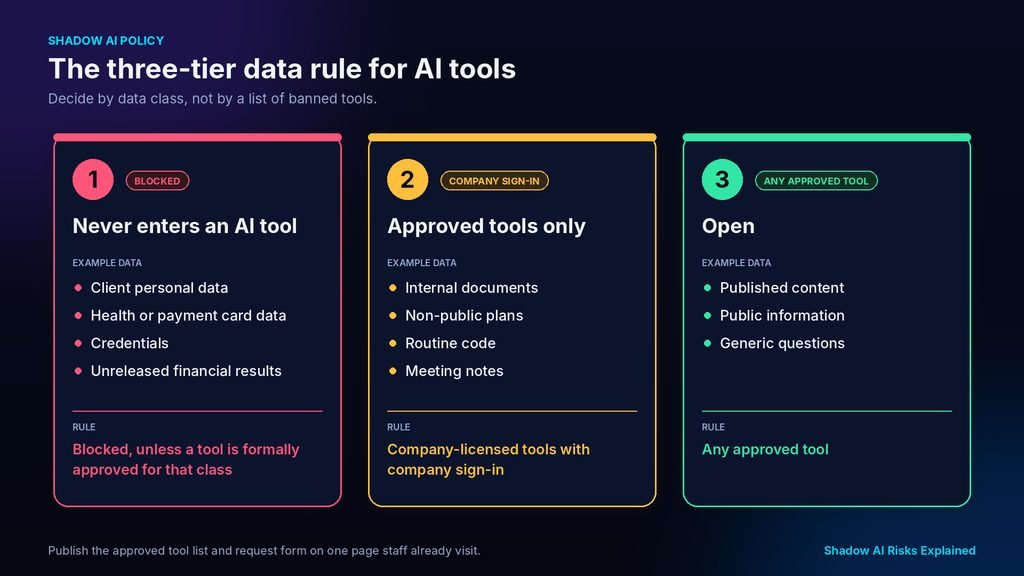
An illustrative three-tier scheme keeps the rule memorable:
| Tier | Example data | Rule |
| Never enters an AI tool | Client personal data, health or payment card data, credentials, unreleased financial results | Blocked, unless a tool is formally approved for that class |
| Approved tools only | Internal documents, non-public plans, routine code, meeting notes | Company-licensed tools with company sign-in |
| Open | Published content, public information, generic questions | Any approved tool |
Pro tip: publish the approved tool list and the request form on one page that staff already visit, such as the intranet home page.
How Do You Choose Which AI Tools to Approve?
Choose tools by what the contract and settings guarantee, not by brand. Business plans from vendors such as OpenAI, Microsoft, Google and Anthropic differ in what they promise about training, retention and admin control, so each needs the same six questions answered in writing:
- Does the plan exclude company inputs from model training by default, in writing?
- How long is data retained, and can the company set or shorten that period?
- Where is data stored, and can the region be chosen?
- Does the plan offer company single sign-on, admin controls and audit logs?
- Will the vendor sign a data processing agreement?
- Which sub-processors and human reviewers can access content?
Record the answers with the date, because vendor terms change.
What Should You Do After Company Data Reaches an Unapproved Chatbot?
Treat it as an incident: identify what was sent, preserve the evidence, limit further use through the vendor’s controls, and ask legal counsel whether notification applies. Speed matters because some laws set a clock.
Follow these six steps in order:
- Record what was pasted or uploaded, by whom, when, and in which tool and account type.
- Preserve the conversation and account details before anything is deleted, so the scope can be assessed.
- Ask the employee to disable training use where the setting exists and to delete the chat, treating deletion as mitigation, not proof.
- Classify the data: personal data, client confidential, trade secret, or none of these.
- Ask legal counsel or the data protection officer whether a notification duty applies, because Article 33 of the GDPR sets a 72-hour window in the EU.
- Fix the cause by adding an approved alternative or clarifying the data rule, so the same paste does not repeat.
Document the decision either way, because records are what a regulator or client reviews afterwards.
Other regions and client contracts set different clocks, and the EU rule applies only to personal data breaches that pose a risk to people, so the classification in step four decides which clock, if any, is running.
What To Do Next
Chatbots do not leak secrets by themselves; accounts, retention terms and pasted data do. The practical order is to find what is already in use, approve a company-licensed option for the common tasks, then write a shadow AI policy that names data classes and gives staff a fast route for new requests. Managing shadow AI risks this way is easier than discovering the tools during an incident. The first step is a short, no-blame survey asking which unapproved AI tools at work people used last week and for which task.
Frequently Asked Questions
1. Is ChatGPT shadow AI?
ChatGPT is shadow AI only when it is used for work without approval. A company-licensed business account that IT has reviewed is sanctioned use, while the same chatbot opened from a personal account to handle company documents is not. The label describes how and where the tool is used, not the product itself.
2. Is it illegal to use AI at work without approval?
Usually it is a breach of employer policy or confidentiality terms rather than a crime, and the consequence is typically disciplinary. Liability can grow if the data was personal data, client data or a trade secret, because privacy law and contracts then apply. Rules differ by country and contract, so legal counsel should answer for a specific case.
3. Can employers see which AI tools staff use?
Often yes, on company devices and networks. Web gateway logs, browser management, identity logs and expense records can show AI usage, though personal phones on mobile data fall outside that view. Many regions require employers to disclose monitoring and limit what they collect, so the policy should state what is logged.
4. Does turning off chat history make a chatbot safe for confidential data?
No. OpenAI’s help centre says temporary chats are not used to improve its models while they remain temporary, which limits training use, but the vendor still processes the content and the account still sits outside company control. Safety for confidential data comes from an approved plan and a data rule, not a privacy toggle.
5. How is shadow AI different from an AI governance programme?
Shadow AI is the AI use an organisation cannot see or has not approved. An AI governance programme is the system that finds that use, decides which tools and data are allowed, enforces the rules and reviews them as tools change. A programme shrinks shadow AI; it rarely removes it entirely.