
Introduction
Claude Code, Cursor, and GitHub Copilot now do fundamentally different jobs, even though marketing pages lump them into the same category. One runs as an autonomous agent in your terminal, one rebuilds the entire editor around AI, and one layers agent features onto the tool most developers already have open. This guide verifies what each one costs today, explains why their benchmark scores contradict each other, names where each tool actually breaks, and gives you a way to choose based on your own workflow rather than a marketing claim.
There is no single winner among best AI coding tools in 2026: Claude Code suits developers who want an autonomous agent handling large refactors from the terminal, Cursor suits developers who want AI built into a full editor with visual diffs, and GitHub Copilot suits teams standardized on GitHub who want AI layered onto their existing workflow.
Claude Code, Cursor, and GitHub Copilot overlap more than their marketing suggests, because GitHub Copilot’s paid tiers let you run Claude Code and OpenAI Codex as delegated agents inside GitHub’s own interface.
Published SWE-bench Verified scores for the same Claude model can differ by 15 or more percentage points across trackers, because each tracker uses a different test harness and scaffolding, not because the model changed.
Cursor’s usage-based pricing means two developers on the same plan can pay very different effective amounts, because model choice and agent workload change how fast the included usage pool empties.
GitHub Copilot’s Free, Pro, and Pro+ individual tiers may use your prompts and code to train future models unless you opt out, while Business and Enterprise tiers never do, because the training policy is set by plan tier, not by brand.
Claude Code’s long agent sessions can lose reasoning quality after roughly 90 minutes of continuous work, which is why restarting the session per task tends to outperform one marathon run.
Pairing two tools costs less in switching effort than picking one, because Cursor’s tab completions and Claude Code’s terminal-agent depth solve different problems rather than competing for the same task.
What “Agentic Coding” Actually Means
Agentic coding is software development where an AI system takes multi-step action on its own: reading files, writing code, running tests, and fixing what breaks, without a human re-prompting it after every step. The developer sets a goal instead of writing each line, and the system plans, executes, and corrects itself inside a loop. This is the capability that separates Claude Code, Cursor’s Agent mode, and GitHub Copilot’s agent mode from the autocomplete tools that came before them.
A standard AI suggestion tool predicts the next few tokens based on what you have already typed. An agentic system instead accepts a goal such as “add OAuth login to this app,” plans the files it needs to touch, writes the code, runs the test suite, reads the failures, and fixes them, often across a dozen or more files, before reporting back. Developers moving from suggestion-style tools to agentic ones for the first time, since vague goals produce vague multi-file changes that are harder to review than a single bad autocomplete suggestion.
The shift is already mainstream. 84% of developers use or plan to use AI tools in their work, and 51% use them daily, though only 29% say they trust the tools’ output to be accurate, according to Stack Overflow’s 2025 Developer Survey.
The common mistake in this transition is treating an agent’s first pass as final. Agentic tools still produce code that is “almost right,” and skipping review because a task ran end to end without an error is how subtle logic bugs and insecure patterns reach production.
Claude Code, Cursor, and GitHub Copilot: The Core Philosophy Differences
Claude Code, Cursor, and GitHub Copilot solve the same underlying problem, writing code with AI, through three different architectures. Claude Code is a terminal-native agent built by Anthropic that reads your whole codebase and executes multi-file changes with your approval at each step. Cursor is a full code editor forked from VS Code with AI built into every interaction, and GitHub Copilot is a plugin layer that adds AI features on top of the editor developers already use.
For readers running their own AI IDE comparison, three things decide which architecture fits your habits:
- Where you want AI to live: inside your existing editor (Copilot), as a replacement editor (Cursor), or in the terminal alongside any editor (Claude Code).
- How much autonomy you want to hand over per task: Copilot’s agent mode and Cursor’s Agent mode both offer autonomy, but Claude Code was built around it as the primary interaction model rather than an add-on.
- Whether your team is already standardized on one ecosystem: Copilot’s advantage is that it already sits inside GitHub’s issues, pull requests, and CI, so teams already living there add less friction switching on AI features.
Each philosophy trades a different kind of friction for a different kind of control, and none of the three removes the need for human code review.
Claude Code: the terminal-native agent
Claude Code runs primarily from the command line and reads project instructions from a CLAUDE.md file you maintain in the repository. It asks for permission before taking actions like editing files or running commands, and that incremental permission system is the tool’s defining trait: it checks in rather than acting silently. Claude Code also ships IDE extensions for VS Code and JetBrains, a browser-based interface at claude.ai/code, and support for the Model Context Protocol, so it can reach outside tools during a task.
Cursor: the AI-native editor
Cursor is built from the ground up around AI rather than adding it to an existing editor. Its Tab completion predicts several tokens ahead as you type, its Composer mode rewrites multiple files from a single natural-language instruction with a visual diff you approve, and Bugbot reviews pull requests and proposes fixes on usage-based billing. Cursor also runs cloud agents that work on tasks in the background while you continue editing elsewhere.
GitHub Copilot: AI layered onto the editor you already use
GitHub Copilot adds inline completions, a chat interface, agent mode, and a cloud agent that can be assigned an issue and opens a pull request when it finishes, all inside the editors developers already run: VS Code, Visual Studio, JetBrains IDEs, and Neovim. On Pro+ and Max plans, Copilot can also delegate tasks to third-party coding agents, including Claude Code and OpenAI Codex, directly from GitHub’s own interface, which narrows the gap with the other two tools considerably.
Beyond these three, tools including Windsurf, Cline, Aider, and Amazon Q Developer compete in the same category, but Claude Code, Cursor, and GitHub Copilot remain the three developers search for and compare by name most often in 2026.
Pricing Compared: What Each Tool Actually Costs in 2026
The number that moves your bill is rarely the plan’s sticker price. It’s how much work runs through premium models, how many hours a day an agent is active, and whether your team pools usage across seats. Figures below are in US dollars as published by each vendor; regional taxes and availability vary, so confirm current pricing on the vendor’s own page before subscribing.
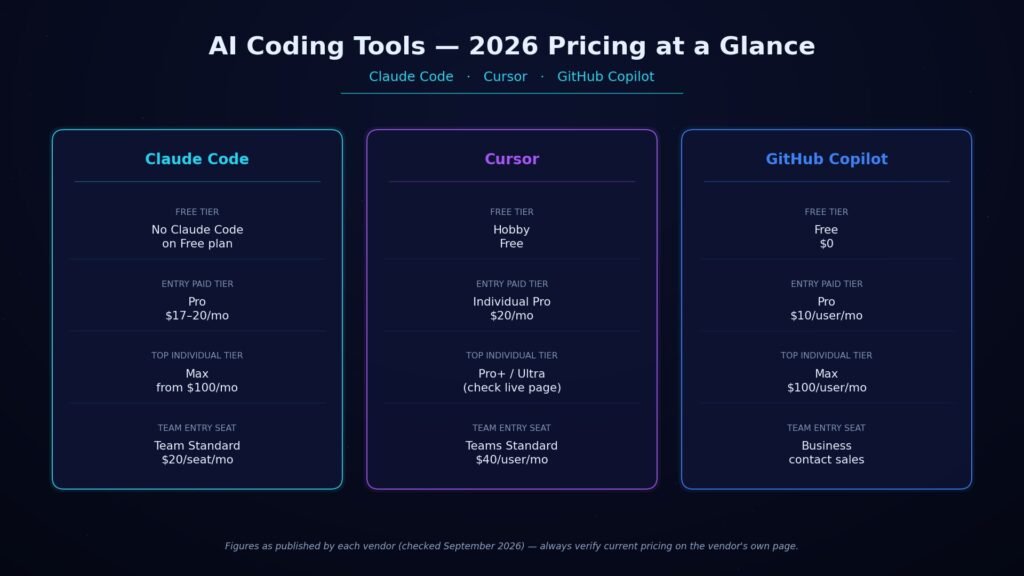
Claude Code is included in every paid Claude plan rather than sold on its own. Pro costs $17 per month billed annually, or $20 billed monthly, and includes Claude Code alongside Claude’s chat apps. Max plans start at $100 per month for higher usage limits. Claude Code shares its usage pool with the rest of your Claude plan, so a heavy day of chatting with Claude reduces your coding budget for that window, according to Anthropic’s own pricing page.
Cursor’s Individual Pro plan costs $20 per month and includes extended agent limits, frontier model access, and cloud agents; Pro+ and Ultra sit above Pro for heavier users, though Cursor’s pricing page doesn’t list their exact monthly figures outside its interactive plan selector, so check the live page before committing. Every plan includes a set amount of model usage, and once that runs out, on-demand usage continues at each model’s list price rather than cutting you off. Teams start at $40 per user per month for a Standard seat.
GitHub Copilot runs on GitHub AI Credits, where one credit equals one cent. Free costs $0 with 2,000 completions a month; Pro is $10 per user per month with $15 in monthly credits; Pro+ is $39 per user per month with $70 in credits and access to premium models including Opus; and Max is $100 per user per month with $200 in credits for sustained agent workflows, according to GitHub’s Copilot plans page. Inline code completions never consume credits on any paid plan; only chat, agent mode, code review, and the cloud agent draw from the credit pool.
| Tool | Free tier | Entry paid tier | Top confirmed individual tier | Team entry seat |
| Claude (includes Claude Code) | Free (no Claude Code) | Pro: $17/mo annual, $20/mo monthly | Max: from $100/mo | Team Standard: $20/seat/mo annual |
| Cursor | Hobby: Free | Individual Pro: $20/mo | Pro+/Ultra exist above Pro (verify live page) | Teams Standard: $40/user/mo |
| GitHub Copilot | Free: $0 | Pro: $10/user/mo ($15 credits) | Max: $100/user/mo ($200 credits) | Business seat: contact sales (not listed on plans page) |
Coding Performance: Why Benchmark Scores Don’t Agree
Independent SWE-bench Verified trackers disagree on the same current-generation Claude models by 15 or more percentage points, and the gap comes from methodology, not from the model changing overnight. Different organizations run the benchmark with different scaffolding, different retry limits, and different tool access, so two trackers testing the identical model checkpoint can report meaningfully different scores. That single fact should change how you read every SWE-bench claim in a coding-tool comparison, including the ones you find elsewhere.
Three examples from active trackers checked in September 2026 show the spread directly. BenchLM.ai’s tracker lists Claude Opus 5 leading SWE-bench Verified at 96%. A separate tracker, llm-stats.com, lists Claude Fable 5, not Opus 5, as the category leader at 95%, with no entry at all for Opus 5. A July 2026 model-card analysis published by DataNorth cites Anthropic’s own reported figure of 96.0% for Opus 5 on the same benchmark.
A benchmark score alone should never decide your tool choice without checking which harness produced it. Weigh published scores alongside your own test task on your own codebase, since SWE-bench measures issue resolution on a fixed public dataset, not your specific stack, your team’s conventions, or how a tool handles your longest-running agent sessions.
Security and Privacy: What Happens to Your Code
AI coding tools introduce risk categories that don’t map onto older software-security models. Context-window leakage sends secrets and proprietary code to a cloud model for inference. Unsanctioned data use trains future models on your prompts unless you opt out. Dependency hallucination suggests a package that doesn’t exist, which an attacker can then register and load with malware. Each of the three tools handles these differently by plan tier, not by brand.
On Claude’s paid plans, model training is opt-out by default for Free, Pro, and Max, and set to no training by default on Team and Enterprise plans, according to Anthropic’s pricing page. GitHub Copilot’s Free, Pro, and Pro+ individual tiers may use your prompts, outputs, and code snippets to train and improve future models unless you opt out in your account settings, while Business and Enterprise tiers never train on your data, according to GitHub’s Copilot plans page. Cursor’s privacy mode, switchable in settings or by a team admin, guarantees that code data is not used for training by Cursor or its model providers once enabled.
Dependency hallucination sits outside any single vendor’s control. One industry report published in 2026 put the share of AI-suggested packages that don’t actually exist at 5 to 22 percent, depending on whether the underlying model is commercial or open-source, according to a report from Digital Applied. Two habits reduce real exposure regardless of which tool you run: turn on privacy or content-exclusion settings on day one rather than after an incident, and treat any AI-suggested new dependency as unverified until you check it against the real package registry yourself. The common mistake to avoid is pasting a raw .env file or credentials into a chat window “for context” that content can be retained under a tool’s default logging settings even when the surrounding conversation feels disposable.
Where Each Tool Breaks: Real Limitations
All three tools have documented failure points that surface only under sustained real use rather than in a demo. Cursor’s own indexing struggles on very large monorepos, Claude Code’s reasoning quality can drop during marathon sessions, and GitHub Copilot’s usage-based billing can produce unpredictable monthly costs for agent-heavy workflows.
- Cursor’s file indexer slows meaningfully above roughly 200,000 files in a single workspace unless the. The cursorignore file is tuned to exclude generated or vendored code, according to hands-on testing published by Nipralo Technologies in mid-2026.
- Claude Code’s reasoning quality can noticeably decline after around 90 minutes of continuous agent work in a single session, per the same testing, which found that restarting the session for the next task outperformed pushing through one long run.
- GitHub Copilot’s move from a fixed subscription to usage-based AI Credits in 2026 means an agent-heavy workflow can exhaust a monthly allowance in a single long session, so budget-conscious teams need to watch the usage dashboard rather than assume the sticker price is the real cost.
- None of the three tools replaces code review. GitHub’s own documentation states plainly that Copilot is not intended to fully automate code development and expects the same review discipline applied to any third-party code of unknown origin.
Budget for these limitations before you standardize on a tool, not after a surprise bill or a session that quietly went sideways.
Best AI Coding Tools 2026: How to Choose
Picking among the best AI coding tools 2026 has produced comes down to three concrete inputs: how many hours a day you spend on agent-driven tasks, how large your codebase is, and how attached you are to your current editor. Get honest answers to those three questions first, and the choice mostly makes itself.
- Daily agent-hours: light users who write a function here and there get the most value from Copilot’s low $10 entry price and built-in GitHub workflow. Heavy daily agent users generally get more from Cursor’s higher individual tiers or Claude’s Max plans, where a bigger monthly price buys headroom instead of unpredictable overage.
- Codebase size: very large monorepos are where Cursor’s indexer needs the most tuning, and where Claude Code’s whole-codebase terminal reads tend to hold up with less configuration.
- Editor attachment: developers unwilling to leave VS Code or JetBrains get the least disruption from GitHub Copilot’s plugin model or Claude Code’s IDE extensions. Developers open to a new editor get the most from Cursor’s from-scratch AI-native design.
- Team standardization: teams already living inside GitHub’s issues, pull requests, and CI reduce onboarding friction by staying inside Copilot, even if a subset of engineers also run Claude Code for the heaviest refactors.
None of these factors overrides the others by itself; the right pick sits wherever your answers to all four line up. If forced to name a starting point, teams new to agentic coding tend to get the fastest, lowest-risk on-ramp from GitHub Copilot’s $10 Pro tier, since it adds AI to tools they already trust, while teams who already know they need deep, autonomous multi-file work are better served skipping that step and going straight to Claude Code or Cursor’s higher tiers.
Can You Just Use All Three?
Yes, and a large share of professional developers already do. Pairing tools rather than committing to one is common among people who use AI coding assistants daily, because the tools solve different problems rather than competing head-to-head for the same task.
A common combination pairs Cursor for daily editing and tab completions with Claude Code for the heaviest multi-file refactors, a split documented directly by Nipralo Technologies’ 2026 comparison of the three tools. GitHub Copilot’s ability to delegate work to Claude Code or OpenAI Codex narrows this further: a team standardized on GitHub gets a version of Claude Code’s depth without leaving GitHub’s interface, at the cost of routing that work through GitHub’s credit system instead of a direct Claude subscription.
The two mistakes to avoid when running more than one tool: letting both tools’ agent modes touch the same files in the same session, which produces conflicting diffs, and assuming a shared subscription budget when the tools actually bill separately.
Conclusion
Start by answering the three questions from the decision-criteria section above, your daily agent-hours, your codebase size, and how attached you are to your current editor, before committing to a subscription. Among the best AI coding tools 2026 has produced, the fastest low-risk step for most developers is trialling GitHub Copilot’s free tier or Cursor’s free plan for a week of real work rather than a demo task, since agentic coding tools reveal their strengths and limitations only under sustained use. If your work is dominated by large, multi-file refactors, budget time to trial Claude Code directly instead of assuming a general-purpose editor will scale with you. Whichever you pick, verify current pricing and model access on the vendor’s own page first, since all three have changed their plans more than once in 2026 alone.
FAQs
1. Is Claude Code better than Cursor?
Neither is better in every case; they solve different problems. Claude Code is built for autonomous, multi-file work driven from the terminal, while Cursor is built for staying inside a visual editor with AI assistance on every keystroke. Developers doing heavy refactors tend to prefer Claude Code; developers who want continuous inline help tend to prefer Cursor.
2. Is GitHub Copilot still worth it in 2026?
Yes, particularly for teams already standardized on GitHub, since Copilot now sits inside issues, pull requests, and CI without a separate tool. Its $10 Pro tier is the cheapest paid entry point of the three, and Pro+ and Max tiers let you delegate tasks to Claude Code or OpenAI Codex from inside GitHub’s own interface.
3. What is agentic coding, in one sentence?
Agentic coding is software development where an AI system independently reads files, writes code, runs tests, and fixes errors across multiple steps toward a stated goal, without a human re-prompting it after every action. It’s the capability separating Claude Code, Cursor’s Agent mode, and Copilot’s agent mode from older autocomplete-style tools.
4. Can I trust AI coding tool benchmark scores?
Treat any single benchmark percentage with caution, because independent trackers testing the same model can report scores 15 or more percentage points apart depending on the test harness used. Check which organization ran the test and under what conditions before letting a benchmark score justify a purchase decision.
5. Do AI coding assistants train on my proprietary code?
It depends entirely on your plan tier, not the tool’s brand. GitHub Copilot’s Free, Pro, and Pro+ individual tiers may use your prompts and code for training unless you opt out, while Business, Enterprise, and Cursor’s privacy mode explicitly exclude your code from training by default or on request.
6. Which AI coding tool is cheapest to start with?
GitHub Copilot’s Pro tier is the lowest-priced paid entry point at $10 per user per month, compared with $17 to $20 monthly for Claude’s Pro plan, which includes Claude Code, and $20 monthly for Cursor’s Individual Pro plan. All three also offer limited free tiers to test before paying.