
Introduction
Every browser tab already runs a general-purpose scripting engine, yet a growing share of the web’s heaviest work – video editors, design tools, games, even AI models now runs through a second, much lower-level execution layer sitting quietly beside it. That layer is WebAssembly. It was built to solve a problem JavaScript was never designed for: running compute-heavy code at close to native speed, without a plugin and without leaving the browser. This page covers what WASM actually is, how it runs, where it genuinely beats JavaScript, where it doesn’t, and the concrete steps to build a first module.
WebAssembly (Wasm) is a binary instruction format that lets code written in languages like Rust, C, C++, or Go run in the browser at near-native speed, alongside JavaScript rather than instead of it. This WebAssembly explained beginners overview covers the mechanics, the real performance difference, and how to compile a first module.
WebAssembly runs alongside JavaScript, not instead of it, because it has no direct DOM access and needs JavaScript as a bridge for anything the browser controls.
WebAssembly’s binary format decodes far faster than JavaScript text parses, which is why cold-start execution is where the performance gap is widest.
WebAssembly modules are sandboxed and cannot touch the filesystem or network unless a runtime explicitly grants that capability, which is why platforms use it to run untrusted third-party code safely.
The toolchain to pick depends on the source language: Rust uses wasm-pack, C and C++ use Emscripten, and AssemblyScript gives JavaScript developers a lower-friction entry point.
WebAssembly is a poor fit for DOM-heavy UI work or ordinary CRUD business logic, because the JavaScript bridge overhead can outweigh any compute gain.
What Is WebAssembly?
WebAssembly is a binary instruction format for a stack-based virtual machine, designed as a portable compilation target so code written in other languages can run in the browser or in a standalone runtime. It is not a language developers write by hand day to day; it is the format a compiler produces.
A WebAssembly module is organised like a code library: it imports the functions it needs, and exports functions other code can call, alongside a block of linear memory it manages directly. The standard is developed as an open specification by a W3C Community Group, and its core design goals name five properties: fast, safe, well-defined, hardware-independent and language-independent. The reason the format exists, since JavaScript was never designed to guarantee any of them.
WebAssembly is not a replacement for JavaScript, and no serious engineering team treats it as one. It complements JavaScript by taking over the computation-heavy pieces of an application while JavaScript keeps handling the DOM, events and page logic. An earlier project called asm.js attempted something similar by compiling to an optimisable subset of JavaScript itself; WebAssembly replaced that approach because a purpose-built binary format validates and compiles faster than any JavaScript subset can.
How WebAssembly Actually Runs
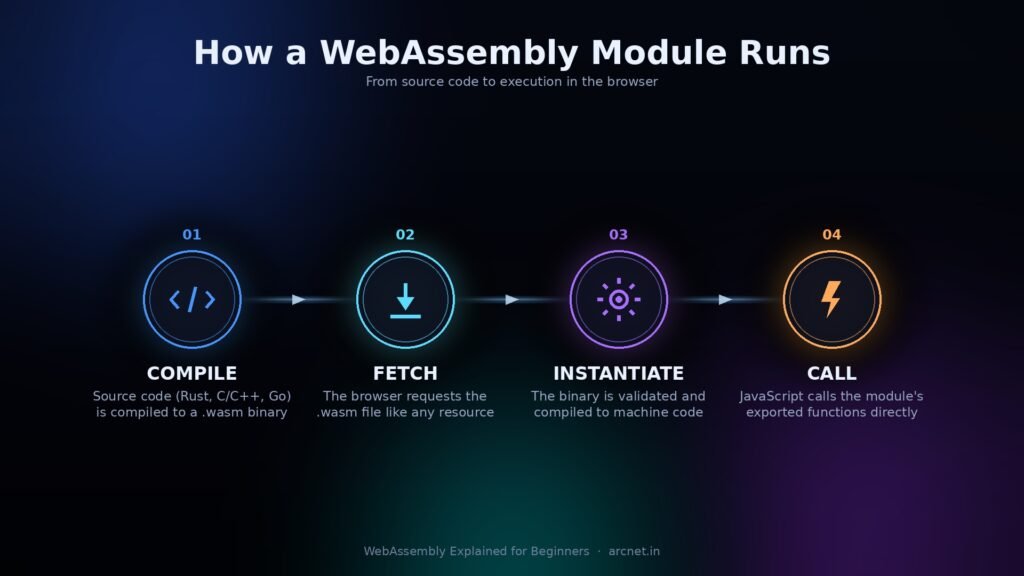
A WebAssembly module goes through four steps before any of its code executes: compile, fetch, instantiate and call. Skipping this pipeline is why most beginner guides leave readers unable to picture what is actually happening inside the browser.
- Write source code in a compiled language – Rust, C, C++, Go, or an AssemblyScript-style TypeScript subset.
- Compile it to a .wasm binary using the toolchain built for that language.
- The browser fetches the .wasm file the same way it fetches any other resource on the page.
- The browser validates and compiles the binary to native machine code – this is the instantiate step, and it is where WebAssembly’s speed advantage over JavaScript parsing shows up.
- JavaScript calls the module’s exported functions directly, and WebAssembly calls back into JavaScript through the same bridge whenever it needs something the browser controls, such as the DOM.
That JavaScript bridge is also WebAssembly’s biggest architectural constraint, and it shapes almost every decision covered later in this guide.
None of this requires a browser specifically. The WASI standard extends the same binary format to run outside a browser runtime entirely on servers, at the edge, or on embedded devices through runtimes such as Wasmtime and WasmEdge, using a capability-based permission model that only grants access to files, the network, or the clock when a module is explicitly given it.
WebAssembly vs JavaScript: Where the WASM Performance Difference Comes From
The WASM performance advantage over JavaScript comes from two places: how each format gets from source to running code, and how each one manages memory. Neither difference is marketing; both are structural.
JavaScript ships as text. The browser has to parse it into a syntax tree, then a just-in-time compiler optimises it based on patterns it observes while the code is actually running, which means performance improves after warmup rather than from the first call. WebAssembly ships as a pre-validated binary, so the browser skips text parsing entirely. WebAssembly’s own FAQ states that native decoding of Wasm has measured more than 20 times faster than parsing equivalent JavaScript text in internal experiments, and that large compiled JavaScript codebases can take 20 to 40 seconds to parse on mobile devices, the exact bottleneck the binary format was built to remove.
Memory management is the second structural difference. JavaScript uses a garbage-collected heap, which is convenient but introduces pause events that can spike latency in timing-sensitive code. WebAssembly uses linear memory – a flat byte array the module manages directly so there is no garbage collector pausing execution by default.
| Characteristic | JavaScript | WebAssembly |
| Format | Text, parsed at runtime | Binary, pre-validated |
| Compilation | Just-in-time, improves with warmup | Ahead-of-time, predictable from the start |
| Memory model | Garbage collected | Linear memory, manually managed |
| Cold-start speed | Slower – parsing overhead | Faster – binary decode |
| DOM access | Direct | Only via a JavaScript bridge |
Neither format wins universally. The gap narrows once JavaScript’s JIT compiler has warmed up on repeat-heavy code, and widens for cold-start, CPU-bound work. The practical approach is to write in JavaScript first and reach for WebAssembly only once profiling shows a specific bottleneck it can actually remove; treating it as a default upgrade for an entire codebase is how teams end up carrying toolchain complexity for no measurable gain.
Why Developers Are Switching to WebAssembly
Developers are adopting WebAssembly where JavaScript hits a real computational ceiling. Four areas account for most of the production adoption happening in 2026: image and video processing, in-browser databases, AI inference, and sandboxed plugin execution.
- Design and creative tools: design software such as Figma’s browser-based canvas renderer is widely reported to use a C++ rendering engine compiled to WebAssembly, drawing complex vector graphics at frame rates that previously required a native application.
- In-browser databases: SQLite compiled to WebAssembly now runs fully client-side in several production web apps, letting a page query real relational data without a server round trip.
- AI inference: quantised machine learning models now run client-side through Wasm backends in frameworks such as TensorFlow.js and ONNX Runtime Web, keeping user data on-device instead of on a server.
Sandboxed plugins and edge functions proxies such as Envoy and edge platforms such as Cloudflare Workers run third-party or customer-authored logic inside WebAssembly’s sandbox specifically because a Wasm module cannot touch memory or resources it was not explicitly given, which lines up closely with the isolation goals behind edge computing generally.
The common thread across all four is a hard performance or isolation requirement that JavaScript’s architecture cannot satisfy on its own, not that WebAssembly is a general-purpose upgrade, which is exactly why the next two sections matter as much as this one.
What WebAssembly Can’t Do
WebAssembly’s limitations are structural, not temporary rough edges, and a complete beginner explainer names them directly rather than burying them in a single caveat at the end.
- No direct DOM access: every DOM interaction has to cross the JavaScript bridge, and that crossing has real overhead. Moving DOM-heavy or event-driven UI code into WebAssembly, expecting a speed gain, is one of the most common mistakes teams make; the bridge overhead cancels out whatever was saved.
- Harder debugging: source maps exist, and modern browser developer tools can step through Wasm when one is available, but the experience still lags behind JavaScript’s, especially once a module is running in production.
- Uneven browser support: Chrome offers the deepest support for newer proposals, Firefox is close behind, and Safari has historically lagged, which matters more for a worldwide audience than it does for a single-market product.
- A real setup and learning curve: compiling Rust or C++ requires systems-level knowledge most web teams do not already have. AssemblyScript lowers that bar but does not remove it.
- No help with I/O-bound work: reaching for WebAssembly on ordinary request-response business logic, where the actual bottleneck is a database query or a network call, is the second common mistake, because WebAssembly cannot speed up a wait for I/O.
None of this makes WebAssembly a bad technology. It makes it a targeted one, which is the trade-off worth naming honestly before committing build time to it.
WebAssembly Explained Beginners: Where to Start Building
The fastest path to a working WebAssembly module is picking a toolchain that matches a language already known, rather than learning Rust or C++ specifically to try WebAssembly.
| Source language | Toolchain | Best suited for |
| Rust | wasm-pack, wasm-bindgen | New, performance-critical modules |
| C / C++ | Emscripten | Porting existing native codebases |
| AssemblyScript | asc compiler | JavaScript developers, moderate compute needs |
| Go | TinyGo | Smaller binaries, simpler use cases |
First module: the steps
- Install the toolchain for the chosen language. For Rust, install rustup, then run rustup target add wasm32-unknown-unknown to add the WebAssembly compilation target.
- Install the packaging tool. For Rust, install wasm-pack, which handles compiling, optimising and generating a JavaScript-ready package in one step.
- Write a small exported function in the source language and mark it for external use – in Rust, this means adding wasm-bindgen and setting the cdylib crate type in the project.
- Compile the project. The build command produces a .wasm binary plus the JavaScript glue code needed to load it.
- Import the generated module into an HTML page or a JavaScript bundler, and call the exported function the same way any JavaScript function is called.
Two failure points catch most beginners here. First, forgetting to add the WebAssembly compilation target before building, which produces a generic compiler error rather than anything mentioning Wasm. Second, passing complex JavaScript objects straight into a WebAssembly function; Wasm only understands numeric types natively, so strings and objects must go through the bindings the packaging tool generates.
Pro tip: start with a single, isolated hot path rather than porting an entire application; it is the only way to get a clean before-and-after comparison. A modern code editor with good Rust or C++ support makes this first pass less painful, and a clean Git-based workflow makes it easy to compare the WebAssembly version against the JavaScript one it replaces, commit by commit.
Should You Use WebAssembly for Your Project?
WebAssembly is worth adopting when a specific, measurable computation is the bottleneck, when untrusted code needs to be sandboxed, or when one binary needs to share logic across multiple platforms, not as a default performance upgrade for an entire codebase.
- Is there a profiled, CPU-bound bottleneck an actual measurement, not a guess?
- Is the bottleneck in computation, rather than in DOM rendering, layout, or waiting on the network?
- Does the team have, or can it realistically build, systems-language experience, or would AssemblyScript cover the gap instead?
- Does untrusted or third-party code need to run safely inside the application?
- Does the exact same logic need to run identically across a web frontend, a backend service, and a mobile app?
- Can the added build-toolchain complexity and the harder debugging story be justified against the performance or isolation gain?
Pro tip: benchmark with the actual workload and the actual browser targets before committing. Published performance figures from another team’s image-processing or cryptography workload rarely transfer cleanly to a different task.
WebAssembly does not make a slow architecture fast; it makes an already-necessary computation cheaper. That distinction is the entire decision in one sentence.
FAQs
1. Is WebAssembly replacing JavaScript?
No. WebAssembly runs alongside JavaScript, not in place of it. WebAssembly has no direct DOM access, so JavaScript still handles UI rendering, events and orchestration, while WebAssembly takes on the specific computational tasks where it has a genuine speed advantage.
2. Which languages compile to WebAssembly?
Rust, C, C++ and Go are the most widely supported source languages, each with its own toolchain: wasm-pack for Rust, Emscripten for C and C++, and TinyGo for Go. AssemblyScript, a strict subset of TypeScript, gives JavaScript developers a lower-friction way to compile directly to Wasm.
3. How much faster is WebAssembly than JavaScript?
It depends on the workload. WebAssembly’s own FAQ documentation cites experiments showing native binary decoding running more than 20 times faster than JavaScript parsing. The gap is largest for cold-start, CPU-heavy tasks and narrows once JavaScript’s JIT compiler has warmed up.
4. Does WebAssembly work outside the browser?
Yes. The WASI standard extends WebAssembly to servers, edge nodes and embedded devices through runtimes like Wasmtime and WasmEdge, using a capability-based permission model similar to containers but with faster startup and a smaller attack surface.
5. Is WebAssembly supported in all browsers?
Chrome, Firefox and Edge support the core WebAssembly specification and most newer proposals. Safari has historically lagged on newer feature proposals, so cross-browser testing matters more for WebAssembly projects than for most JavaScript features, especially for a worldwide audience.
6. Do I need to know Rust or C++ to use WebAssembly?
No. AssemblyScript compiles a strict subset of TypeScript syntax directly to WebAssembly, giving JavaScript and TypeScript developers a starting point without learning a systems language first, though its performance ceiling is lower than Rust or C++.
Conclusion
WebAssembly earns its place in a project the moment a real, measured computational bottleneck shows up, not before. Start small: compile one isolated function and benchmark the actual WASM performance difference against the JavaScript version it replaces, then decide whether the toolchain overhead is worth carrying into production. That single test tells you more than any WebAssembly explained beginners comparison table ever will. If the results look different once building starts, the comment section is open.