Introduction
An app that shows a live forecast, takes a card payment or offers to sign you in with another account is asking a different program for help. That request travels through an API, and the rules of that exchange decide whether the app works or breaks. This guide shows what an API call looks like from the inside, the styles of API you will meet, what makes an API RESTful, and how to connect two systems so the link survives real failures. It also covers what most explainers skip: what the errors mean, where the security risks sit and what depending on someone else’s API costs you. No coding background is assumed, though the examples are concrete enough to try.
Quick Answer
An API, short for application programming interface, is a defined set of rules that lets one program request data or actions from another without knowing how the other is built. The requesting program sends a structured message to an address called an endpoint, and the other program returns a structured reply, usually as JSON over HTTP.
Key Takeaways
An API is a contract that hides how a service is built, so a shop can accept payments, maps or sign-ins from providers whose internals it never sees and keep working when those internals change.
Every web API call has the same parts, from endpoint and method to status code and response body, and the status code names many failures, so reading a call carefully solves many problems before debugging starts.
A RESTful API follows the constraints Roy Fielding described, and many JSON APIs called REST skip the hypermedia constraint, so the documentation is a better guide than the label.
API integration is more than one working request, because you must choose polling or webhooks by how fast changes must arrive and plan for retries when networks or providers fail.
Broken object level authorization and broken authentication rank first and second in the OWASP API Security Top 10 (2023 edition), so keep credentials out of source code and give each one the fewest permissions it needs.
The real cost of an API is usage-based pricing plus the effort of surviving its changes, so read rate limits, tier restrictions and the deprecation policy before building on it.
What Does API Stand For, and What Does an API Actually Do?
API stands for application programming interface. The application is any software with a job to do, and the interface is the agreed way other software may ask it to do that job. The agreement lists what can be requested, how to ask and what the reply will look like, and everything else about the system stays hidden.
That hidden part is the point. Someone who searches what is API is usually missing one idea: an API is a contract, not a connection. The contract stays fixed while the code behind it is rewritten, moved to another server or replaced, which is why a shop can accept card payments without building a payment network. People use a screen to work with software, and programs use an API.
How do API, web API, web service, local API and SDK differ?
These terms overlap, and mixing them up causes confusion in documentation and job descriptions.
- API: the interface itself, meaning the rules and the operations on offer.
- Web API: an API reached over a network, usually through HTTP, which IBM’s overview describes as the form most modern APIs take.
- Web service: a web API that needs a network to work, so every web service is an API but not every API is a web service.
- Local API: an interface an operating system or library gives to programs on the same machine, such as access to files or location.
- SDK: a packaged library that wraps an API’s calls in a language’s own functions so developers avoid writing raw requests by hand.
When an article says API without more detail, it almost always means a web API, and this guide does too.
How Does an API Work?
An API works through a request and a response. A client, meaning the program that needs something, sends a request to a server, meaning the program that holds the data or performs the action, and the server sends back a response. The API is the set of rules both sides follow, so neither needs to see the other’s internals.
A phone weather app shows the pattern. The app is the client, the weather service’s system is the server, and the app asks for a forecast for one location. The server replies with plain data rather than a finished web page, and the app decides how to display it. That server may run in a cloud data centre or nearer the user at the network edge, a trade-off covered in Arcnet’s edge versus cloud comparison.
What are the parts of an API request and response?
Almost every web API call, whatever the provider, is built from the same six parts.
- Endpoint URL: the address of the resource, such as a users path on the provider’s API domain.
- HTTP method: the verb that states intent, such as GET to read, POST to create, PUT to replace, PATCH to change part of a record and DELETE to remove one.
- Headers: metadata such as the credential, the format the client accepts and caching instructions.
- Request body: optional data the client sends, usually JSON, with methods that create or change things.
- Status code: a three-digit number in the response that reports the outcome, which MDN’s HTTP reference groups into classes such as success, client error and server error.
- Response body: the data the server returns, again usually JSON.
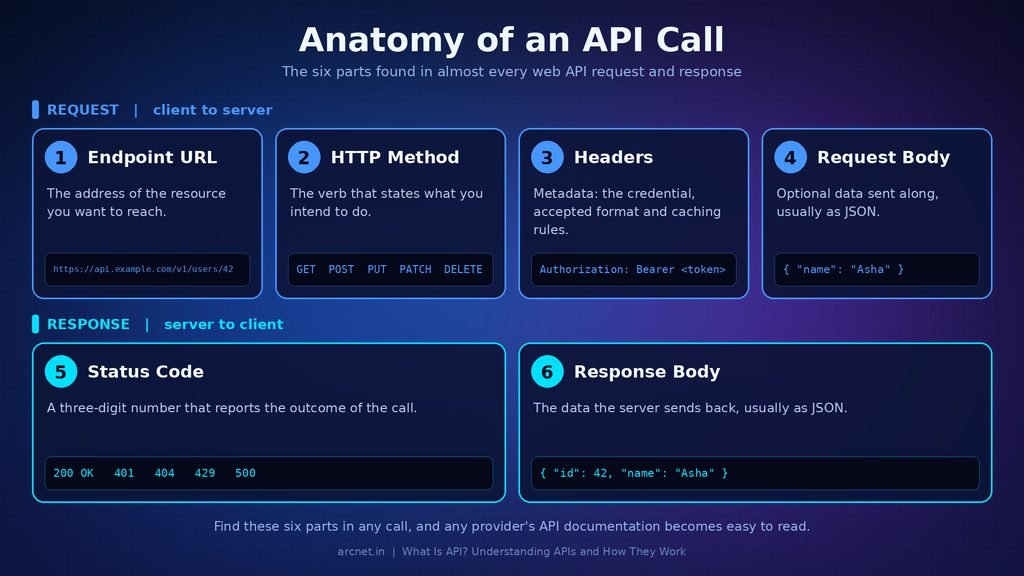
Once you can find these six parts in a call, reading any provider’s documentation becomes a matter of looking up what that provider names each one.
Where do APIs show up in everyday software?
Four everyday actions each hide an API exchange.
- Checking the weather: the app calls a weather service and displays the forecast data it returns.
- Paying online: the shop’s server sends a payment request to a provider, so the shop can avoid handling card details itself.
- Signing in with another account: the site asks an identity provider to confirm who you are without ever seeing your password.
- Viewing a map inside a delivery or travel app: the app calls a maps service for map tiles, routes and points of interest.
In every case the product team composed a hard capability from someone else’s API instead of building it.
What Are the Different Types of APIs?
APIs are classified in two ways: by who may use them and by the style of communication they use. The audience decides how an API is documented, secured and priced. The style decides how requests are shaped, how data comes back and what the API is good at.
Types of APIs by audience
Four audience types cover almost every API a reader will meet.
- Public (open) APIs: available to any developer who registers, usually with an API key and usage limits.
- Partner APIs: shared with approved business partners under an agreement, with onboarding and credentials.
- Private (internal) APIs: used inside one organisation to connect its own systems and teams.
- Composite APIs: bundle several calls into one request, which helps when a single task needs data from several services.
Most readers will call public or partner APIs, while private APIs are usually the ones a company builds for itself.
Types of APIs by architectural style
The table below summarises how IBM’s API overview and Moesif’s API guide describe the five styles you are most likely to meet.
| Style | Data format | Pattern | Suited to | Main trade-off |
| REST | Usually JSON | Request and response over HTTP | Public web APIs | No built-in schema; over-fetching |
| SOAP | XML only | Structured messages, several transports | Enterprise systems with formal contracts | Verbose and harder to debug |
| GraphQL | JSON | One query naming the wanted fields | Apps with varied data needs | Caching and query cost are harder |
| gRPC | Protocol Buffers | Remote procedure calls over HTTP/2 | Service-to-service traffic | Binary messages are hard to inspect |
| WebSocket | Often JSON | Persistent two-way connection | Chat and live dashboards | Different scaling and reconnection logic |
How do you choose between API styles?
Six factors settle the choice for most projects.
- Consumer: many unknown outside developers favour REST, because its tooling and documentation habits are the most widespread.
- Data shape: screens that need different slices of the same data favour GraphQL.
- Contract strictness: partners in banking or insurance may require SOAP for its formal, typed contracts.
- Performance and streaming: internal service traffic suits gRPC, and live updates suit WebSocket.
- Caching: REST can use standard HTTP caching, while GraphQL needs a per-field strategy.
- Team skills: pick the style your team can debug in production without a specialist.
For a public API, REST is the safer default, and GraphQL earns its extra server complexity only when client needs vary widely.
What Is a RESTful API, and Is Every JSON API One?
A RESTful API is a web API designed to follow the constraints of REST, short for Representational State Transfer, an architectural style Roy Fielding described in his 2000 doctoral dissertation. Not every JSON API qualifies. Many copy the visible habits, such as resource URLs and HTTP methods, and skip constraints that are harder to build.
Fielding’s chapter on REST builds the style from client-server separation, stateless interaction, caching, a uniform interface, a layered system and optional code on demand. The uniform interface has four parts: identifying resources, changing them through representations, self-descriptive messages and hypermedia as the engine of application state.
In practice, four ideas matter most when you judge whether an API is truly RESTful.
1. Resources have their own addresses, so a user or an order is something you can point to with a URL.
2. Requests are stateless: each one carries everything the server needs, and session state stays on the client.
3. Responses say whether they may be cached, so repeat reads can skip the network.
4. Responses link onward through hypermedia, so a client can discover the next actions instead of hard-coding URLs.
The fourth idea is the one most JSON APIs skip, which is why an API can be called RESTful and still need its documentation open beside every call.
Fielding names the price himself: a uniform interface trades some efficiency for simplicity and for independence between components, and statelessness repeats some data in every request.
What Is API Integration and How Do You Set One Up?
API integration is the work of connecting two systems through their APIs so data or actions flow between them automatically. A single working request is the start, not the finish, because an integration also decides how often to ask, what to do when a call fails and how changes are announced. Skipping those decisions is why many integrations work in a demo and fail in production.
Consider an online shop connected to a payment provider. The shop’s server sends a payment request, and the provider replies at once that the request was received. The customer may finish paying later, so the final result arrives as a notification the provider sends to an address the shop registered. Treating the first reply as proof of payment is the classic integration mistake.
Polling or webhooks: which should an integration use?
Polling means your system asks the provider for updates on a schedule, while a webhook means the provider sends an HTTP request to your address when an event happens. Polling is simple and works with any provider, but it wastes requests when nothing changed and delays updates by up to the polling interval. Webhooks arrive almost immediately, but you must expose a public endpoint and cope with missed or repeated deliveries.
Four factors settle the choice for most integrations.
- Freshness: if a change must show up within moments, use webhooks, and if a delay is acceptable, polling is enough.
- Event volume: very high volumes can flood a webhook receiver, so scheduled polling in batches can be calmer.
- Provider support: many APIs offer no webhooks, which leaves polling as the only option.
- Reliability: webhooks can be missed or arrive out of order, so a periodic poll should reconcile what they reported.
The usual pick is webhooks for speed with a slow polling job as a safety net.
How do you make your first API call?
This hypothetical command reads one record from a made-up service and prints the response headers, so replace the address and credential with values from your provider’s documentation:
curl -i https://api.example.com/v1/users/42 \
-H “Authorization: Bearer $API_TOKEN” \
-H “Accept: application/json”
- Open the provider’s API reference and find the endpoint, required parameters and usage limits.
- Create a credential in the provider’s developer settings, usually labelled API keys or Credentials.
- Load the credential into an environment variable named API_TOKEN from a secrets store, never from source code.
- Run the command above in a terminal, with your real endpoint in place of the example address.
- Check the first line of the output: a status of 200 followed by a JSON body means the call worked.
- Read the fields you need from the JSON, and add handling for errors and rate limits before writing anything more.
Pro tip: make one call with curl before writing any application code, because it separates credential problems from code problems.
What do common API errors mean, and what should you do?
A handful of status codes come up constantly, and MDN’s status code reference defines each of them.
- 400: the request is malformed, so check the body, parameters and content type before retrying.
- 401: MDN says this means unauthenticated, so the credential is missing, expired or wrong.
- 403: the server knows who you are and still refuses, so the credential lacks permission for that action.
- 404: the path or record does not exist, or the server hides a record you may not access.
- 429: you exceeded a rate limit, so slow down and check whether the response includes a Retry-After header.
- 500 range: the provider’s server failed, so retry with growing delays and stop after a sensible limit.
Read the status code first, because it usually tells you whether to fix your credential, your request or your pace.
Pro tip: repeated POST requests can create duplicates, so check whether the provider accepts an idempotency key before adding automatic retries to anything that charges or creates records.
How Do You Keep an API Integration Secure?
Keep an API integration secure by protecting credentials, limiting what each credential can do, encrypting traffic and treating third-party data as untrusted input. Most incidents start with basic mistakes in authentication and authorization, not exotic attacks. The OWASP API Security Top 10, in its 2023 edition, lists broken object level authorization first and broken authentication second.
Authentication proves who is calling, and authorization decides what that caller may do. AWS’s API overview says an API key identifies the calling application while a token authenticates a user, and it adds that keys are less secure than tokens but allow usage monitoring. Providers often place an API gateway in front of their services to handle authentication, rate limits and monitoring in one place.
Six habits cover the consumer side of an integration.
- Keep credentials out of source code and public repositories, and load them from environment variables or a secrets store.
- Give each credential the fewest permissions it needs, and create separate ones for testing and production.
- Use HTTPS for every call, and never send a credential over plain HTTP.
- Rotate credentials on a schedule and immediately after any suspected leak.
- Validate data from third-party APIs before using it, because OWASP’s 2023 list names unsafe consumption of APIs as a risk.
- Verify webhook deliveries with the signature or secret the provider documents before acting on them.
A leaked key is the fastest way to turn a working integration into an incident, so treat credentials like passwords.
Mistake to avoid: committing a key to a public repository, because anyone can then read it and use it.
What Does Depending on an API Cost You?
Depending on an API costs money that grows with use, plus effort every time the provider changes something. The price list is the smaller part, because rate limits, version changes, outages and lock-in can cost more than the subscription.
API pricing is set by each provider and changes often, so this section names what moves the bill instead of quoting figures that go stale. Providers publish prices in their own currency, and local taxes and regional pricing can differ, so read the pricing page for your region on the day you decide.
Six factors usually decide what an API costs a specific project.
- Request volume: many plans meter calls and bill overages once the included allowance runs out.
- Tier gating: the endpoint or feature you need may exist only on a higher plan.
- Rate limits: a ceiling on requests per period can push you to a costlier tier before your usage grows.
- Data returned: some providers charge by records, data volume or compute rather than by call.
- Environments and seats: test and production may be billed separately, and some plans add per-project or per-seat minimums.
- Support and service levels: uptime commitments and faster support often sit behind paid tiers.
Estimate cost from your expected calls and your peak load, not from the headline price of the entry plan.
The costs missing from the pricing page are effort and risk.
- Version changes: providers retire old versions, so budget engineering time for migration.
- Outages: your product is unavailable when the provider is, so decide what it does when calls fail.
- Lock-in: features unique to one provider make switching expensive, so keep the calls behind one internal module.
- Compliance: sending personal data to a provider can trigger rules such as the GDPR in the European Union or the CCPA in California, United States, so check where the provider stores data.
- Latency: each call adds network time, and one screen may need several calls.
An integration is a dependency, so it needs an owner who reads the provider’s changelog.
Your Next Step With APIs
An API is useful because both sides promise to keep requests, responses and errors stable, which lets everything behind the promise change. The practical answer to what is API is a contract you can test in a minute. Any API integration you build later, whether it polls or listens for webhooks, rests on the same six parts and the same status codes. Pick one provider whose documentation you can read today, send one read-only request with curl, and study the status line that comes back.
Frequently Asked Questions
1. What is an API endpoint?
An API endpoint is the specific address where a client sends requests for one resource or action, such as a path that returns a single user record. Each endpoint accepts certain methods and returns certain data. Endpoints also matter for security and performance, because every one is a place where requests enter the system.
2. Is an API the same as a website?
No. A website returns pages meant for people to read, while an API returns structured data meant for programs, without layout. Many websites use APIs behind the scenes, loading a page and then calling APIs to fetch the data shown on it. You can often call the same API directly with a tool such as curl.
3. Is ChatGPT an API?
No. ChatGPT is a consumer product, while the underlying model is reachable through an API that developers call from code. Several AI providers publish such APIs for their models. The product is what people see, and the API is what other software integrates with.
4. What is an API gateway?
An API gateway is a service placed in front of one or more APIs that receives requests, checks credentials, applies rate limits, routes each request to the right back-end service and returns the reply. It gives a provider one place to enforce security and collect usage data.
5. Are all APIs free?
No. Some APIs are free, some offer a free tier with limits and some charge by use. A free tier is not an unlimited plan, because it usually caps requests or features. Check the provider’s pricing page for your region, since terms and currency vary.