Introduction
A cloud invoice can look steady for months and then jump by an amount nobody planned. The cause is usually many small decisions made by people who never see the price at the moment they decide. This guide explains the practice built to fix that, how it runs inside a real organisation, what to do in the first month, and how the same discipline now has to stretch to cover AI spending.
Quick Answer
FinOps is an operating model that makes engineering, finance and business teams share responsibility for technology spending. Teams get timely cost data, assign every cost to an owner, and weigh speed, cost and quality together when they build. The goal is not the smallest bill but the most business value from each unit of spend.
Key Takeaways
A cloud bill grows because any engineer can create spend in minutes while the invoice arrives weeks later, so the fix is faster feedback and clear owners, not tighter approvals.
FinOps is a shared-accountability practice before it is a toolset, because no report changes behaviour until engineers, finance and product owners act on the same numbers.
Allocation comes before optimisation, because a saving that nobody owns is a saving that nobody keeps.
Commitment discounts should follow usage clean-up, because a commitment made first locks today’s waste in at a lower rate.
AI cost governance reuses the same loop, but token pricing and missing native tags make allocation harder, which is why the FinOps Foundation’s State of FinOps 2026 survey found that 98 percent of respondents now manage AI spend.
A small bill needs consistent tags, budget alerts and a monthly review rather than a dedicated team, because a full practice only pays for itself when spend is large and spread across many teams.
Why does a cloud bill explode in the first place?
A cloud bill explodes because cloud spending is variable, easy to create and slow to show up. Anyone with access can start resources in minutes, usage-based pricing charges for every hour they run, and the invoice arrives long after the decision was made. Nobody feels the cost at the moment they create it.
Here is a typical scenario. An engineer starts a large GPU instance for a weekend experiment and forgets to stop it. Nothing fails, so nobody is alerted, and the charge surfaces on an invoice weeks later with no tag showing who started it.
These forces usually sit behind a surprise bill:
- Variable pricing: cost follows usage, so one feature launch can change the bill overnight.
- Easy provisioning: a developer can start compute, storage or an AI service without a purchase order.
- Idle leftovers: test environments, old snapshots and unattached disks keep billing after the work ends.
- Unclear ownership: engineers assume finance is watching the bill, and finance assumes the reverse.
- Slow feedback: a monthly invoice shows history, so a mistake can run for weeks unseen.
FinOps attacks all of them at once by speeding up feedback and putting an owner on every cost.
What is FinOps, and what does it not mean?
FinOps, a blend of Finance and DevOps, is the practice of making engineers, finance staff and business owners jointly accountable for what technology costs and what it returns. The industry body that maintains the framework updated the FinOps Foundation definition in March 2026 so that it covers technology spend broadly rather than cloud alone. The goal is value, not the smallest possible bill: sometimes the right decision is to spend less, and sometimes it is to invest more.
Several misunderstandings are common. FinOps is not a cost-cutting campaign, because cuts that slow delivery often cost more later. It is not a product, because no tool creates shared ownership. It is not a finance-only function, because engineers make the decisions that set the bill. The Foundation also lists cloud cost management and cloud optimisation as other names for the practice.
Because FinOps borrows DevOps habits such as short feedback loops and automation, cost checks fit naturally into existing continuous delivery pipelines. The table separates three approaches that people often treat as one.
| Approach | Main question | Who acts | Typical failure |
| Cost cutting | How do we spend less this quarter? | Finance or leadership, by mandate | Savings slow delivery and return later |
| Cloud cost management tooling | Where is the money going? | A platform or operations team | Reports exist but nobody acts on them |
| FinOps practice | What value does each unit of spend buy? | Engineering, finance and business together | Seen as policing, so teams resist |
The pick is the practice over either alternative: tooling supplies the data, cost cutting is one action the practice may recommend, and only the practice decides when each is worth doing.
How does FinOps work? The Inform, Optimize and Operate loop
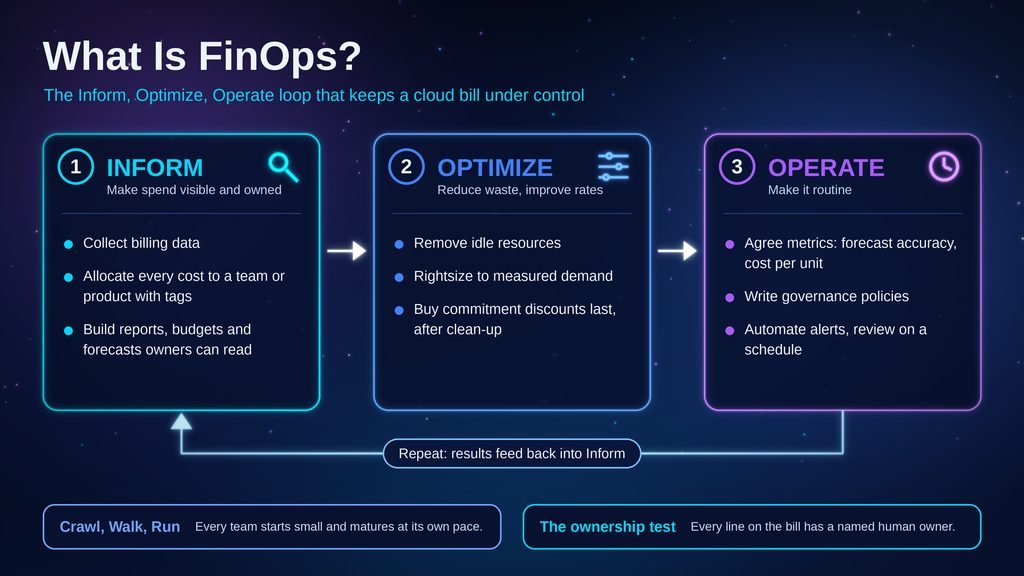
FinOps runs as a repeating loop of three phases, according to the FinOps Framework: Inform, Optimize and Operate. Inform makes spend visible and assigns it to owners, Optimize reduces waste and improves rates, and Operate builds the routines that keep both going. Different teams can sit in different phases at the same time.
Inform: make spend visible and owned
Inform answers who spent what, and why. Teams collect billing data, allocate every cost to a team or product through tags and account structure, and build reports, budgets and forecasts that owners can read.
Optimize: reduce waste and improve rates
Optimize turns visibility into action: teams remove waste, match resource sizes to real demand and buy capacity at better rates.
Operate: make it routine
Operate makes the habit stick. Teams agree measures such as forecast accuracy and cost per unit of work, write governance policies, automate alerts and review results on a schedule. The output feeds back into Inform, so the loop restarts, and the framework’s Crawl, Walk, Run maturity model lets each team start small.
The FinOps Foundation defines six principles that describe the culture behind the loop:
1. Teams collaborate across engineering, finance, product and leadership.
2. Business value drives technology decisions, balanced against quality and speed.
3. Everyone owns their own technology usage, including its cost.
4. Cost data is accessible, timely and accurate.
5. A central team enables the practice.
6. Teams use the variable cost model with continuous small adjustments.
Who is responsible for FinOps in an organisation?
Responsibility is shared. Engineers own the resources that create cost, finance owns budgeting and forecasting, product and business owners own the value case, leadership sets direction, procurement manages contracts, and a small central team supplies data, standards and coaching. No single role can do it alone because each decision touches a different part of the bill.
According to the State of FinOps 2026 survey from the FinOps Foundation, the dominant operating model is centralised enablement with federated execution, and 78 percent of practices report into the CTO or CIO organisation while only 8 percent report to the CFO. The same survey says teams stay lean even at the highest spend levels.
A healthy setup passes one simple test: every line on the bill has a named human owner.
How do you start cloud cost management in the first month?
Start with ownership and visibility, not savings. In the first month, pick one account or product team, agree a short set of tags, activate them for billing reports, share a cost view with each owner and set alerts for sudden jumps. The State of FinOps 2026 survey supports this order, because teams prioritised allocation, forecasting, budgeting and reporting ahead of optimisation across SaaS, licensing and data centre spend.
The walkthrough uses AWS because its tagging steps are documented precisely in the AWS tag activation guide; Azure and Google Cloud offer equivalent billing tools under different menu names.
- Choose one scope, such as a single AWS account or one product team’s workloads.
- Agree tag keys with the engineering lead, for example Owner, Environment and CostCenter.
- Apply those tags to the resources in scope.
- Open the AWS Billing and Cost Management console and choose Cost allocation tags in the navigation pane.
- Select the tag keys you created, then choose Activate.
- Wait for activation, because AWS documentation says tag keys can take up to 24 hours to appear on the page and up to 24 hours more to activate. Expected result: the keys show as active and begin appearing in billing reports.
- Build a monthly cost view grouped by Owner and send it to each owner as showback, meaning a report of their costs without charging them back.
- Turn on anomaly alerts in your provider’s cost tools, such as AWS Cost Anomaly Detection, and route them to the owning team rather than to finance.
Pro tip: start with showback, because charging teams before they trust the numbers turns every report into a dispute.
Where this plan usually breaks
These failure points are common, and both are easy to recognise:
- Tag keys do not appear on the Cost allocation tags page: the tags must already exist on resources, and AWS documentation says the page can lag by up to 24 hours, so apply the tags, wait a day, then check again.
- A large share of spend stays untagged: shared services and automation-created resources often carry no tags, so measure coverage by share of spend rather than count of resources.
A cloud cost with no named owner is a cost nobody is paid to reduce.
Which levers actually reduce a cloud bill?
Every cloud charge is a price multiplied by a quantity, so the bill falls only when the rate falls or the quantity falls. Usage levers cut quantity by removing idle resources, rightsizing and scheduling non-production systems. Rate levers cut price through commitment discounts and spot capacity. Usage work should come first.
These levers cover most of what teams do in the Optimize phase:
- Remove idle resources: stop or delete unattached disks, unused snapshots and forgotten test systems.
- Rightsize: match instance size and type to measured utilisation rather than to the original estimate.
- Schedule non-production systems: switch development and staging environments off outside working hours where the workload allows it.
- Tier storage: move rarely accessed data to cheaper storage classes with lifecycle rules.
- Reduce data transfer: keep data and compute in the same region.
- Use commitment discounts: reservations, savings plans or committed use discounts trade a long commitment for a lower rate.
- Use spot or preemptible capacity for batch jobs that can tolerate interruption.
The usage levers reduce quantity and are easy to reverse; the commitment and spot levers change the rate and carry commitment or interruption risk.
The most common mistake is committing too early. A commitment discount applies to future usage, so a team that commits before cleaning up waste locks the waste in at a lower rate. Check the provider’s flexibility rules, because savings plans, reservations and committed use discounts differ. Pro tip: do commitments last, and review them on a schedule rather than once.
How is AI cost governance different from cloud cost management?
AI cost governance applies the same FinOps loop to AI spending, but the meter changes. Many AI services bill by tokens, GPU capacity is scarce, new service types often lack native tagging, and the value of the spend is harder to prove. The core questions stay the same: who used it, what did it cost, and was it worth it.
The State of FinOps 2026 survey, which drew 1,192 respondents, found that 98 percent now manage AI spend, up from 63 percent in 2025 and 31 percent in 2024. The same survey lists visibility into AI costs, allocating AI costs to business units and proving AI value as the top challenges.
The FinOps for AI Overview from the FinOps Foundation points to these differences from ordinary cloud billing:
- Tokens as the meter: charges follow tokens processed, and the tokens billed can differ from what a user typed once prompts are rewritten or compressed.
- Volatile pricing: models are sold in many versions, and prices can move sharply in either direction.
- Scarce GPUs: capacity limits affect both availability and price.
- Tagging gaps: some new service types cannot be tagged natively, so engineers must add their own metadata.
- A wider audience: product, marketing and sales staff now create AI spend directly, which is how the shadow AI problem starts on the bill as well as in security.
- Hard-to-define value: exploratory projects have no baseline, so return is difficult to measure.
None of these breaks the FinOps loop, but each makes the Inform phase harder to complete.
A second scenario shows the pattern. A support chatbot team adds a long policy document to every request so answers stay accurate. Each call now carries far more input tokens, and prompt length is a direct cost driver, so it helps to understand what fills a context window. Because every call shares one API key with no tags, spend rises and nobody can say which feature caused it.
A workable control set for AI spending looks like this:
- Tag by workload: keep training, inference and batch work separate so one AI line item does not hide different cost behaviour.
- Set quotas and throttles: limit API calls or token use per team, and rate-limit experiments.
- Alert on anomalies: compare usage with a historical baseline and investigate sudden token jumps.
- Match model to task: avoid the most expensive model for every request when a smaller one meets the quality bar.
- Track unit cost: the FinOps for AI Overview works an example that divides 5,000 dollars of inference cost by 100,000 requests to reach 0.05 dollars per request.
Because AI pricing and plan limits change often, check each vendor’s pricing page before forecasting.
Do you need a FinOps tool, or are native cloud tools enough?
Native cloud tools are enough to begin. AWS Cost Explorer, Azure’s cost management tools and Google Cloud’s billing reports cover allocation, reporting and basic alerts for a single provider. Third-party platforms such as IBM Cloudability become useful when spend spans several providers, SaaS products and AI services.
The FinOps Foundation supports FOCUS, an open specification for billing data, and says that AWS, Microsoft Azure, Google Cloud and Oracle Cloud Infrastructure all offer FOCUS-formatted exports from their consoles. Check these points before buying any platform:
- Data format: does it read FOCUS data or only proprietary exports?
- Scope: can it cover SaaS and AI spend, not only infrastructure?
- Pricing model: does the vendor charge a flat fee or a share of your cloud spend, and does that reward you for spending less?
- Exit path: can you export your data if you leave?
A tool supplies data but does not create ownership, so buy one only after the ownership model exists.
What does FinOps not fix, and what does it cost?
FinOps does not fix weak architecture, absent executive support or the habit of treating cost as someone else’s job. It reduces waste and improves decisions, but it costs engineering time, needs clean allocation data, and its early savings shrink as the obvious waste disappears.
These limits appear in the State of FinOps 2026 findings and in everyday practice:
- Diminishing returns: mature practitioners in the survey report that easy waste is found first and the remaining opportunities are smaller.
- Hard-to-measure avoidance: the survey describes an unsolved problem in giving engineers credit for costs they prevented before deployment.
- Engineering time: someone has to fix what the reports find, and that work competes with product features.
- Tagging debt: allocation is only as accurate as the tags, and older resources are rarely tagged.
- Culture: if FinOps feels like policing, teams hide usage instead of sharing it.
For a small company with a modest bill, the pick is tags, budgets and a monthly review, not a dedicated team.
Alternatives carry their own trade-offs. Central approval gates slow delivery, and moving workloads out of the cloud suits steady, predictable workloads but swaps variable cost for capital spending and operations work.
What to do next
Asking what is FinOps usually starts as a question about saving money and ends as a question about ownership. Cloud cost management works when every line of the bill has an owner, and AI cost governance works the same way once tokens and GPU hours are tagged and alerted on. Open your billing console today, list the largest line items that have no owner tag, and assign one named person to each of them.
Frequently Asked Questions
1. Is FinOps only for cloud spending?
No. The FinOps Foundation updated its mission in 2026 from the value of cloud to the value of technology, and the State of FinOps 2026 survey reports that 90 percent of respondents manage or plan to manage SaaS spend, alongside licensing, private cloud, data centre and AI. Cloud is the origin of the practice, not its boundary.
2. Is FinOps a job title or a practice?
It is both. Engineers, finance staff and product owners all take part in the practice, while FinOps practitioners form a small central group that supplies data, standards and coaching. The FinOps Foundation offers a FinOps Certified Practitioner course for people who want to work in the role.
3. How is FinOps different from DevOps?
DevOps unites development and operations to ship software faster and more reliably. FinOps borrows its habits, such as shared ownership and short feedback loops, and applies them to cost. A team can run strong DevOps and still not know what each service costs, which is the gap FinOps fills.
4. Do small companies need FinOps?
They need the habits, not a team. A company with a modest bill gets most of the value from consistent tags, a budget alert, a named owner for each large cost and a short monthly review. A dedicated practice starts to pay off when spend is large and spread across many teams.