Introduction
Every AI coding agent starts a task knowing nothing about your repository: which command runs the tests, which folder is off limits, which convention reviewers enforce. Teams used to answer those questions separately for each tool, in CLAUDE.md, Cursor rules and Copilot instruction documents. AGENTS.md is the open, plain Markdown answer that most agents now read. This guide covers what belongs in it, which agents load it, what two recent studies say about whether it helps, and how to write one that earns its place. It also covers two things most guides skip: how Claude Code now treats it, and why it needs the same review as code.
Quick Answer
An AGENTS.md file is a plain Markdown document at the root of a repository that tells AI coding agents how to build, test and change the project. It has no required fields, is read by most major coding agents, and works well when it records only what an agent cannot discover from the code.
Key Takeaways
Make AGENTS.md the shared source of truth and import it elsewhere, because the format is stewarded by the Linux Foundation’s Agentic AI Foundation and read by many agents, so one edit reaches every tool your team uses.
Write it by hand and keep it short, because research on auto-generated context files found lower task success and higher cost, and overview sections did not help agents find the right files faster.
Check how Claude Code loads it, because it reads AGENTS.md on its own only when no CLAUDE.md or CLAUDE.local.md exists in or above the working directory.
Use nested documents for monorepos, because the closest one wins, but keep the combined text small, because Codex stops adding documents once its size limit is reached.
Treat it as executable-grade configuration, because agents follow it closely and a poisoned instruction can steer every future session.
Keep enforcement out of the text, because instructions are context rather than guarantees, so rules that must always run belong in hooks, permissions or CI.
What Is AGENTS.md and Where Did It Come From?
AGENTS.md is a README for coding agents: a plain Markdown document in a repository that holds the build steps, test commands and conventions an agent needs and a human reader does not. A coding agent is an AI tool that reads a codebase, edits it and runs commands on a developer’s behalf, such as OpenAI Codex, Claude Code or GitHub Copilot’s coding agent. The format has no required fields or fixed headings, so any text you write is read as instructions.
OpenAI released the format in August 2025, and the Linux Foundation announced on 9 December 2025 that AGENTS.md joined its new Agentic AI Foundation alongside Anthropic’s Model Context Protocol and Block’s goose, according to the Linux Foundation press release. The official format site reports use in over 60,000 open-source projects, a figure it links to a GitHub code search, and that claim was checked on 27 October 2026.
The split from README.md is deliberate. README.md stays short and written for people, while the agent document carries detail that would clutter it, such as exact test flags and architectural constraints. Before a shared name existed, each tool asked for its own document, including .cursorrules, CLAUDE.md and .github/copilot-instructions.md, so a team running three agents maintained three copies of the same rules. A name stewarded by a neutral foundation is also a safer bet than one tied to a single vendor’s roadmap.
Which Coding Agents Read AGENTS.md?
Most major coding agents read it, but they differ in how. OpenAI Codex, GitHub Copilot’s coding agent and Claude Code load it natively, while Gemini CLI and Aider need a one-line setting, according to each vendor’s documentation and the agents.md site. That site also lists Jules, Windsurf, Zed, Warp, Devin, Amp and Factory among compatible tools.
The table below summarises vendor documentation checked on 27 October 2026, so confirm your own tool version before relying on a row.
| Tool | How it loads AGENTS.md | Catch |
| OpenAI Codex | Native, one document per directory; AGENTS.override.md is checked first | Combined size is capped by default |
| GitHub Copilot coding agent | Native, root and nested documents | Also reads CLAUDE.md and GEMINI.md |
| Claude Code | Native from version 2.1.277 when no CLAUDE.md is in or above the working directory | A CLAUDE.md must import it |
| Gemini CLI | Set context.fileName to AGENTS.md in .gemini/settings.json | Needs configuration |
| Aider | Add read: AGENTS.md to .aider.conf.yml | Needs configuration |
| Cursor | Plain Markdown alternative to .cursor/rules | No scoping metadata; check nesting for your version |
For a team that mixes tools, write AGENTS.md first and then verify each tool by asking it to list the instructions it loaded. Assuming support is how teams end up with an agent that quietly ignores half the rules.
Does an AGENTS.md Help or Hurt? What Two Studies Found
It helps speed, and its effect on success depends on who wrote it. One study found faster runs when the document was present, while another found that auto-generated context files slightly lowered task success and raised cost. The two results fit together once you separate efficiency from correctness, and human-written files from machine-written ones.
Lulla and colleagues, in a paper published on arXiv in January 2026, ran agents on 124 pull requests across 10 repositories with and without the document and measured a 28.64 percent lower median runtime and a 16.58 percent lower output token count, with comparable task completion.
The ETH Zurich evaluation paper, submitted to arXiv on 12 February 2026, built 138 tasks from 12 repositories that already had developer-written context files. According to the ETH Zurich paper, developer-written files raised success by about 4 percent on average, while LLM-generated files lowered it slightly and raised inference cost by 20 to 23 percent depending on the benchmark.
The same ETH Zurich paper reports that agents follow instructions closely, which is the catch: a rule you add is a rule the agent obeys, and unnecessary rules make the task harder. It also found that overview sections did not help agents reach the relevant files sooner, and that in repositories stripped of other documentation, generated files improved success by 2.7 percent on average. In plain terms, a context file helps most where the repository explains nothing else.
Both studies carry limits. The ETH Zurich benchmark is Python-only, the Lulla study measured speed rather than correctness, and neither tested every agent or every language. Augment Code’s April 2026 analysis of its own monorepo adds a qualitative warning: instruction documents built mostly from prohibitions pushed agents to over-explore and do less.
A sound default is to write it by hand, keep it short and treat every line as a cost. An AGENTS.md should record what the agent would get wrong, not what it could have read. That discipline is the core of what context engineering means for coding agents.
How to Write an AGENTS.md File That Helps Instead of Hurts
The setup takes minutes and works the same for every agent in the table above. Write it yourself, because the research above found that machine-generated drafts add cost without adding success. If you start from an agent’s init command, treat the output as a rough draft and delete most of it.
- Create a document named AGENTS.md, with capital letters, in the repository root next to the main build file.
- Add a Commands section listing the exact install, build, single-test, full-test and lint commands with their flags.
- Add a Conventions section containing only rules that differ from the language defaults, such as “Named exports only”.
- Add a Boundaries section naming paths the agent must not edit and actions that need approval first.
- Add a Gotchas section for mistakes your agent has already made in this repository.
- Commit the document on a branch and open a pull request, so a teammate reviews it like code.
- Ask your agent to summarise its current instructions and confirm that the reply quotes your lines back.
Each step is small on purpose, because the finished document should be shorter than the README.
The following illustrative sample shows the shape, with placeholder commands and paths that you should replace with your own.
# Invoice API
## Commands
– Install: pnpm install
– Run one test file: pnpm vitest run path/to/file.test.ts
– Checks before a commit: pnpm lint && pnpm test
## Conventions
– Named exports only; no default exports.
– Money values are integers in minor units.
## Boundaries
– Never edit files under src/generated/.
– Ask before adding a production dependency.
## Gotchas
– src/legacy/ is synchronous on purpose; do not convert it.
In Codex, the following command runs the verification step from the list above. The expected result is a reply that repeats your Commands and Boundaries lines.
codex –ask-for-approval never “Summarize the current instructions.”
Two failure points are worth checking. First, Codex skips empty documents, so a file with only a title loads nothing. Second, when an agent seems to ignore a rule, the cause is usually truncation at the size cap or a higher-level override, according to the Codex documentation.
What Belongs in It
Include only items an agent cannot learn by reading your code.
- Exact commands with flags, especially ones that differ from package scripts or defaults.
- Conventions that differ from language or framework defaults.
- Architecture constraints, such as which layer may call which.
- Boundaries: generated code, vendored folders and actions that need approval.
- Gotchas and deliberate oddities, such as a module that stays synchronous on purpose.
- Pointers to deeper documents, so detail loads only when it is needed.
If a line would not change what the agent does, delete it.
What to Leave Out
Every extra line is an instruction the agent will try to obey, so cut anything that carries no new information.
- Directory tours and architecture overviews, which the ETH Zurich paper found did not help agents reach relevant files sooner.
- Standard language conventions the model already knows.
- Text copied from README.md or other documentation, which repeats what the agent can already read.
- Long API documentation; link to it instead.
- One-off task instructions, which belong in the prompt or a written spec, as the spec-driven development workflow shows.
- Secrets, tokens and internal URLs, because the document is committed and widely read.
A short document that states only differences from the defaults is cheaper for the agent to follow and easier for your team to keep true.
AGENTS.md vs CLAUDE.md: What Claude Code Does Now
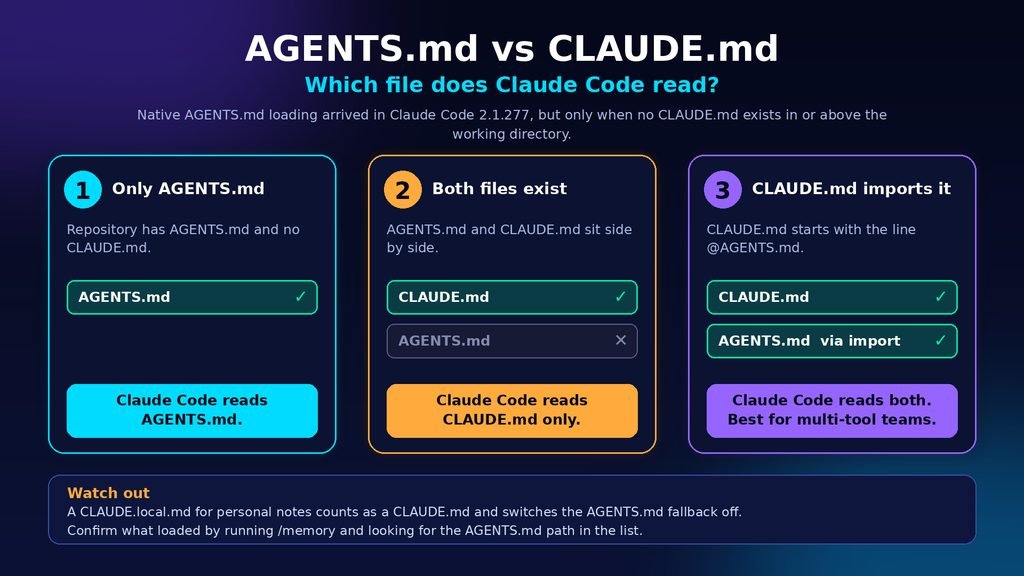
Claude Code reads AGENTS.md directly from version 2.1.277, but only when no CLAUDE.md or CLAUDE.local.md exists in the working directory or any directory above it, according to the Claude Code memory documentation checked on 27 October 2026. When any of those files exists, Claude Code reads the CLAUDE.md files only. Guides that say Claude Code ignores AGENTS.md describe the behaviour from before that version.
Three situations cover almost every repository.
- A repository with AGENTS.md and no CLAUDE.md: Claude Code reads AGENTS.md.
- A repository with both: Claude Code reads the CLAUDE.md files only.
- A CLAUDE.md that imports AGENTS.md: Claude Code reads CLAUDE.md with AGENTS.md included through the import.
The third situation is the one to aim for when a team mixes Claude Code with other agents.
The following CLAUDE.md imports the shared document and adds one Claude-only rule below the import.
@AGENTS.md
## Claude Code
Use plan mode for changes under src/billing/.
A symlink also works when you need no Claude-specific content. The command is:
ln -s AGENTS.md CLAUDE.md
On Windows, creating a symlink needs Administrator privileges or Developer Mode, and Git checks a committed symlink out as plain text unless core.symlinks is enabled, so the documentation tells Windows users to prefer the import.
Two failure points are common. First, adding a CLAUDE.local.md for personal notes counts as a CLAUDE.md and switches the AGENTS.md fallback off, as the same documentation explains. Second, on versions before 2.1.281, some sessions, such as those on Amazon Bedrock or with telemetry disabled, still read CLAUDE.md only. To confirm what loaded, run /memory and look for the path of AGENTS.md in the list; to read both files together, open /config and set Project instructions to claude-md-and-agents-md.
The safer default for a multi-tool team is real content in AGENTS.md plus a short CLAUDE.md that imports it. A team that only uses Claude Code can keep a single CLAUDE.md and skip the extra file.
How Do You Use AGENTS.md in a Monorepo?
Put shared rules in a root AGENTS.md and package-specific rules in a nested AGENTS.md inside each package, because agents read the closest document and nearer instructions take precedence, according to the agents.md site. Think of the repository as an agent instructions repo: the root states what is true everywhere, and each package states only how it differs. The same site notes that the main OpenAI repository held 88 separate AGENTS.md documents at the time of its writing.
OpenAI’s Codex shows the mechanics. Codex walks from the project root down to the working directory, checks AGENTS.override.md before AGENTS.md in each directory, joins the results from the root down, and lets later text override earlier text, according to OpenAI’s Codex documentation. Its example places a services/payments/AGENTS.override.md that tells Codex to use make test-payments instead of npm test, so payment work gets different commands from the rest of the repository.
Codex stops adding documents once the combined size reaches 32 KiB by default, set by project_doc_max_bytes in the same documentation, so rules duplicated across packages waste a shared budget. Duplication also creates contradictions: Claude Code’s documentation states that when two instructions conflict, Claude may pick one arbitrarily.
To check the result from inside a package, ask the agent to list the instruction sources it loaded. Codex’s documentation uses that prompt and expects the root document first and the package document last.
How Does It Compare With Every Other AI Coding Rules File?
AGENTS.md holds repository-wide instructions that any agent can read, and the other formats add tool-specific features on top. CLAUDE.md adds imports and personal overrides, Cursor’s project rules add file scoping, GitHub’s instruction documents serve Copilot, and skills load only when a task needs them.
Use this list to decide where each kind of rule belongs.
- AGENTS.md: shared facts any agent needs, loaded every session.
- CLAUDE.md: Claude Code instructions with imports up to four hops deep and a CLAUDE.local.md for personal notes, per the Claude Code documentation.
- .cursor/rules: Cursor’s scoped rules, while the older .cursorrules is deprecated, per Cursor’s documentation.
- .github/copilot-instructions.md and .github/instructions: Copilot repository-wide and path-specific instructions, per GitHub’s documentation.
- Skills: multi-step procedures that load on demand instead of every session, per the Claude Code documentation.
- Hooks and CI: enforcement, because Claude Code’s documentation says instructions are context rather than enforced configuration and points to a PreToolUse hook for blocking actions.
Shared facts go in AGENTS.md, and anything scoped, procedural or enforced goes in the native mechanism that can actually carry it.
Is an AGENTS.md Safe to Trust? A Security Check
It is safe when reviewed like code and risky when treated as harmless notes, because agents follow these instructions closely and a poisoned instruction can steer every later session. In March 2025, Pillar Security described a Rules File Backdoor attack that hid instructions in invisible Unicode characters inside rules files for GitHub Copilot and Cursor, according to Pillar’s published report.
Pillar recommended reviewing rules files for invisible Unicode and unusual formatting and treating AI configuration with the same scrutiny as executable code, as SC Media reported. The risk is a form of indirect injection, because the developer never types the malicious instruction; it arrives through a document the tool trusts.
- Require pull request review for every change to AGENTS.md, CLAUDE.md and other instruction paths, using a CODEOWNERS entry.
- Scan those paths in CI for zero-width characters and bidirectional overrides.
- Read third-party templates as raw text before copying them into a repository.
- Keep secrets, tokens and internal URLs out of the document.
- Enforce limits with permissions, sandboxes and hooks rather than with wording in the document.
Review catches what a reader can see, and scanning catches what they cannot.
Mistakes to Avoid and Habits Worth Keeping
Mistakes to avoid
These mistakes all add text the agent must obey without adding information it lacks.
- Committing an init command’s output unreviewed, which the ETH Zurich paper links to lower success and higher cost.
- Writing a directory tour that the agent can rebuild by listing folders.
- Filling the document with prohibitions, since Augment Code reported over-exploring agents when instruction documents held long runs of don’ts and few dos.
- Mixing it up with Copilot custom agents: GitHub’s blog post on writing a great agents.md covers persona definitions under .github/agents, so its persona advice does not transfer.
- Keeping a separate, diverging copy for each tool instead of importing one shared document.
Fixing any one of these usually shortens the document, which is the direction the research points.
Pro tips
These habits keep the document short and accurate over time.
- Add a line only after the agent makes the same mistake twice, the trigger Claude Code’s documentation gives for editing CLAUDE.md.
- Write rules concrete enough to verify, such as “Use 2-space indentation” instead of “Format code properly”, the contrast the Claude Code documentation uses.
- Move multi-step procedures and single-directory rules into skills or nested documents instead of the root.
- Run /doctor prompt-audit in Claude Code version 2.1.283 or later to find outdated or conflicting instructions, per the Claude Code documentation.
- Repeat the summarise-your-instructions check after every structural change.
A document maintained this way stays small enough that every line still matters.
Your Next Step
The useful version of this standard is short and specific. A single AGENTS.md file that records only what your agents get wrong will outperform a long tour of the codebase, and it keeps your AI coding rules file portable across whichever tools your team tries next. Your next step is to list the five mistakes your agent repeats, put them in the root document, then ask the agent to summarise its current instructions and confirm it quotes them back.
Frequently Asked Questions
1. Is AGENTS.md the same as README.md?
No. README.md is written for people and covers what a project does and how to get started. AGENTS.md carries the extra build steps, test commands and conventions that coding agents need and that would clutter a README. The agents.md site keeps the two separate on purpose, so each stays short and aimed at its own reader.
2. Does AGENTS.md have a required format or fields?
No. The format is plain Markdown with no required fields, and you can use any headings you like because the agent parses the text you provide, according to the agents.md FAQ. Popular sections include project overview, build and test commands, code style, testing instructions and security considerations, but none is mandatory.
3. What happens when instructions conflict?
The closest AGENTS.md to the edited code wins, and explicit instructions typed into the chat override everything, according to the agents.md FAQ. Inside Claude Code, files are concatenated and the documentation says Claude may pick one arbitrarily when two instructions disagree, so remove contradictions instead of relying on precedence.
4. Will an agent run the test commands I list?
Usually yes. The agents.md FAQ says the agent attempts to run listed programmatic checks and fix failures before finishing. The ETH Zurich paper likewise found that agents use a named tool far more often when the instructions mention it. A listed command is therefore an instruction, not a suggestion, so list only commands you want run.
5. Who maintains the AGENTS.md standard?
The Agentic AI Foundation, part of the Linux Foundation, stewards it. OpenAI released the format in August 2025, and the Linux Foundation announced on 9 December 2025 that it was one of the foundation’s founding projects alongside the Model Context Protocol and goose. The name is therefore not tied to a single vendor’s roadmap.