Introduction
Attackers do not have to break an AI model to reach your data; they only have to get you to connect one more tool. A Model Context Protocol (MCP) server gives an AI assistant the ability to act, and whoever controls that server inherits the access you gave it. This guide explains why these servers attract attackers, which flaws and real incidents show the pattern, and how to vet, restrict or remove one.
Hackers favour MCP servers because one compromised server gives them the user’s credentials, the user’s permissions and a trusted channel into the AI model, usually through an install step nobody reviews. Securing MCP servers means vetting each one, limiting what it can reach, and requiring human approval for risky actions.
Key takeaways
Attackers favour these servers because one install combines stored credentials, user-level permissions and a trusted path into the model, so a single compromise yields access and not just data.
A tool description is an instruction to the model rather than documentation, so a poisoned or silently changed description can steer an assistant while the user sees nothing unusual.
Package impersonation is the cheapest route in, because installing a server runs third-party code under the user’s account, and the postmark-mcp case shows it has already happened.
The dispute over whether command execution through stdio configuration is a design flaw or expected behaviour does not change the advice, which is to treat outside configuration as executable code and sandbox it.
Vetting before install pays off most, because checking the publisher, the source and the access requested costs far less than rotating credentials after a bad server has run.
Approval prompts only work when they are rare, so ask loosely for reads and strictly for sends, writes and deletes, since people click through prompts that appear on every call.
What is an MCP server, and where does it fit in the AI tool supply chain?
An MCP server is a program that exposes tools, data and prompts to an AI assistant through the Model Context Protocol, an open protocol Anthropic introduced for connecting models to outside systems. The AI application, called the host, reaches the server through a client component, and the server does the real work, such as reading files, querying a database or sending an email.
Two facts turn this into a supply chain question. A server is third-party code: it arrives through a package manager such as npm or PyPI (the Python Package Index), a registry or a repository, and it runs with real permissions. The assistant also trusts what the server says about itself. Each tool has a name and a description, and the large language model (LLM) reads that text when it decides what to call. For background on how those models work, see how generative AI works.
Servers run in two ways. A local server starts as a process on your own machine, usually over the standard input/output (stdio) transport, so it inherits your account’s access to files and credentials. A remote server runs elsewhere and is reached over the network, usually with sign-in through OAuth, a standard that issues limited access tokens. Local servers put foreign code on your machine, while remote servers put foreign text and decisions in front of your model. Each fails differently, so each needs its own checks.
Why are MCP servers such attractive targets?
MCP servers attract attackers because one compromised server hands over an AI assistant’s access and the user’s trust together. Six features explain why that bundle is so useful to them.
- Credentials are close by. Configuration files can hold tokens for other servers, and local servers can read files the user can read, such as SSH keys.
- Authority is borrowed. Actions run under the user’s identity, so misuse can look like ordinary activity in the logs of connected services.
- Installation is one command. Adding a server usually means fetching and running third-party code, with no review step unless the installer adds one.
- Text is the attack surface. The model reads tool descriptions that users rarely see in full, so hidden instructions can steer it.
- Trust spreads between servers. Output from one server lands in the same context as the tools of another, so a malicious server can influence calls to a trusted one.
- The audience is large. OX Security ties its findings to software with more than 150 million downloads, so one flaw in a common component reaches many installations.
Together, these features turn one unreviewed install into access, influence and cover at once.
Which Model Context Protocol vulnerabilities show up most often?
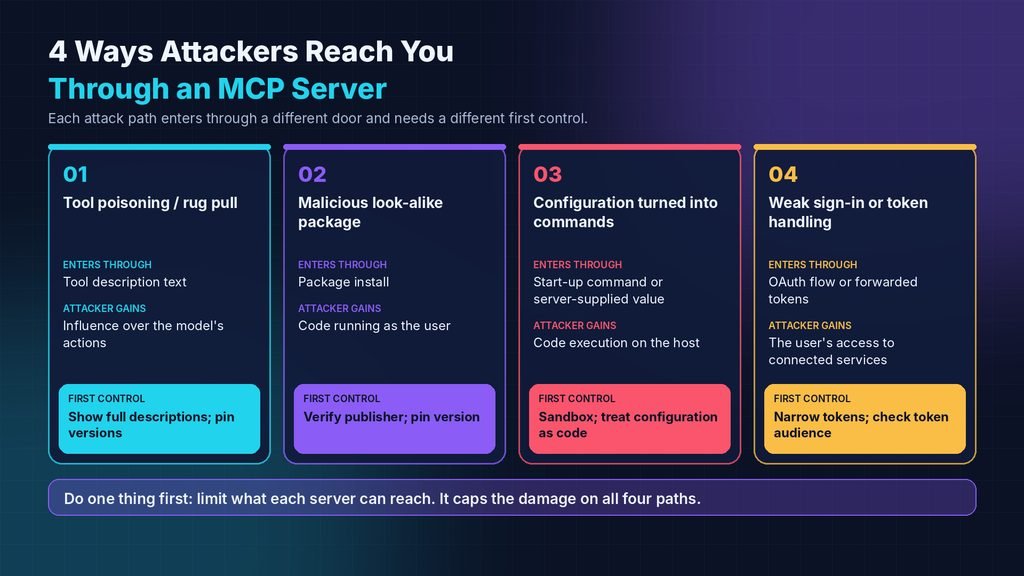
The Model Context Protocol vulnerabilities that security teams write about most fall into four groups: poisoned tool descriptions, malicious packages, configuration that turns into commands, and weak sign-in or token handling. Each group enters through a different door and needs a different first control, as the table shows.
The table summarises the four groups with short descriptions only. Every dated case appears in the sections that follow, with its source named.
| Attack path | Where it enters | What the attacker gains | First control |
| Tool poisoning or rug pull | Tool description text | Influence over the model’s actions | Show full descriptions; pin versions |
| Malicious or look-alike package | Package install | Code running as the user | Verify publisher; pin version |
| Configuration turned into commands | Start-up command or server-supplied value | Code execution on the host | Sandbox; treat configuration as code |
| Weak sign-in or token handling | OAuth flow or forwarded tokens | The user’s access to connected services | Narrow tokens; check token audience |
If only one control gets done first, limit what each server can reach, because that caps the damage on all four paths even when detection fails.
Tool poisoning and silent description changes
Tool poisoning hides instructions inside a tool’s description, where the model reads them and the user usually does not. Invariant Labs documented tool poisoning in a post dated 1 April 2025 and described it as a form of indirect prompt injection, meaning instructions that reach the model through content instead of from the user.
In the first Invariant Labs demonstration, a harmless-looking tool in the Cursor coding assistant led the model to read a configuration file and a private SSH key and send both to the server, while the user saw only a benign action. In a second demonstration, one server’s description changed how the assistant used a separate, trusted email tool, so messages went to an address the attacker chose even when the user named someone else.
A rug pull is the slower version: a server behaves well while the user reviews it, then changes a description or behaviour after approval. Microsoft’s Defender Experts team calls this stage silent re-trust, one of four phases in its example attack, and argues that the weakness sits in the trust boundary between systems rather than in any single product.
A tool description is not documentation; to the model, it is an instruction. Poisoned descriptions also differ from AI data poisoning, which corrupts training data, and Arcnet’s explainer on AI data poisoning attacks covers that separate case.
Malicious and look-alike packages
A look-alike package is a copy of a trusted server published under a different owner, with one harmful change. The Hacker News reported on 29 September 2025, citing Koi Security, that the npm package postmark-mcp copied the official Postmark Labs library and, from version 1.0.16, added a hidden blind carbon copy of every email it sent to an outside address.
The Hacker News gave a total of 1,643 downloads for the package, citing the npm-stat.com tracker, and reported that Postmark said the package was not official and that its own API and services were unaffected. The lesson concerns the install step rather than email: anything a server can read or send, a look-alike can read or send, and a familiar name proves nothing about who wrote it.
OX Security says 9 of 11 MCP registries were “poisoned” with a malicious test package, so a registry listing is weak evidence of safety. Package impersonation is one form of the supply chain attacks listed in Arcnet’s overview of top cybersecurity threats.
Configuration that turns into commands
Many MCP clients start local servers from a configuration entry that names a command, so anything that can write or influence that entry can make the client run code. Several disclosed flaws follow this shape.
JFrog’s technical write-up of 9 July 2025 scores CVE-2025-6514, a Common Vulnerabilities and Exposures (CVE) entry, at 9.6 on the Common Vulnerability Scoring System (CVSS) for mcp-remote, a proxy that lets clients such as Claude Desktop reach remote servers. JFrog says a malicious or hijacked remote server could send a crafted authorisation endpoint value during sign-in, which mcp-remote then opened as a URL, leading to command execution on the client machine. JFrog lists versions 0.0.5 through 0.1.15 as affected and version 0.1.16 as the fix.
The Hacker News reported on 1 July 2025 that Oligo Security found CVE-2025-49596, scored 9.4, in MCP Inspector, Anthropic’s debugging tool, and that visiting a malicious website could be enough for an attacker to run commands on a developer’s machine. The Hacker News gave versions below 0.14.1 as vulnerable and 0.14.1 as the fixed release. A CVSS score ranks technical severity, not the risk in your own setup, and Arcnet’s guide to how CVSS scores work explains how to weigh one.
In its 2025-11-25 revision, the specification’s security guidance calls this local MCP server compromise and says clients that offer one-click setup must show the exact command, untruncated, and get explicit approval before running it.
Weak sign-in and token handling
Remote servers add sign-in flaws on top of the paths above. The specification’s security guidance names five that server builders and clients should plan for.
- Confused deputy: a proxy server in front of another service’s API can be tricked into skipping user consent, so the specification requires per-client consent.
- Token passthrough: a server that forwards tokens not issued to it bypasses controls and blurs audit trails, and the specification forbids it.
- Server-side request forgery (SSRF): a malicious server can point a client’s sign-in discovery at internal addresses, so clients should block private address ranges.
- Session hijacking: a guessed or stolen session ID lets someone impersonate a client, so servers must verify every request and never treat a session as authentication.
- Over-broad scopes: a wildcard token turns one leak into full access, so start with minimal scopes and ask for more only when needed.
Most of this list falls on server builders, but anyone choosing a remote server can ask which of these protections it documents.
Is the protocol itself at fault, or the people who build on it?
Both sides have a case, and the facts are disputed. OX Security’s report argues that unsafe defaults in how Anthropic’s official MCP software development kits (SDKs) handle stdio configuration are a design weakness, while Anthropic, as OX reports it, called the behaviour expected and treats input sanitisation as the developer’s job.
OX Security’s report puts the exposure at more than 7,000 publicly accessible servers and up to 200,000 vulnerable instances, and The Hacker News counted ten vulnerabilities across projects including LiteLLM, LangChain, LangFlow, Flowise, LettaAI and LangBot in its 20 April 2026 coverage. Some of those have patches, so check each project’s advisory for its current status.
Microsoft’s guidance sidesteps the argument. Its Defender Experts team advises treating every MCP server as a production dependency with a named owner, treating tool descriptions as system prompts that need change review, and applying least agency, which limits an agent’s autonomy as well as its permissions.
The protocol’s own guidance is narrower than many readers assume. The specification’s security guidance, in the 2025-11-25 revision, covers authorisation attacks, request forgery, session hijacking, local server compromise and scope design, and they contain no section on poisoned tool descriptions or malicious packages. The MCP maintainers’ release post of 28 July 2026 says the 2026-07-28 specification requires clients to validate the issuer parameter before redeeming an authorisation code and deprecates dynamic client registration in favour of Client ID Metadata Documents. The same post deprecates Roots, Sampling and Logging, which it says will keep working for at least twelve months, so advice that still lists sampling controls as a core defence describes a feature on its way out.
The more defensible position for MCP server security is to stop waiting for the argument to resolve. Treat every configuration entry from outside and every tool description as untrusted input, because a protocol change is outside your control while a sandbox is not.
How do you vet an MCP server before installing it?
Vet an MCP server as you would any dependency that runs with your permissions: confirm who publishes it, read what it will run, and decide what it may reach before the first connection. Installing one is closer to giving a contractor your keys than to switching on a feature.
- Find the publisher. Check that the repository belongs to the vendor or maintainer you expect and that the vendor’s own documentation links to it.
- Match the package to the source. Compare the package name and owner on npm or PyPI with the repository, because look-alikes copy the name and README but not the owner.
- Read the install command in full. Reject commands that chain extra programs or send files anywhere.
- List what the server needs. Note every credential, folder and network destination it asks for, and refuse any its function does not require.
- Read the tool descriptions. Open the full text of each tool, not the shortened version some clients display, and look for instructions aimed at the model.
- Check how it changes. Prefer tagged releases with a change log, and pin the version you reviewed so an update cannot alter behaviour unseen.
- Run a trial on throwaway data. Connect the server to an empty account or folder first and watch which tools the assistant calls.
A server that fails any check is not necessarily malicious, but each failure is a reason to add a control before connecting it.
What MCP server security controls limit the damage when a server is bad?
These controls work in layers: restrict what a server can reach, require approval for high-impact actions, record every tool call, and control which servers can be installed at all. No single layer is enough, because poisoned descriptions, bad packages and flawed configuration each get past a different one.
- Sandbox local servers. Run each in a container or restricted account with limited file and network access, as the specification and OX Security both advise.
- Scope every credential. Give each server its own narrow token or key, so a leak exposes one service and not every service.
- Approve by risk tier. Let read-only calls run freely and ask for confirmation on anything that sends, writes, deletes or pays.
- Pin and verify versions. Fix each server to the version you reviewed and compare a hash or checksum before updating.
- Keep an allowlist. Permit only approved publishers and servers, and switch off any setting that allows all servers.
- Log tool calls. Record which tool ran with which parameters, and watch for new outbound destinations.
- Treat descriptions like system prompts. Review any change to a tool description as you would a change to a system prompt.
Start with the sandbox and scoped credentials, because they cap the damage on every attack path even when detection fails.
Mistakes that make incidents bigger
Three habits turn a small compromise into a large one.
- Reusing one broad token across servers. A single stolen token then opens every connected service, while separate tokens contain the loss.
- Approving by habit. Consent fatigue, where people click through repeated prompts, defeats approval gates, so keep prompts rare and meaningful.
- Treating a listing as an audit. OX Security says 9 of 11 MCP registries were “poisoned” with a malicious test package, so a registry entry says little about safety.
Each mistake removes a boundary that another control was counting on.
What should you do if you installed a malicious or compromised MCP server?
Remove the server from every client, assume anything it could read is exposed, and rotate those credentials before you review logs. A server that stays connected keeps acting with your access, so removal comes first.
- Remove the server’s entry from every AI client and restart each one. If its tools still appear, another client or profile still lists it.
- Stop any leftover process. Check the running processes for the server’s name and end it.
- Write down what it could reach. List every credential in its configuration or environment and every folder it could read.
- Rotate those credentials at each service and revoke the old ones. Test an old key afterwards; if it still works, the revocation failed.
- Review each service’s logs for the period the server ran; for postmark-mcp, The Hacker News advised checking email logs for blind-copied messages.
- Install the fixed version if a flaw caused the problem, and report a hostile package to its registry.
Keep the list from step three, because it doubles as the inventory that makes the next removal faster.
When should you skip an MCP server altogether, and what are the alternatives?
Skip an MCP server when the task touches sensitive data or actions that cannot be undone and the server is community-maintained, poorly documented or broader than the task needs. Six factors decide it.
- Data sensitivity: what the server can read or send, and whether exposure could be recovered from.
- Reversibility: whether its actions, such as sending, deleting or paying, can be undone.
- Accountability: a named vendor with a security contact beats an anonymous maintainer.
- Surface size: how many tools it exposes and how much access sits beyond the task.
- Location: a local server runs code on your machine, while a remote server controls text and data your model reads.
- Cost of control: sandbox set-up, approval friction and allowlist upkeep, weighed against the value of the task.
When several factors point the wrong way, choose a direct route instead.
Alternatives exist, and each is wrong for someone. Calling the vendor’s API directly from code you control, with its own narrow key, keeps unreviewed code out but costs build time and maintenance, so it suits teams that can maintain it. A vendor-maintained integration built into the AI client has a clearer owner but covers fewer systems, so it fails anyone who needs a tool the vendor does not support. Passing data in by hand suits one-off tasks and nothing recurring. MCP remains the fastest way to connect many systems, which is why the controls above matter.
A practical tip: connect any new server to throwaway data first and watch which tools the assistant calls before it sees anything real.
Where to start
Hackers favour MCP servers because a single install hands over credentials, permissions and the model’s trust at once. In practice, MCP server security comes down to an order of operations: know what is installed, sandbox and scope what you keep, and approve only what can be undone. Model Context Protocol vulnerabilities and AI tool supply chain incidents keep being disclosed, so the habit matters more than any one patch. Start today by listing every MCP server configured in each of your AI clients and marking which ones run local commands.
Frequently asked questions
1. Are MCP servers safe to use?
MCP servers are safe enough when they come from a verified publisher, hold only the access the task needs and run under monitoring, and risky when added by pasting a one-line command from an unknown repository. Safety depends on the specific server and setup rather than on the protocol alone, which is why the vetting checks matter more than any general verdict.
2. Can an MCP server run code on my computer?
A local MCP server can, because the client starts it as a process on your machine with your account’s permissions. Remote servers cannot run commands on your computer directly, but client flaws such as the mcp-remote issue JFrog described have let a hostile remote server trigger execution. Treat every local server as installed software and sandbox it.
3. Are remote MCP servers safer than local ones?
Remote servers reduce one risk and keep the rest. They do not start a program on your machine, but they still supply the tool descriptions and results your model reads, and they hold whatever data you send them. Ask who operates the server, where your data goes and which sign-in scopes it requests, as you would for any online service.
4. Does the latest MCP specification fix these problems?
No. The 2026-07-28 specification tightens sign-in and transport behaviour, but a specification cannot inspect a server’s code or the text of its tool descriptions. Vetting, sandboxing and approval policy stay with whoever installs the server, so the controls in this guide still apply after clients and servers move to the new revision.
5. What is the OWASP MCP Top 10?
The OWASP MCP Top 10 is a project from OWASP, the Open Worldwide Application Security Project, that lists the main risks in MCP-based systems, including token mismanagement, tool poisoning, supply chain attacks, command injection, prompt injection, weak authentication and shadow MCP servers, meaning unapproved servers running unnoticed. Its roadmap currently lists the project as in beta, so check the project page before citing it.