Introduction
A smart doorbell, a baby monitor, a printer and a streaming stick all run software, hold credentials and sit on the same home or office network as everything else. Most of them were built to be cheap and easy to set up, and security was rarely the feature that sold them. That gap is why a single neglected gadget can end up spying on a household, joining a botnet or giving an attacker a route to a work laptop. The sections that follow separate what goes wrong from what to do about it: three real incidents that each failed in a different way, practical steps for homes and businesses, the rules now in force in the UK, the EU and the US, and a pre-purchase checklist.
Quick Answer
IoT cybersecurity risks come from devices that are cheap, rarely updated and often shipped with weak or shared passwords. Attackers use them to spy, join botnets, steal data or reach other devices on the same network. Changing default credentials, applying updates, securing the linked account and isolating devices on their own network closes the most common routes in.
Key Takeaways
Default and shared passwords are still the cheapest way into a device, because the Mirai malware used only a short list of 62 common credentials to take over routers and cameras, according to a CISA alert.
The account and app behind a device are part of its attack surface, because the US Federal Trade Commission said attackers took over Ring accounts and cameras after the company failed to defend against credential stuffing and brute-force attacks.
A device that no longer receives security updates should be treated as untrusted, because every flaw found after support ends stays open for good; isolate it or replace it.
Moving connected devices to a guest network limits the damage from one bad device, because CISA says it stops them discovering other devices or reaching router settings.
Check the update period and the brand before you buy, because the FBI ties pre-infected off-brand streaming devices to BADBOX 2.0, and UK law requires a published update end date but no minimum length.
Rules are arriving unevenly: the UK’s PSTI regime has applied since 29 April 2024 and EU Cyber Resilience Act reporting duties since 11 September 2026, according to the UK NCSC and the European Commission, yet neither repairs a device already in your home.
What Makes Connected Devices Harder to Secure Than Laptops?
Connected devices are harder to secure than laptops because they lack the protections laptops take for granted: a screen that shows warnings, security software, forced updates and an IT team that watches them. An Internet of Things (IoT) device is any physical product with a sensor or controller that connects to a network and exchanges data with little human operation, from smart bulbs to factory sensors.
Six structural conditions explain most of the weakness.
- Price pressure: cheap hardware leaves little budget for security engineering or long-term support.
- Constrained hardware: limited memory and processing power make strong encryption and on-device monitoring hard to fit.
- No interface: many devices have no screen or keyboard, so owners cannot see warnings or easily change settings.
- Long lifespans: a camera or thermostat can stay in service for years after the maker stops issuing updates.
- Fragmented vendors: thousands of makers use different chips, software and protocols, so no single security baseline applies.
- Hidden dependencies: third-party code libraries, cloud services and companion apps sit outside the owner’s control.
These six conditions explain why the same few mistakes keep appearing in very different products.
What Are the Biggest IoT Cybersecurity Risks?
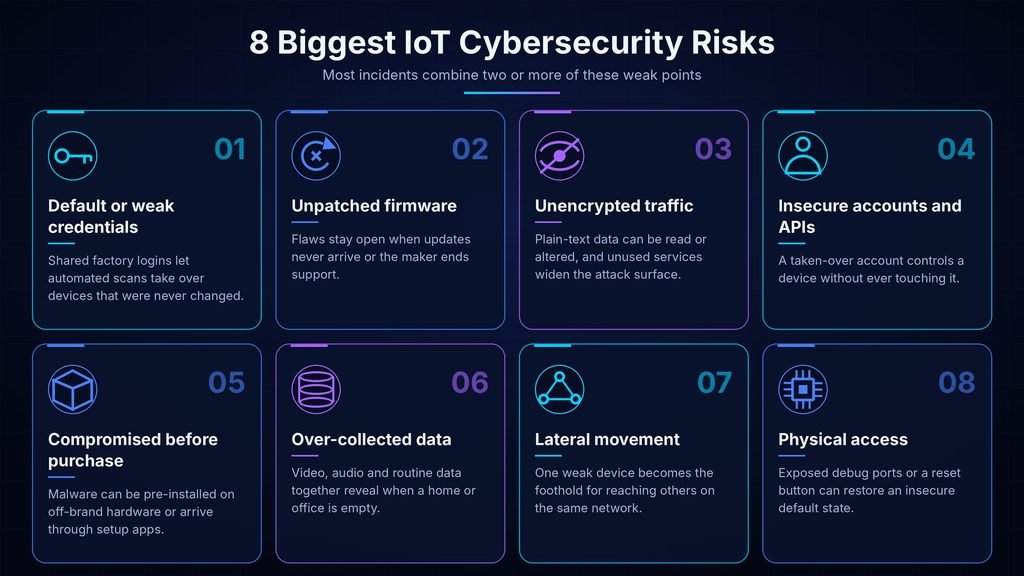
The biggest IoT cybersecurity risks are weak or shared credentials, missing updates, insecure accounts and cloud services, unencrypted communication, malware installed before purchase, excessive data collection, flat networks and physical tampering. Each matters for a different reason, and most incidents combine two or more of them.
Eight risks account for most of what goes wrong, and each one has a different fix.
- Default or weak credentials: factory logins shared across units let automated scans take over devices that were never changed.
- Unpatched firmware: firmware is a device’s built-in software, and its flaws stay open when updates never arrive or support ends.
- Unencrypted traffic and open services: plain-text data can be read or altered, and unused services such as Telnet, an old remote-login protocol, widen the attack surface.
- Insecure accounts, apps and APIs: application programming interfaces (APIs) are the connections apps use to reach devices, and a taken-over account controls a device without touching it.
- Compromise before purchase: malware can be pre-installed on off-brand hardware or delivered by apps downloaded during setup.
- Over-collected data: video, audio, location and routine data together reveal when a household or workplace is empty.
- Lateral movement: attackers use one weak device as a foothold to reach other devices on the same network.
- Physical access: exposed debug ports or a reset button can return a device to its insecure default state.
The next section shows how three of these risks played out in real incidents.
How Do Real Attacks on Connected Devices Unfold?
Real incidents tend to fail in one of three places: the device’s own credentials, the account behind it, or the hardware before it reaches the buyer. Three documented cases show each pattern, and none required an advanced exploit.
Mirai: factory credentials at internet scale
According to the CISA alert on Mirai, the malware continuously scans the internet for vulnerable devices and tries a short list of 62 common default usernames and passwords. CISA reported that the devices hit in the 2016 incidents were mainly home routers, network cameras and digital video recorders, and that the malware’s source code was published soon afterwards, which invited copies. A password nobody changed was the whole vulnerability.
Ring: the account was the weak point
In a complaint announced in 2023, the US Federal Trade Commission said Ring failed to put standard protections in place against credential stuffing and brute-force attacks, and that attackers used camera two-way features to harass and threaten customers, including children. Credential stuffing means trying passwords leaked from other sites against a new login. A strong password on the camera itself would not have helped if the account controlling it reused a leaked one.
BADBOX 2.0: infected before you open the box
In an FBI public service announcement dated 5 June 2025, the FBI warned that criminals compromise streaming devices, projectors, digital picture frames and aftermarket car infotainment systems, either by pre-installing malware or by delivering backdoors through apps downloaded during setup. The FBI said the botnet consists of millions of infected devices that can be sold as residential proxies, which route other criminals’ traffic through the owner’s home connection.
A connected device is only as secure as the weakest of three things: the device itself, the account behind it and the network it sits on.
For the wider picture beyond connected devices, this overview of top cybersecurity threats covers the attack types that sit around these cases.
How Do You Improve Smart Home Security Step by Step?
Smart home security comes down to four jobs, done in order: harden the router, give every device and account a unique credential, keep software current, and isolate devices from your phones and laptops. The order matters because a hardened router is what makes the remaining steps worth doing.
Router menus differ by brand, so the labels below are the common ones; look for the closest match.
- Open your router’s admin page and change the default administrator username and password. The old login should stop working immediately.
- Open the router’s firmware or update page and install any available update, then switch on automatic updates if the option exists.
- Set the Wi-Fi security mode to WPA3, or to WPA2 with AES if WPA3 is not offered.
- Enable the guest network (often labelled Guest Wi-Fi), set its own password and move internet-only devices onto it, as CISA’s home Wi-Fi guidance advises.
- Change the default password on every device, or finish the setup prompt that asks you to create one, and store each in a password manager.
- Turn on multi-factor authentication (MFA), which asks for a second proof such as an app code, for every device account and for the email address used to reset them.
- Open each device’s companion app, install pending firmware updates and enable automatic updates where the setting exists.
- Switch off features you do not use, including remote access, and disable Universal Plug and Play (UPnP), a router feature that lets devices open ports on their own.
Done in this order, the steps leave every device with a unique login, current software and no direct path to your personal devices.
Two Failure Points to Expect
First, a device may stop working or lose local control after moving to the guest network, because some products need to share a network with the phone or hub that sets them up. Move it back only for setup, then return it, and treat a device that cannot work in isolation as a reason to reconsider that product.
Second, a guest network only helps if it blocks access to your main network. Check the guest settings for an option that lets guests reach local devices, which should be off, because labels and defaults differ across router brands.
Common Mistakes and Pro Tips
Five points come up repeatedly in home setups.
- Mistake: reusing one password across device accounts, so a single leaked login opens every camera and speaker.
- Mistake: hardening gadgets while leaving the router’s own default login unchanged.
- Mistake: leaving an old device online after the maker stops updates, which turns it into a permanent open door.
- Tip: keep a simple list of every connected device, its account email and the date you last updated it.
- Tip: check the router’s connected-devices list monthly and unplug anything you do not recognise.
If you do only one thing from this section, put connected devices on their own network, because that protects you even when you cannot judge a device’s own security.
How Can Businesses Reduce Risk From Connected Devices?
Businesses reduce IoT risk by knowing every device they own, keeping each on a restricted network segment, removing shared credentials, tracking update support and watching device traffic. Cameras, printers, badge readers and sensors sit outside normal endpoint tools, so the controls have to be built around the network.
Eight controls cover most organisations, in rough order of priority.
- Inventory: record every device, its owner, model, firmware version and support end date, because unlisted devices cannot be defended.
- Segmentation: place devices in separate network segments, such as VLANs, with rules that allow only the connections each one needs.
- Credentials: issue unique credentials per device, store them in a secrets manager and ban factory defaults at deployment.
- Patch ownership: name who applies firmware updates and rank flaws with a severity scale such as this CVSS scoring guide before rollout.
- Monitoring: log device traffic and alert on unusual destinations, because most devices cannot run security software themselves.
- Procurement rules: require vendors to publish an update period, a vulnerability reporting contact and unique default credentials before purchase.
- Shadow IoT: set policy for personal speakers, cameras and wearables on office or home-office networks.
- Response plan: decide in advance who isolates a compromised device, how it is reset and how spread to other devices is checked.
Small teams without a security department can start from Arcnet’s small business security guide and build the inventory first.
What Do Laws and Standards Say About IoT Security?
Rules for connected devices now exist in several regions, but they differ in scope and timing. The UK and the EU legally require makers to meet minimum security requirements, while the US runs a voluntary labelling programme. None of them updates a device that is already in your home.
The table summarises the position as stated by the UK National Cyber Security Centre, the European Commission, the US Federal Communications Commission (FCC) on its Cyber Trust Mark page updated on 28 September 2026, and the published ETSI standard.
| Regime | Region | Status | What it covers |
| PSTI regime | United Kingdom | Applies since 29 April 2024 | Consumer smart devices: no universal default passwords, a vulnerability reporting contact, a published update end date |
| CRA reporting duties | European Union | Applies since 11 September 2026 | Manufacturers report actively exploited vulnerabilities and severe incidents |
| CRA main obligations | European Union | Applies from 11 December 2027 | Security requirements across design, development and maintenance of products with digital elements |
| U.S. Cyber Trust Mark | United States | Voluntary; administrators being appointed | Label for consumer wireless IoT products; ioXt Alliance is lead administrator from 13 April 2026 |
| ETSI EN 303 645 | Europe, used globally | Published standard (version 3.1.3, September 2024) | Baseline provisions: unique or user-set passwords, updates, secure communication |
The European Commission says manufacturers must send an early warning within 24 hours of learning about an actively exploited vulnerability and a full notification within 72 hours, and that the duty covers products already on the market, as set out in its European Commission announcement.
Three limits apply to all of these rules.
- PSTI requires makers to publish how long updates will last but, according to guidance from the Smart Technology (Product Safety) Stakeholder Group, it sets no minimum length.
- The US label is voluntary and, per the FCC’s page updated on 28 September 2026, is still being put in place through administrators and accreditation bodies.
- No regime repairs a device bought before it applied, so older products depend on the owner’s own controls.
Treat these rules as a tie-breaker when choosing a product, not as proof that a device is safe, and check which regime applies in the region where it is sold.
What Should You Check Before Buying a Connected Device?
Before buying, check that the maker publishes how long it will issue security updates, that setup forces a unique password, that a vulnerability reporting contact exists and that the brand is recognised and certified for its platform. These checks take minutes and remove the riskiest products from a shortlist.
Seven checks cover the decision.
- Support period: a published end date for security updates, which the UK’s PSTI regime requires makers to state.
- Credential handling: setup that forces a unique or user-chosen password, the baseline in ETSI EN 303 645.
- Account protection: MFA support on the app or cloud account that controls the device.
- Disclosure contact: a public page for reporting vulnerabilities, which shows the maker expects and handles reports.
- Brand and certification: skip unrecognised brands, devices promising free paid-channel content and Android products that are not Play Protect certified, all indicators the FBI lists for BADBOX 2.0.
- Local control: an option to run without a cloud account or on an isolated network, which reduces what can go wrong.
- Data practices: clear controls to switch off microphones and cameras and to delete stored recordings.
Where two products are otherwise equal, the stronger choice is the one with the shorter feature list and the longer published update commitment.
What Should You Do If a Device Is Compromised or Out of Support?
Disconnect the device, reset it to factory settings, update its firmware and set a new unique password before reconnecting it to an isolated network. If the maker no longer issues updates, keep it off your main network or replace it, because no setting fixes a flaw the maker will never patch.
Follow these steps in order, using a different trusted device for anything that involves passwords.
- Disconnect the device from Wi-Fi or unplug its network cable. It should disappear from the router’s connected-devices list.
- Change the password on the router and on the account linked to the device.
- Factory reset the device using the method in the maker’s manual, which erases its settings.
- Reconnect it only to the guest or IoT network and install the latest firmware.
- Set a new unique password and enable MFA on its account before using it again.
- Watch the router’s device list and traffic for unfamiliar destinations over the next few days.
- Report suspected criminal activity to your national authority; in the United States the FBI points victims to its Internet Crime Complaint Center.
Skipping the new password is the usual reason a reset device is compromised again, because the shared default that let the attacker in is still there.
What If the Maker Has Stopped Issuing Updates?
A device the maker no longer updates cannot be repaired with settings, because flaws found after support ends stay open permanently. Keep it away from your main network, remove remote access, and replace it if it handles video, door access, health data or payments. Makers can also switch off the cloud service a device depends on, so check the support page before relying on an older product.
What to Do First
Most IoT cybersecurity risks trace back to a handful of fixable habits rather than advanced attacks. Treat every device as three things to secure: the hardware, the account that controls it and the network it joins. For smart home security the quickest gain is a separate network for gadgets, and for businesses it is a complete inventory with support end dates. Start today by opening your router’s connected-devices list and unplugging anything you cannot identify.
Frequently Asked Questions
1. Are smart home devices safe to use?
They can be, if set up carefully. Safety depends on the device’s update support, the strength of its account protection and the network it joins. A device with a unique password, multi-factor authentication and a published update period on an isolated network carries far less risk than a no-name device left on factory settings.
2. Can a compromised smart device give access to my other devices?
Yes, when everything shares one network. A compromised camera or TV box can scan for other devices, attempt logins and relay traffic. Putting connected products on a guest or separate network, as CISA advises, limits what they can reach, though it does not protect the device’s own data.
3. How do I know if an IoT device has been compromised?
Warning signs include unexpected network traffic, settings that change on their own and unfamiliar entries in the router’s connected-devices list. The FBI also lists unrecognised brands and requests to disable security settings as indicators. None proves compromise alone, so treat them as reasons to check, reset and reconnect safely.
4. Do I need antivirus software on a smart device?
Usually you cannot install it. Most connected devices run closed software that does not accept security tools, so protection has to come from the network and the account: unique credentials, updates, isolation and monitoring from the router. Antivirus still belongs on the phones and laptops that control these devices.
5. Who is responsible for IoT security, the maker or the owner?
Both. Makers are responsible for secure defaults, update delivery and a way to report flaws, which the UK’s PSTI regime and the EU’s Cyber Resilience Act now require in their regions. Owners remain responsible for changing credentials, installing updates, securing the linked account and retiring unsupported devices.