
Introduction
Every new router box now says Wi-Fi 7, and every 2026 phone spec sheet name-drops it, but the real question is whether upgrading changes anything in your home. That rarely comes down to which standard is theoretically faster. It comes down to three things most buying guides skip: whether your devices support it, whether your internet plan can feed it, and whether your walls let the fastest band reach your couch. This article works through all three before it tells you what to buy.
Quick Answer
Wi-Fi 7 outperforms Wi-Fi 6E on nearly every technical measure, thanks to wider channels, denser modulation and Multi-Link Operation, which lets a device use two bands at once instead of one. Buy Wi-Fi 7 if you are purchasing new hardware, run 20 or more devices, or have a multi-gig internet plan. Stick with a working Wi-Fi 6E setup if your devices predate 2024 and your network already performs well.
Key Takeaways
Multi-Link Operation lets a Wi-Fi 7 device use two frequency bands at the same time, which matters because it removes the single point of failure that made Wi-Fi 6E connections stutter when one band hit interference.
Wi-Fi 6E’s 6 GHz band delivers its top speeds only within roughly 25 feet of the router in real-world testing, so upgrading to Wi-Fi 7 alone will not fix a weak signal on another floor.
A Wi-Fi 7 router only outperforms Wi-Fi 6E once both the router and the connected device support it, so a 2022 laptop sees no benefit from a new Wi-Fi 7 router by itself.
Most home internet plans deliver far less than either standard’s link speed, so the bottleneck is usually the ISP connection and the router’s WAN port, not the wireless generation.
Entry-level dual-band Wi-Fi 7 routers now sell for around 80 to 100 dollars, which has closed the price gap that used to be the main reason to wait.
Wi-Fi 7 mandates WPA3 encryption and adds beacon protection for its multi-band connections, so a properly configured network on either standard is already about as secure as home Wi-Fi gets.
What’s the Difference Between Wi-Fi 7 and Wi-Fi 6E?
Wi-Fi 6E is Wi-Fi 6 extended into the 6 GHz radio band, while Wi-Fi 7, formally IEEE 802.11be, is a newer generation built on that same foundation with wider channels, denser data encoding and the ability to combine bands into one connection. Both standards run on the 2.4 GHz, 5 GHz and 6 GHz bands, so frequency alone isn’t what separates them.
Wi-Fi 6E’s entire contribution over standard Wi-Fi 6 was opening up that 6 GHz band, spectrum that was still empty of older devices at launch, which is why it offered less interference from day one.
Wi-Fi 7 keeps that same 6 GHz access but adds its own feature set: 320 MHz-wide channels instead of a 160 MHz cap, 4096-QAM modulation for denser data packing, support for up to 16 spatial streams, and Multi-Link Operation, according to Ezurio’s technical comparison. None of this makes Wi-Fi 7 a different kind of network; it makes the same three bands carry more data, more reliably, at once. You’ll also see the term EHT, short for Extremely High Throughput, in router spec sheets; it’s the technical name for what Wi-Fi 7 does under the hood.
Every factor in the sections below feeds into the wifi 7 vs wifi 6e comparison that actually decides whether upgrading is worth it for your specific home, so treat the spec differences above as background rather than the full answer.
Speed, Channels and Modulation: How the Numbers Compare
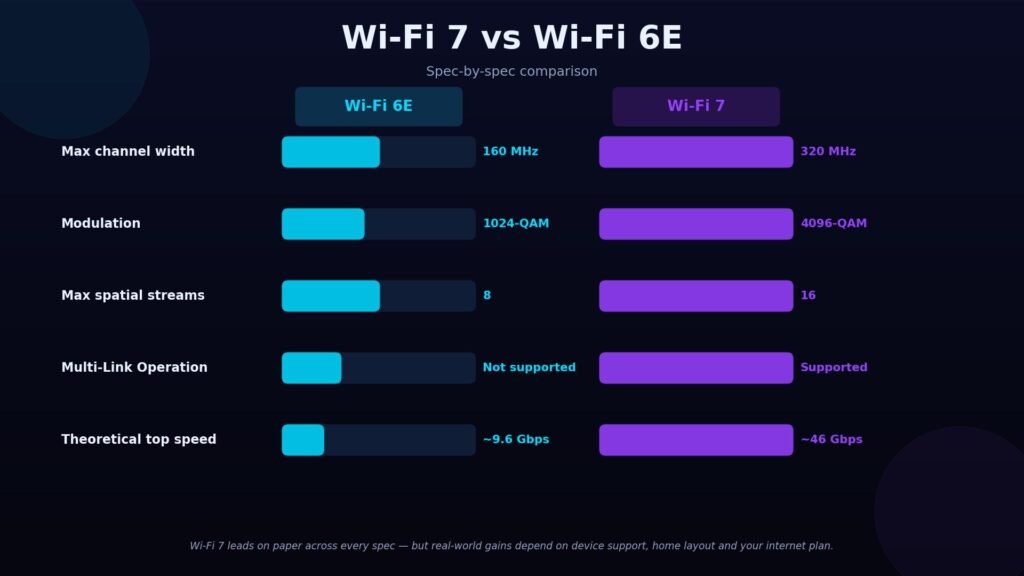
Wi-Fi 7’s headline number is a theoretical maximum of about 46 Gbps versus roughly 9.6 Gbps for Wi-Fi 6E, nearly a fourfold gap, according to Ezurio’s Wi-Fi 7 comparison. Neither figure is something any home network will hit; both are lab ceilings measured under ideal conditions with every optional feature enabled. The table below lines up the specs side by side before the explanation of what each one actually changes.
| Spec | Wi-Fi 6E | Wi-Fi 7 |
| Bands used | 2.4, 5, 6 GHz | 2.4, 5, 6 GHz |
| Max channel width | 160 MHz | 320 MHz |
| Modulation | 1024-QAM | 4096-QAM |
| Max spatial streams | 8 | 16 |
| Multi-Link Operation | Not supported | Supported |
| Theoretical top speed | ~9.6 Gbps | ~46 Gbps |
Wi-Fi 7 leads on every row in that table, but a spec sheet win only becomes a real-world win once the router, the connected device and the internet plan all support it. The sections below cover each of those conditions.
Three changes account for the speed gap, and it helps to know all three because router marketing tends to mention only one:
- Channel width: Wi-Fi 7 supports 320 MHz channels, double the 160 MHz ceiling on Wi-Fi 6E, which lets a single connection carry more data per transmission.
- Modulation density: Wi-Fi 7 uses 4096-QAM, up from Wi-Fi 6E’s 1024-QAM, packing roughly 20 percent more data into the same radio signal.
- Spatial streams: Wi-Fi 7 supports up to 16 spatial streams on paper, though consumer routers typically ship with far fewer antennas than that implies.
Wi-Fi 7 also adds preamble puncturing: a device can keep using the clean part of a wide channel when only a portion is jammed by interference, instead of abandoning the whole channel. In practice this means fewer dropped connections in apartment buildings and other crowded RF environments, not a headline speed number.
Multi-Link Operation: The Feature That Actually Changes Daily Use
Multi-Link Operation, or MLO, lets a single Wi-Fi 7 device connect to the router over two bands simultaneously instead of picking one and sticking with it. It matters because it fixes the most common real-world complaint about both Wi-Fi 6 and Wi-Fi 6E: a device locks onto a band, and if that band gets noisy, the connection stutters until it reconnects.
Picture a household running a video call on the 5 GHz band while a smart speaker and three streaming devices crowd the same frequency. On Wi-Fi 6E, interference on that band interrupts the call. On Wi-Fi 7 with MLO active, the same device leans on 6 GHz for the clean portion of the conversation and falls back to 5 GHz without the call visibly dropping, because it was never relying on only one link to begin with.
The trade-off worth naming: MLO only helps if both the router and the connected device support it, and support varies by chipset even among devices that otherwise carry a Wi-Fi 7 label; check a device’s exact spec sheet rather than assuming the logo guarantees it.
Range and Coverage: Where the 6 GHz Band Struggles
Both Wi-Fi 6E and Wi-Fi 7 share the same weakness on the 6 GHz band: shorter wavelengths travel less far and lose more strength passing through walls than the 2.4 GHz and 5 GHz bands do. Upgrading to Wi-Fi 7 does not change this physics, because the range limitation comes from the frequency, not from the generation of standard running on it.
In practical testing, a 6 GHz signal dropped sharply in strength around 25 feet from the router and effectively disappeared soon after, according to Tom’s Hardware’s range testing, which is consistent with reports that 6 GHz coverage in a typical home is often confined to a single room or the room next door – a reason larger homes running 6 GHz on either standard usually need a mesh system rather than one router.
Two mistakes are easy to make here, and both waste money:
- Assuming a new Wi-Fi 7 router alone will fix a weak signal in a bedroom two floors up. The 6 GHz band will not reach that far regardless of which standard drives it; only additional access points or mesh nodes fix a coverage problem.
- Assuming every room needs 6 GHz coverage. The 2.4 GHz and 5 GHz bands on either standard still cover the rest of the home reliably; 6 GHz is a speed boost for nearby devices, not a full-home replacement.
The practical fix for a multi-room home is the same on both standards: add mesh nodes or wired access points rather than relying on one router’s radios to cover square footage the 6 GHz band physically cannot reach.
Which Devices Actually Support Wi-Fi 7 Right Now?
As of 2026, Wi-Fi 7 support is concentrated in flagship and premium hardware rather than being universal. On phones, BGR’s device compatibility roundup reports that all iPhone 16 and 17 models except the budget 16e and 17e support Wi-Fi 7, as do Samsung’s Galaxy S25 and S26 lines except the FE variants, along with recent flagship Pixel and OnePlus phones.
Beyond phones, support breaks down roughly like this:
- Laptops and PCs: premium and gaming models built on Intel Core Ultra (Series 1 and 2), AMD Ryzen 9000/AI, or Qualcomm Snapdragon X Elite and X Plus chips typically include Wi-Fi 7.
- Tablets: high-end models from Apple, Samsung and OnePlus have added Wi-Fi 7; budget and midrange tablets generally have not.
- Smart home and streaming devices: smart TVs, wearables, streaming boxes, security cameras and most wireless printers still ship on Wi-Fi 6E or older standards, and that is unlikely to change quickly given the added chipset cost.
- Gaming hardware: select consoles and handhelds have moved to Wi-Fi 7, though this remains the exception rather than the rule across the category.
The mistake to avoid is buying a Wi-Fi 7 router expecting an instant speed boost on hardware you already own. Both ends of a connection need to support the standard; a Wi-Fi 7 router talking to a Wi-Fi 6 laptop simply runs at Wi-Fi 6 speeds on that link. If a phone or laptop upgrade is already on your calendar, prioritizing a Wi-Fi 7-capable model now spreads the cost of a full upgrade across two purchases instead of one.
Does Your Internet Plan Support the Upgrade?
For most households, no wireless standard is the actual bottleneck; the internet plan is. A typical home internet plan, even one marketed as gigabit-speed, delivers far less than either Wi-Fi 6E’s or Wi-Fi 7’s link speed, so a device connected at multi-gigabit Wi-Fi speeds is still capped by whatever the ISP is delivering to the router.
Where the router upgrade genuinely helps regardless of internet speed is local, device-to-device traffic that never leaves the home network: transferring a large video file between a laptop and a NAS drive, streaming a 4K movie from a home media server, or backing up a phone to a desktop over Wi-Fi. Wider channels and MLO both improve that traffic even on a modest internet plan.
The detail almost no buying guide names is the router’s WAN port speed. A budget router with a 1 Gbps WAN port caps a multi-gig internet plan at 1 Gbps no matter how fast its Wi-Fi radios are, since that port is the only path between the ISP connection and the router’s wireless side. Before paying more for a higher-tier router, check your internet plan’s advertised speed against the router’s WAN port rating, which mid-range and premium Wi-Fi 7 routers now list as 2.5 Gbps or 10 Gbps.
Multi-gig internet plans and their pricing vary widely by country, city and provider, so check what your own ISP actually offers before assuming a multi-gig plan is available or affordable where you live.
Security and IoT Support: What Changed
Both standards require WPA3 encryption on the 6 GHz band, and Wi-Fi 7 goes further, mandating beacon protection and new authentication key management methods for Multi-Link Operation connections, according to Cisco Meraki’s Wi-Fi 7 technical documentation. A correctly configured 6 GHz network on either standard is already running the strongest encryption the Wi-Fi Alliance currently certifies.
A relevant update for smart-home shoppers: the Wi-Fi Alliance announced in January 2026 that it would extend a subset of Wi-Fi 7’s efficiency and reliability features to devices using only narrow 20 MHz channels, according to RCR Wireless’s coverage of the announcement. That matters because most IoT sensors, wearables and smart home gadgets have historically been shut out of newer Wi-Fi generations’ benefits for exactly that reason a gap neither Wi-Fi 6 nor Wi-Fi 6E addressed for that device category.
Whichever standard you run, the encryption protocol matters less than basic router hygiene: a default admin password and an unsegmented network undercut WPA3 regardless of Wi-Fi generation. For the fundamentals of hardening a home or small office network, including guest network separation and router credential changes, see Arcnet’s guide to securing a network from common intrusion methods.
How Much Do Wi-Fi 7 and Wi-Fi 6E Routers Cost?
What actually drives the price of a router in either standard is band count, port speed and mesh node count, not the Wi-Fi generation on the box. A dual-band Wi-Fi 7 router without 6 GHz access can now cost less than a tri-band Wi-Fi 6E router did at launch, so the spec sheet matters more than the standard’s name.
At the budget end, TP-Link’s dual-band Archer BE3600 launched at 99 dollars and now regularly sells closer to 80 dollars, according to Tom’s Guide’s review, though it drops 6 GHz entirely to hit that price. A step up, TP-Link’s tri-band Archer BE9700 carries a street price around 200 dollars with full 6 GHz support and multi-gig ports, per Tom’s Hardware’s router testing. Premium mesh systems for large homes run from roughly 600 dollars past 1,300 dollars for a multi-node kit, per the same coverage and BroadbandNow’s 2026 router roundup.
Two hidden costs are worth naming before you buy either standard:
- Subscription-gated features: some routers hold parental controls or advanced security scanning behind a paid add-on that can run 30 to 100 dollars a year on top of the hardware price, so check what a router includes free before comparing sticker prices.
- Missing 6 GHz on budget models: the cheapest Wi-Fi 7 routers often skip the 6 GHz radio to hit a low price, which means you gain MLO and modest efficiency improvements but lose the band that delivers Wi-Fi 7’s biggest theoretical speed gains.
Vendor pricing shifts often and varies by region and currency, so treat these figures as a starting point and check current listings before buying.
Wi-Fi 7 vs Wi-Fi 6E Comparison: Which Should You Actually Upgrade To?
If you’re buying a router today with no strong reason to wait, buy Wi-Fi 7. Entry-level prices have closed most of the gap with Wi-Fi 6E, and a Wi-Fi 7 router is backward compatible with every older device you own, so there’s little downside beyond the marginal cost.
The decision changes once you weigh it against your own situation. Run the wifi 7 vs wifi 6e comparison against these five factors before deciding:
- Device support: if most of your household’s phones, laptops and tablets are from 2023 or earlier, a Wi-Fi 7 router will not speed up those specific devices until they’re replaced.
- Home size and layout: a single-floor apartment sees more benefit from either standard’s 6 GHz band than a multi-story house, which will need mesh coverage regardless of which standard you choose.
- Internet plan speed: a sub-gigabit internet plan will not expose most of the difference between the two standards for internet-bound traffic, though local file transfers still benefit.
- Device count: households running 20 or more connected devices see the clearest benefit from Wi-Fi 7’s added capacity and MLO stability.
- Budget and timeline: if your current Wi-Fi 6E setup, bought within the last two years, already performs well, there is no technical urgency to replace it before it’s due for retirement anyway.
The router is rarely the actual bottleneck anymore the wall, the client device and the internet plan usually are, and no amount of router spec-chasing fixes any of those three. If your Wi-Fi 6E setup already performs well and most of your devices are still Wi-Fi 6 or 6E, there’s no urgent reason to replace working hardware. If you’re buying new hardware anyway or supporting a growing number of connected devices, Wi-Fi 7 is the better purchase for the same reason any newer, backward-compatible standard usually is: it costs little more and closes off no options.
Conclusion
Start by checking two things before buying anything: whether your most-used devices actually support Wi-Fi 7, and whether your internet plan matches your router’s WAN port. Run through the wifi 7 vs wifi 6e comparison points above against your own device list and home layout, since a new router won’t outrun an internet plan or a wall it can’t see through, no matter which standard drives it. If your current setup already covers your home reliably, there’s no rush to replace it. Questions about how this applies to your own router or layout? Leave them in the comments.
FAQs
Is Wi-Fi 7 worth it over Wi-Fi 6E?
For most buyers purchasing new hardware, yes, the wifi 7 vs wifi 6e comparison favors Wi-Fi 7 since entry-level routers now cost about the same as Wi-Fi 6E routers did and add Multi-Link Operation’s stability benefits at no real premium. It is less clearly worth it if you already own a well-performing Wi-Fi 6E setup and most of your devices don’t yet support Wi-Fi 7.
Can Wi-Fi 7 routers work with Wi-Fi 6E devices?
Yes. Wi-Fi 7 routers are backward compatible with Wi-Fi 6E, Wi-Fi 6 and older devices, which will simply connect at their own standard’s speeds rather than at Wi-Fi 7 speeds. You do not need to replace every device at once to benefit from a router upgrade.
Is Wi-Fi 6E still worth buying in 2026?
It can be, particularly for budget-conscious buyers, since discounted Wi-Fi 6E hardware still delivers strong real-world performance and full 6 GHz access. The main trade-off is skipping Multi-Link Operation and losing some resale and support longevity as Wi-Fi 7 becomes the default.
Does Wi-Fi 7 need a special internet plan?
No special plan is required, but a standard sub-gigabit plan won’t showcase Wi-Fi 7’s biggest advantages for internet-bound traffic. The bigger practical requirement is a router with a WAN port fast enough to match your plan, typically 2.5 Gbps or higher for multi-gig internet.
Is Wi-Fi 7 available worldwide?
Wi-Fi 7 hardware is sold globally, but 6 GHz band availability for the highest-speed features depends on each country’s spectrum regulations, and access varies by region. Check your local telecommunications regulator’s rules on 6 GHz unlicensed spectrum if you’re unsure whether your region has opened the band.