Introduction
A growing number of cost-conscious engineering teams are moving selected workloads off AWS, Azure and Google Cloud and onto hardware they control, and many do it without fanfare. The pattern is real, but the headlines overstate it. Recent months have added two forces that older guides miss: a memory shortage that has raised server prices, and a European rule that removes cloud switching charges. This guide explains what the move involves, why it happens, what it costs and how to decide whether any of your workloads belong in it. It also covers the exit planning that most guides skip.
Cloud repatriation is the practice of moving specific workloads from public cloud providers such as AWS, Azure or Google Cloud back to private cloud, colocation or company-owned data centres. In cloud repatriation in 2026, most firms move only steady, high-cost or regulated workloads and keep the rest in the cloud.
Cloud repatriation is selective rather than an exodus, because surveys with very high headline figures count a single moved workload or an evaluation, while IDC reported that only 8 to 9 percent of companies plan full workload repatriation.
Steady, data-heavy workloads are the strongest candidates to come back, because public cloud pricing charges for elasticity that flat demand never uses.
Rising server prices weaken the case for buying hardware, because TrendForce reported conventional DRAM contract prices rose about 93 to 98 percent quarter on quarter in the first quarter of 2026.
The EU Data Act lowers the cost of leaving from 12 January 2027, according to the European Commission, but it does not remove the cost of rebuilding on new infrastructure.
Staff, refresh cycles and dual running are the costs most savings claims leave out, so a hardware-only comparison overstates the benefit.
A written cloud exit strategy is worth having even if you stay, because it exposes lock-in and gives you negotiating strength at contract renewal.
What Is Cloud Repatriation?
Cloud repatriation is the process of moving applications, data or compute capacity out of a public cloud such as AWS, Azure or Google Cloud and back to infrastructure the organisation controls. That destination can be a private cloud, a colocation facility or the company’s own data centre. The practice is also called reverse cloud migration or unclouding.
It is a narrower idea than cloud migration, which covers every move into the cloud and between clouds. It also differs from hybrid cloud, which describes a way of running systems across public and private environments rather than a move. The decision usually sits inside a wider digital transformation strategy rather than replacing it, and many organisations that repatriate end up hybrid because they bring some workloads home and leave others where they are.
The table below separates the four terms that get mixed up most often.
| Term | Direction | Scope | Example |
| Cloud migration | Into the cloud, or between clouds | Any workload | Moving a database from a data centre to AWS |
| Cloud repatriation | Out of public cloud | One workload up to a whole estate | Moving a storage-heavy app to colocation |
| Hybrid cloud | Not a move; a way of running | Public and private together | Core database in colocation, web tier in the cloud |
| Cloud-to-cloud switching | Between public providers | Usually whole services | Moving from one hyperscaler to another |
Scope varies. Full repatriation moves an entire estate off public cloud, which is rare. Selective repatriation moves specific workloads that are expensive, latency-sensitive or regulated, and leaves elastic workloads where they are. If you remember one distinction, remember that repatriation is a placement decision for individual workloads, not a verdict on the cloud.
Is Anyone Really Leaving the Cloud?
Yes, but selectively, and far less than the loudest headlines suggest. Most organisations that move workloads back keep using public cloud for other work, so overall cloud use is not shrinking. Uptime Institute’s Data Report 167, published in February 2025 from its Capacity Trends and Cloud Survey 2024, found that cost is the main reason enterprises move workloads off the cloud, while most also run several public clouds alongside their own facilities.
In an IDC analysis of cloud budgets published on 28 October 2024, IDC cited its Server and Storage Workloads Survey as showing that only 8 to 9 percent of companies plan full workload repatriation, with most moving specific elements such as production data, backup processes or compute. Only 6 percent of respondents to Uptime Institute’s 2022 Data Center Capacity Trends Survey said they had abandoned the public cloud altogether.
Headline numbers conflict because they measure different things. A Cloudera-sponsored survey of 1,500 infrastructure and data architects, reported by Virtualization Review on 12 August 2026, found that 66 percent said their organisations had moved AI workloads from public cloud back to private cloud or on-premises in the past year. A survey commissioned by Cloudian, published in its press release of 3 March 2026, reported that 93 percent of 203 enterprise IT decision-makers had repatriated AI workloads, were doing so or were evaluating it. Both vendors sell on-premises or hybrid products, and both count a single moved workload, or an evaluation, as repatriation. A survey that counts one moved workload as repatriation measures intent, not an exodus.
Why Are Companies Moving Workloads Off Public Cloud?
Companies leave for reasons tied to specific workloads, not to the cloud as a whole. These six drivers come up most often across the surveys and case studies in this guide.
- Cost predictability: steady workloads pay for elasticity they never use, and storage and managed databases often dominate the bill.
- Data sovereignty and regulation: some data must stay in a named country or under a named legal regime.
- AI workloads: GPUs rented around the clock cost a great deal, and sensitive training data is easier to govern in-house.
- Performance and latency: workloads beside on-site equipment, or needing steady low latency, can suffer from the network hop.
- Vendor lock-in: each proprietary managed service makes leaving harder and renegotiating weaker.
- Control: owning the hardware means owning upgrade timing, configuration and pricing risk.
Cost is the most cited trigger, but a move justified on cost alone is the one most likely to disappoint, as the cost section below explains.
What Did 37signals Do, and What Does It Prove?
37signals, the company behind Basecamp and HEY, is the most widely documented case of a software company leaving the public cloud. Its figures show what a successful exit looks like for a steady, well-understood workload, but they do not show what an average company should expect. Figures in this section are in US dollars as published by the sources, and local pricing and taxes vary by region.
According to Data Center Dynamics, 37signals began moving its applications off AWS and Google Cloud in 2022, when its annual cloud bill exceeded 3.2 million dollars. In Hansson’s own cloud exit post, CTO David Heinemeier Hansson wrote that the company had finished moving seven apps, including HEY, onto its own hardware, that the 1.3 million dollars it still spent on cloud was all AWS S3 storage holding almost 10 petabytes, and that projected savings from the full exit were well over ten million dollars across five years.
The Register reported on 9 May 2025 that 37signals spent 1.5 million dollars on 18 petabytes of Pure Storage hardware that Hansson said would cost less than 200,000 dollars a year to run, and that AWS waived 250,000 dollars in egress fees for the transfer. Data Center Dynamics noted that such savings claims leave out hardware refreshes, extra operations roles, power and cooling. 37signals also had steady workloads and engineers who already knew how to run servers. Dropbox moved back to its own data centres in 2016, according to Data Center Dynamics. Treat both as templates for a method, not forecasts for your bill.
What Makes Cloud Repatriation 2026 Different From Earlier Waves?
Three forces separate this wave from the earlier one: AI workloads, a memory-driven rise in server prices, and a legal deadline that ends cloud switching charges in the EU. The first changes why firms move, the second changes what moving costs, and the third changes what leaving costs.
AI workloads
AI is the newest reason to move workloads, because AI jobs run on costly GPUs, often continuously, and often touch sensitive data. A common mistake is assuming AI belongs on-premises by default. Training bursts and experiments suit rented capacity, while steady production inference is the stronger repatriation candidate. Governance also covers staff using unapproved AI tools.
Server prices
Server hardware has become more expensive and slower to obtain, which weakens the cost case for buying your own. TrendForce reported in its June 2026 release that conventional DRAM contract prices rose about 93 to 98 percent quarter on quarter in the first quarter of 2026, and it forecast a further 58 to 63 percent rise for the second quarter. In a 5 January 2026 release, TrendForce said suppliers were shifting capacity toward server and high-bandwidth memory products for AI servers, which limits supply elsewhere.
A savings model built on older hardware quotes is out of date. Ask vendors for a written delivery date and a price validity period before approving any business case, because a quote that can change before shipment is not a fixed cost.
The EU Data Act
The EU Data Act removes cloud switching charges, including data egress charges, from 12 January 2027, according to the Commission’s Data Act explainer. The Act has applied since 12 September 2025, and from 11 January 2024 until 12 January 2027 providers may still charge for the costs they incur in switching and egress, the Commission explains. This lowers the price of leaving but not the price of rebuilding.
Law firm Lindahl notes that early termination penalties and customised cloud services fall outside the fee ban, and cloudmagazin reports that egress fees for ongoing parallel use of several clouds still apply. If a contract auto-renews before that date, check its switching terms.
Exit waivers outside the EU
The large providers also offer exit waivers. Data Center Dynamics reported that AWS, from March 2024, gives credits for free data transfer out to the internet when customers move off its platform, provided the account is in good standing and all data leaves AWS, and that transfers from CloudFront, Direct Connect, Snow Family and Global Accelerator are excluded. Telecoms.com reported a 60-day window, and InfoQ reported that Google Cloud and Microsoft introduced comparable options in early 2024. Check the provider’s own pages before relying on any waiver, because AWS says it may change the terms at any time.
Which Workloads Should Move Back, and Which Should Stay?
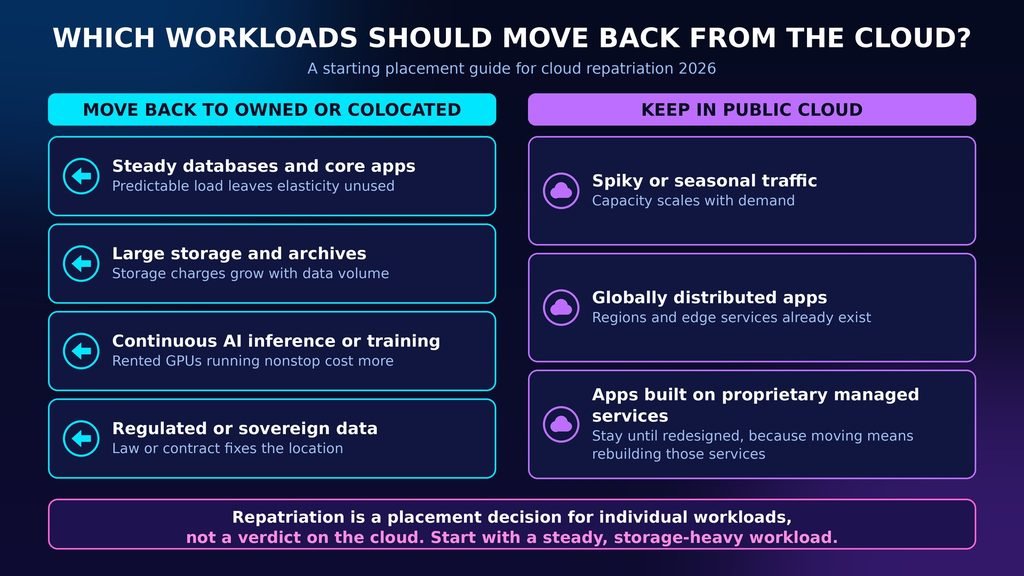
Move workloads whose demand is steady, whose data volume is large or whose rules require control, and keep workloads that are spiky, global or built on managed services you would have to rebuild. For cloud repatriation 2026 planning, that sorting step matters more than any survey figure, because it turns a trend into a per-workload decision.
The table gives a starting placement for common workload types.
| Workload type | Usually better placed | Main reason |
| Steady databases and core apps | Owned or colocated hardware | Predictable load leaves elasticity unused |
| Large storage and archives | Owned or colocated hardware | Storage charges grow with data volume |
| Continuous AI inference or training | Owned hardware or a mix | Rented GPUs running nonstop cost more |
| Regulated or sovereign data | Private cloud or in-country hosting | Law or contract fixes the location |
| Spiky or seasonal traffic | Public cloud | Capacity scales with demand |
| Globally distributed apps | Public cloud | Regions and edge services already exist |
| Apps built on proprietary managed services | Public cloud until redesigned | Moving means rebuilding those services |
Six criteria decide each individual case.
- Demand pattern: flat load favours owned hardware, while spiky load favours cloud.
- Data volume and outbound traffic: large stored data and heavy egress raise cloud bills.
- Compliance: residency or audit rules may fix where the workload can run.
- Team skills: someone must run hardware, patching and on-call duty.
- Service dependencies: the more proprietary managed services in use, the higher the rebuild cost.
- Contract timing: commitments and renewal dates set the cheapest moment to move.
The safer first candidate is usually a steady, storage-heavy workload with few managed-service dependencies, because it gives the clearest cost signal and the fewest surprises.
What Does Cloud Repatriation Really Cost?
Cloud repatriation costs more than the hardware invoice, and the missing items are what turn a promised saving into a small one or a loss. A common mistake is comparing cloud list prices with hardware prices and stopping there.
Backup and recovery are the item people forget most often, because the cloud provider handled them quietly in the background, so plan them early using the guide to data backup strategies. Model every figure in the currency your suppliers quote, since local prices and taxes differ by region.
These eight cost drivers decide the real result.
- Hardware, including exposure to the memory price rises described above.
- Space, power and cooling, or colocation fees if you rent racks.
- Staff time for installation, patching, monitoring and on-call duty.
- Refresh cycles, since servers and disks wear out and need replacement.
- Dual running, where you pay for cloud and new hardware during the migration.
- Data transfer, subject to the conditions of any provider waiver.
- Replacing managed services such as backups, disaster recovery and security tooling.
- Committed spend and early termination penalties already signed.
Model all eight before approving a move, because a comparison that includes only hardware overstates the saving.
On Premise Migration, Colocation or Private Cloud: Where Should Workloads Land?
Colocation suits teams that want to own hardware without running a building, on premise migration into your own data centre suits organisations that already have facilities and operations staff, and private cloud suits teams that want cloud-style tooling on dedicated hardware. Moving to another public cloud provider is a different decision and is not repatriation.
The table compares the three landing zones.
| Option | Hardware owner | Facility run by | Suited to | Main risk |
| Colocation | Your company | Colocation provider | Control without a building | Contract and remote-hands dependence |
| Own data centre (on premise migration) | Your company | Your company | Existing facilities and staff | Capital cost and facility workload |
| Hosted private cloud | Varies by contract | Provider | Cloud-style tools on dedicated hardware | Lock-in to a new provider |
A sovereign cloud is a provider that hosts data under a named country’s jurisdiction, and it fits when residency rules are the main driver. For most mid-sized teams making a first move, colocation is the lower-risk choice because it removes the facility work while keeping hardware control, and teams with an existing data centre and on-call staff can reasonably skip it.
How Do You Build a Cloud Exit Strategy Before You Need One?
A cloud exit strategy is a written plan that names which workloads could leave, what each would cost to move, where each would go, and which contract dates and fees limit the timing. Write one even if you plan to stay, because it exposes where you are locked in and gives you negotiating strength at contract renewal.
Follow these steps in order.
- Export last month’s costs grouped by service, using Cost Explorer on AWS, Cost analysis on Azure or Billing reports on Google Cloud. You should see services ranked by spend.
- Label each workload as steady, spiky or seasonal using its usage graphs.
- List the managed services each workload uses, with a self-hosted equivalent for each, such as PostgreSQL on your own servers in place of a managed database.
- Record each workload’s stored data volume and monthly outbound transfer.
- Read your cloud contract for commitments, early termination penalties and renewal dates.
- Ask the provider in writing which switching terms and fee waivers apply to you.
- Get a written hardware or colocation quote with a delivery date and price validity period, then add staffing.
- Run one low-risk workload in parallel with its cloud copy. You should see real operating cost and real failure modes before committing further.
- Keep the cloud copy until the new setup has passed a full billing cycle.
Teams underestimate rebuilding deployment automation.
Two failure points to plan for
Two failures cause most delays.
- Hidden dependencies: an app fails after cutover because it relied on a cloud-only queue, identity role or DNS service, which shows as start-up errors and is prevented by step three.
- Uncovered transfer fees: the final bill shows data transfer lines the waiver excluded, which you catch by checking the bill against the waiver’s written conditions.
Both are cheap to prevent on paper and expensive to discover during cutover.
What Are the Alternatives to Leaving the Cloud?
Leaving is not the only way to cut a cloud bill, and sometimes it is the wrong one. Uptime Institute’s 2022 Data Center Capacity Trends Survey found that 41 percent of applications moved back to on-premises had earlier been lifted and shifted into the public cloud, which suggests some repatriation fixes a migration shortcut rather than a cloud limit.
- Rightsize instances and delete idle resources.
- Commit to discounts for steady load, such as AWS Savings Plans or Reserved Instances.
- Move cold data to cheaper storage tiers.
- Re-architect lifted-and-shifted apps to use cloud-native services properly.
- Switch to another public or sovereign cloud provider with better terms.
- Use your exit plan to negotiate at renewal.
Try these first on workloads that are not clear repatriation candidates, and move only when the numbers still favour owning the hardware.
What to Do Next
The useful way to read this trend is as selective placement, where each workload sits in the environment that fits its demand pattern, data and rules. The money case for cloud repatriation 2026 is harder to call than older guides suggest, because server prices are rising while the cost of leaving falls for EU customers. Whatever you decide, a written cloud exit strategy turns an opinion into a comparison and strengthens your hand at renewal. Start by exporting last month’s cloud bill grouped by service and marking which of the top lines run at a steady level.
FAQs
1. Is cloud repatriation the same as leaving the cloud entirely?
No. Cloud repatriation usually moves selected workloads and leaves others in the public cloud. IDC cited its Server and Storage Workloads Survey as showing that only 8 to 9 percent of companies plan full workload repatriation. Most organisations end up hybrid, placing each workload where its cost and rules fit.
2. Does cloud repatriation save money?
It can for steady, data-heavy workloads, but not automatically. Hansson’s own post projects savings of well over ten million dollars across five years for 37signals, a team that already ran servers. Hardware prices, staffing, refresh cycles and dual running reduce any saving, so model them before moving.
3. What are the risks of moving workloads off public cloud?
The main risks are underestimated costs, hidden dependencies on cloud-only services, longer hardware delivery times and the need for in-house operations skills. Security duties for the hardware layer also shift to you. A pilot on one low-risk workload exposes most of these early.
4. Will egress fees disappear?
Not entirely. The European Commission says switching charges, including data egress charges, are removed from 12 January 2027, but that covers the act of switching. Cloudmagazin reports that egress fees for ongoing parallel use of several clouds still apply. Check your own contract and the provider’s written terms.
5. Which companies have moved workloads back from the cloud?
37signals, the company behind Basecamp and HEY, is the most documented example, and Data Center Dynamics reports that Dropbox moved back to its own data centres in 2016. Both run steady, well-understood workloads with strong in-house engineering. Many firms repatriate quietly, so public examples are a small, self-selected sample.