
Introduction
Most advice on optimizing a blog post is a long, unordered list of tips, so writers end up doing everything at once and checking nothing. This guide puts the work in the order you actually do it: choose the target, place the words, write the tags, structure the page, prepare the images, and check what Google did with the result. It also says what to ignore, including several rules of thumb that Google’s own documentation does not support. You finish with a sequence you can run on a new post or an old one.
Quick Answer
To optimize a blog post for SEO, choose one target keyword that matches what readers search, then name it naturally in the title, a subheading, the opening copy and the image alt text, write a unique meta description, structure the page with clear headings and internal links, and check indexing after publishing.
Key Takeaways
Choosing one keyword per post and reading the current results first prevents two failures: targeting a query the page cannot satisfy, and competing against your own older post.
Keyword placement is about where a reader expects the topic to be named, not how often, because Google’s spam policy defines stuffing by unnatural repetition rather than by a count.
The title element and meta description are worth writing by hand because Google can replace a title link that looks inaccurate or outdated, and only sometimes uses the description as the snippet.
Google ignores the meta keywords tag entirely, so time spent there is wasted, while a leftover robots noindex rule can keep a finished post out of search.
Google says optimizing for its AI features is still ordinary SEO, so LLMS.txt files and content chunking add work without a documented benefit in Google Search.
Publishing is not the end of the job, because titles with old years and stale facts are exactly what Google says it adjusts for, and a post-publish check catches them early.
What Does It Mean to Optimize a Blog Post for SEO?
Blog SEO optimization is the work of making one blog post easy for search engines to find, understand and display, and satisfying for the reader who clicks it. It covers four jobs: choosing the topic and keyword, setting the on-page elements such as the title, headings, meta tags, images and links, keeping the page crawlable and indexable, and maintaining it after publication. Off-page work such as earning backlinks or social sharing sits outside this guide, which stays with what you control inside the post and its page.
Optimization has a ceiling. Google’s guidance on generative AI features states that a page can meet every requirement and still not be crawled, indexed or served. The same guidance separates useful content from what it calls commodity content: generic tip lists built on common knowledge that add little for readers. Google points to a distinct point of view and first-hand experience as what sets useful content apart. Optimization removes doubt about what a page answers; it cannot supply an answer the page does not contain.
How Do You Choose a Target Keyword and Match Search Intent?
Choose one primary keyword per post: the phrase a reader would type to get the answer your post gives. Then read the current search results to confirm which format Google rewards for that phrase. Backlinko’s blog SEO guide recommends one main keyword per post and suggests that new blogs begin with long-tail phrases, meaning longer and more specific searches.
Run these steps before you write a word.
- Write the reader’s question in their own words, such as “how do I export passwords from one manager to another” rather than the broad “password manager”, where comparison pages are the likely format.
- Choose one primary keyword that names that question, plus a few secondary phrases that describe its subtopics.
- Search the phrase and note which page types rank, because tutorials, lists and comparisons signal the format Google expects.
- Read the headings of the top results and list what they all cover and what none of them answers.
- Collect follow-up questions from People Also Ask and related searches to use as headings.
- Search your own site for an older post on the same keyword, because two posts aimed at one phrase compete with each other, a problem called keyword cannibalization.
- Decide the angle: the one thing your post explains that the ranking pages leave out.
How Does Keyword Placement Work in Blog SEO Optimization?
Keyword placement means naming your primary keyword in the few places where a reader expects the topic to be stated, once each and in natural wording. There is no required repeat count. Google’s spam policy describes keyword stuffing as repeating words or phrases so often that the text sounds unnatural, and Google’s Danny Sullivan has said it is about how the text reads rather than how many times a term appears, as reported by Search Engine Roundtable.
Use this placement map as a checklist, then stop adding.
- Article title (H1): once, in plain wording.
- URL slug: a short, readable version of the topic.
- Meta description: once, inside a sentence that summarizes the page.
- One subheading (H2) that names the topic or asks it as a question.
- The opening paragraphs: state the topic plainly, in the reader’s words.
- Image alt text: only where it truly describes the image.
- The conclusion: once, if it fits the sentence.
- Secondary keywords: in subheadings and body copy wherever they describe a real subtopic.
Placed this way, the keyword appears where it helps a reader scan, and anything beyond that is repetition rather than optimization.
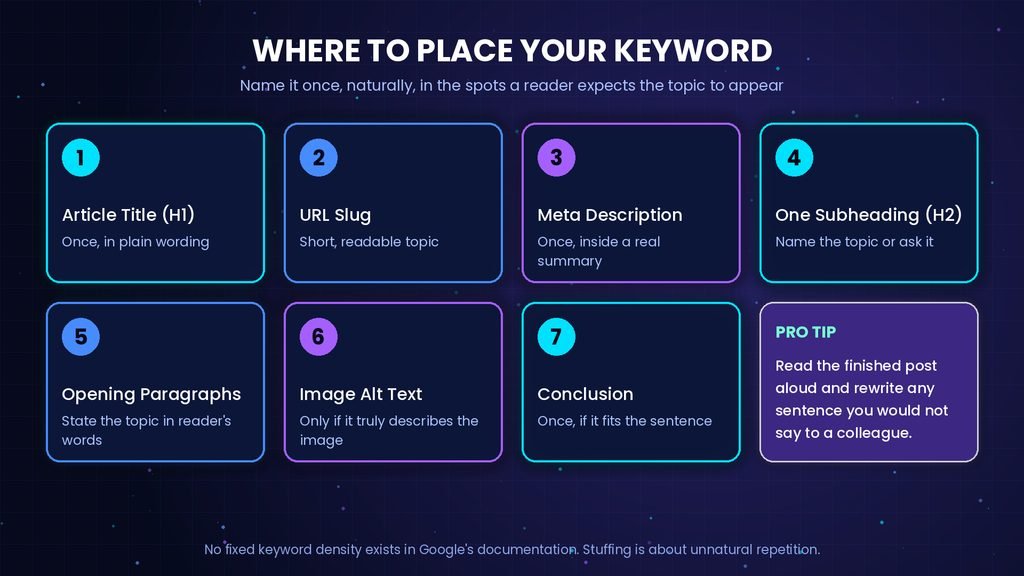
Guides that quote a density percentage or a fixed repeat count are passing on a rule of thumb, since no such figure appears in Google’s documentation. Google’s generative AI guidance also says its systems understand synonyms, so a post does not need every phrasing of a query. Pro tip: read the finished post aloud and rewrite any sentence you would not say to a colleague.
What Are Meta Tags and How Do You Write Them for a Blog Post?
Meta tags are HTML elements in the head section of a page that give search engines and browsers information about it. For a blog post, three matter most: the title element, the meta description and the robots tag. Google publishes a list of the meta tags Google supports and of those it ignores. The table below draws on Google Search Central’s documentation for meta tags, title links and snippets.
| Tag | What Google does with it | What to do in a blog post |
| Title element | One source for the title link | Write a unique, descriptive title that matches the H1 |
| Meta description | Sometimes used for the snippet | Write one unique summary per post |
| og:title | May be used as a title link source | Keep it consistent with the title |
| Robots meta tag | Controls indexing and snippet display | Leave at the default unless you need noindex or nosnippet |
| Meta keywords | Ignored by Google Search | Skip it |
If time is short, write the title and the description by hand for every post and leave the other tags at their defaults.
Title tag and title link
The title element is the tag you write in the page head, and the title link is the clickable headline Google shows in results. Google builds the title link automatically from several sources, including the title element, the main visible title, heading elements, og:title tags and anchor text that points to the page, as described in Google’s title link documentation.
Write a title that is unique, descriptive and concise, and do not repeat the same words inside it. Google states that the title element has no length limit, but the displayed link is cut to fit the device width, so put the most useful words first. Pro tip: keep the H1, the title element and og:title consistent, because Google reads all three when it builds the title link.
Google may swap in a different title link when it detects one of these common issues on the page:
- A half-empty title, such as a separator followed only by the site name.
- An obsolete title, such as a year that no longer matches the visible heading.
- An inaccurate title that does not describe the page content.
- Repeated boilerplate that makes pages hard to tell apart.
- No clear main title, because several headings look equally prominent.
- A title in a different language or script from the page.
Because Google says it cannot change title links by hand for individual sites, correcting the source on the page is the only fix.
Meta description
A meta description is a short summary in the page head that Google sometimes uses as the snippet under the title, when it describes the page better than text taken from the page itself, according to Google’s snippet documentation. Write one unique description per post that summarizes the whole page and avoids keyword lists. Google notes that a blog description can also carry details such as the author or publication date, and that it sets no length limit but truncates snippets to fit the device width.
For example, “Password tips, security, tools, apps, managers” is a keyword list, while “How to export passwords from one manager and import them into another, with the checks that stop entries going missing” says what the page does. A common mistake is pasting one description across many posts, which Google’s documentation calls unhelpful.
Robots and other meta tags
The robots meta tag controls whether a page can appear in search and how its snippet is shown. A noindex rule keeps a page out of results, and a nosnippet rule prevents a snippet. Google’s robots documentation adds that nosnippet also stops the content being used as direct input for its AI Overviews and AI Mode. When robots rules conflict, Google applies the more restrictive one, so a rule left over from drafting can override everything else you did.
The meta keywords tag is not used by Google Search and has no effect on indexing or ranking, so skip it. Google also advises caution when JavaScript injects or changes meta tags, so set them in your CMS or SEO plugin, such as Yoast SEO or Rank Math, rather than through scripts.
How Should You Structure Headings, Links and Content?
Use one H1 that names the post, H2 headings for main sections and H3 headings for subsections, answer each question-style heading in its first sentences, and link to related pages with descriptive anchor text. Google’s generative AI guidance says pages organized into paragraphs and sections with clear headings are easier for readers to follow, which is the purpose of the structure.
Apply these checks to the outline before you draft.
- Keep heading levels in order: H1, then H2, then H3, with no skipped levels.
- Phrase several headings as the questions readers actually type, using People Also Ask and related searches.
- Answer each question in the first two or three sentences under its heading, then add detail. Short direct answers are also the passages search features can pull out, though nothing guarantees it.
- Cover what every ranking page covers, then add the point none of them answers.
- Define each technical term in one sentence the first time it appears, and keep paragraphs short for readers working in a second language.
- Link to related posts on your own site only where they are the reader’s next step, using anchor text of a few descriptive words.
- Link out to primary sources for claims, since Semrush’s blog SEO guide notes that linking to the original source builds credibility and gives AI tools a chain of attribution to follow.
- Assign one clear category and only distinct tags, because HubSpot’s guide points out that near-duplicate tags such as “blog” and “blog posts” add clutter.
A page built this way reads well on a phone and gives Google clear sections to show, and readers who want the wider picture can move on to Arcnet’s overview of digital marketing trends.
How Do You Optimize Images and Page Experience?
Give every meaningful image a descriptive filename, accurate alt text and a position next to the text it illustrates, and make sure the page loads quickly and reads well on a phone. Google’s image guidance calls alt text the most important attribute for image metadata, and it also serves people who use screen readers.
Run this list on each image before you upload it.
- Rename the file with a short descriptive name in lowercase words separated by hyphens, never image1.jpg.
- Use a real HTML image element with a src and an alt attribute, since Google advises against CSS images for content.
- Write alt text that describes what the image shows in the context of the page, and include the keyword only if it truly describes the image.
- Place the image near the text it supports.
- Use an empty alt attribute for purely decorative images so screen readers skip them.
- Compress and resize the file before upload so it does not slow the page.
Alt text written for the reader is also the alt text search engines can use.
A common mistake is filling alt text with keywords. Google asks for information-rich alt text that uses keywords appropriately in context, so a string of phrases fails readers first.
Google’s guidance for generative AI features describes good page experience as displaying well across devices, reducing latency and keeping the main content easy to tell apart from other elements.
Do You Need to Do Anything Different for AI Search?
No separate tactic is needed for Google’s AI Overviews and AI Mode. Google’s generative AI guide says the recommended SEO practices still apply because those features are rooted in its core ranking and quality systems, and it describes optimizing for AI search, often labelled AEO or GEO, as still SEO.
The same guide lists tactics that Google says you can ignore for Google Search:
- LLMS.txt files and other special machine-readable files or markup.
- Splitting content into tiny chunks; there is no such requirement and no ideal page length.
- Rewriting posts in a special style for AI systems or chasing every long-tail variation.
- Seeking inauthentic mentions on other sites.
- Treating structured data as a requirement; it is not needed for AI features, though it can still help with rich results.
Google adds that an LLMS.txt file neither helps nor harms visibility in Google Search, so it is harmless if another service you use reads it.
What helps is the ordinary work in this guide, plus the Generative AI performance report in Search Console to see how your pages appear. Two limits apply. This is Google’s position for Google Search, and other assistants retrieve content in ways Google’s statement does not describe. An answer-first layout is still worth using, because readers skim, not because a machine needs it.
What Should You Check After Publishing, and When Should You Update a Post?
After publishing, confirm the page is indexable and that Google shows the title and description you wrote, then revisit the post whenever its facts, dates or results change. Google’s title link documentation says reprocessing after a change can take a few days to a few weeks, so check on a schedule instead of once.
Use this list after each publish and again during every content review.
- Inspect the live URL with the URL Inspection tool in Search Console, which Google recommends for checking the meta tags and attributes on a page.
- Confirm that no noindex or nosnippet rule remains from drafting.
- Search for the post once it is indexed and compare the displayed title and snippet with what you wrote.
- If Google shows a different title, compare the page against the common title issues above and fix the source.
- Open the Performance report and, where available, the Generative AI performance report in Search Console to see which queries show your page.
- Update titles and headings that contain a year or a fact that has changed, since Google gives an outdated year as a case it adjusts for.
- Refresh older posts on a schedule, because HubSpot’s blog SEO guide calls updating existing content one of the highest-return blog SEO tasks.
Treating blog SEO optimization as a loop rather than a launch task is what keeps a post accurate long after it goes live.
Conclusion
A post is optimized when its target keyword is chosen on purpose, named in a few natural places, described by a unique title and description, and checked after publishing. Blog SEO optimization works as a short routine repeated on every post, not a one-time push before launch. Keyword placement and meta tags are the two parts most writers rush, so give them the slower pass. Start with one existing post: run the placement map and the post-publish checks on it this week, and note what Search Console shows before and after.
Frequently Asked Questions
1. Is blogging good for SEO?
Ans. Yes, when each post answers a real search question more completely than the pages already ranking. A blog gives a site many pages that can match specific queries. Blogging alone guarantees nothing, because Google states that indexing and serving are not guaranteed even for compliant pages.
2. How long should a blog post be for SEO?
Ans. Long enough to answer the question completely, and no longer. Google’s guide on generative AI features states there is no ideal page length and that shorter or longer pages can work depending on the audience and subject. The fixed word counts some guides quote are not part of Google’s documentation. Cover the topic, then stop.
3. Should I use an SEO plugin such as Yoast SEO or Rank Math?
Ans. An SEO plugin is a convenient place to set the title, meta description, sitemap and noindex rules, which Backlinko’s guide lists as typical plugin jobs. Treat its content score as a prompt, not a target: Shopify’s blog SEO guide quotes its lead SEO advising that on-page tools are a guide rather than a mandate.
4. How long do SEO changes take to show?
Ans. Google says it must recrawl and reprocess a page before changes to title sources are noticed, which may take a few days to a few weeks, and you can request a recrawl. Ranking movement after that varies, so judge a change over weeks of Performance report data.