Introduction
A backup that has never been restored is a guess, and most companies find that out on the worst possible day. This guide covers the rules, backup types, storage choices and recovery targets that decide whether a business gets its files back after ransomware, a failed drive or an accidental deletion. It also covers two gaps most guides skip: cloud-hosted data the vendor does not back up, and backup copies an attacker can delete. Where a law or price differs by region, the text says so.
Quick answer
A sound business backup strategy keeps three copies of important data on two types of storage with one copy off-site, makes at least one copy immutable or offline, sets frequency by how much data loss the business can accept, and confirms all of it through regular restore tests.
Key takeaways
The 3-2-1 rule is the baseline because it removes single points of failure, but it does not stop an attacker holding administrator credentials.
At least one copy must be immutable or offline, because many ransomware variants delete or encrypt reachable backups before attacking production systems.
Frequency should follow each system’s recovery point objective, because everything changed since the last backup is what the business loses.
Cloud-hosted software data needs its own backup, because Microsoft’s services agreement recommends that customers keep backups of content stored on its services.
File sync is not backup, because sync copies deletions and encrypted files to every device as faithfully as good files.
A restore test matters more than any setting, because recovery time depends on access, sequence and practice.
What is a data backup, and how does it differ from disaster recovery?
A backup is a secure copy of business data stored separately from the primary systems, so it can be restored after a cyberattack, a failure or a deletion, as https://www.cisa.gov/audiences/small-and-medium-businesses/secure-your-business/back-up-business-data describes it. Disaster recovery is the wider plan for restoring systems, access and operations, and restoring from backup is one step inside it.
Replication and file sync are not backups, because both copy mistakes and encryption to the second location as faithfully as good data. An archive is different again: long-term storage of rarely used data, kept for retention rules rather than incident recovery.
How does the 3-2-1 rule work, and why do some teams add two more numbers?
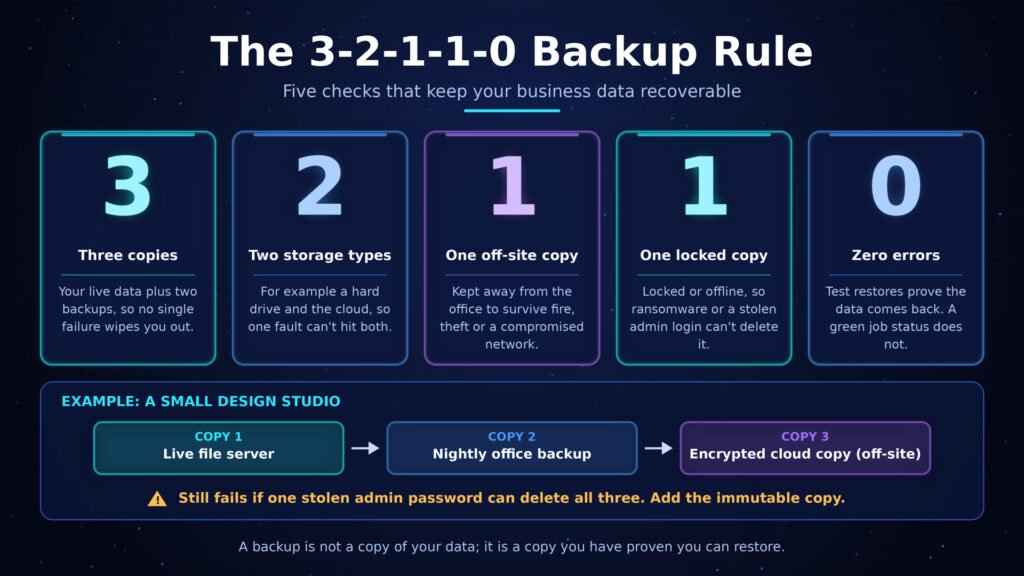
The 3-2-1 rule means keeping three copies of important data, on two different types of storage, with one copy off-site. CISA’s small business guidance calls it a trusted guideline and cites a hard drive plus the cloud as two storage types.
Consider a small design studio: the live file server is copy one, a nightly backup to office network storage is copy two, and an encrypted cloud copy is copy three. That satisfies the rule, yet fails if a stolen administrator password can delete all three.
Vendors and practitioners therefore extend the rule to 3-2-1-1-0, adding one immutable or offline copy and zero errors after restore verification. It is a convention rather than a CISA standard, though CISA’s ransomware guidance asks for the same ideas: offline, encrypted, regularly tested backups.
A common mistake is counting a second folder on the same disk as a second copy, when two folders on one disk share one failure.
Full, incremental or differential: which backup type should a business use?
A full backup copies everything, an incremental backup copies what changed since the previous backup of any kind, and a differential backup copies what changed since the last full backup. Most businesses run a scheduled full backup with incrementals in between.
The table compares the three types.
| Backup type | What it copies | Backup speed and storage | What a restore needs |
| Full | Everything, every run | Slowest run, most storage | One complete set |
| Incremental | Changes since the previous backup of any kind | Fastest run, least storage | Last full backup plus every increment in order |
| Differential | Changes since the last full backup | Grows until the next full backup | Last full backup plus the latest differential |
The restore column matters most, because an incremental chain restores only if the last full backup and every later increment are intact. The sensible default for most small and mid-sized businesses is a weekly full backup with daily incrementals, moving to differentials only when restore simplicity outweighs storage.
Pro tip: schedule the full backup for a low-usage window such as a weekend, because it loads storage and the network most heavily.
How often should a business back up its data?
Back up each system as often as the business can afford to lose its changes, a limit called the recovery point objective. A constantly changing customer database may need continuous or hourly protection, while finished brochures may need only a weekly run.
What are RPO and RTO?
The recovery point objective (RPO) is the maximum acceptable data loss, measured backwards from the moment of failure. The recovery time objective (RTO) is the maximum acceptable downtime, measured forwards until the system works again. If the last backup ran overnight and a server fails mid-afternoon, the working day is lost.
Frequent backups do not help if restores are slow, so set both targets together for each system. Include laptops and other endpoints, which matters for remote teams.
Five inputs set each schedule.
- Data change rate: how much changes per hour or per day.
- Cost of lost work: staff hours to re-enter data, or orders that cannot be rebuilt.
- Recovery objectives: an RPO and RTO agreed with the system’s owner, not guessed by IT.
- Backup window: the low-usage period that tolerates extra load.
- Retention duty: how long copies must be kept, which regulation sets and which varies by region and industry.
Record every system’s targets in a one-page table and have each owner agree to their row.
Are cloud backups enough, or do businesses still need a local copy?
Cloud backups supply the off-site copy the 3-2-1 rule requires, but alone they restore at internet speed and depend on one provider. A local copy restores faster, and a cloud copy survives fire, theft or a compromised office network, so most businesses need both.
Why is file sync not cloud backup?
Sync services copy changes to every connected device, so a deletion or an encrypted file replicates as fast as a good one. Version history in some cloud drives is time-limited, which helps with small mistakes but is not a retention policy.
How do you choose between local, cloud and hybrid?
Six factors decide the mix.
- Restore speed: local restores run at network speed, cloud restores at internet speed.
- Site loss: only an off-site copy survives fire, flood or theft.
- Bandwidth: first uploads and large restores can saturate a connection.
- Retrieval charges: some providers bill for downloads, so check the pricing page.
- Data location: where copies sit matters under rules such as the General Data Protection Regulation (GDPR) in the European Union, and many providers let customers pick a region.
- Encryption keys: whoever holds the keys controls recovery, and lost keys mean unrecoverable backups.
For most businesses the sensible pick is hybrid: a local copy for quick restores and an immutable cloud copy for site loss and ransomware.
What drives the cost of a backup setup?
Prices differ by vendor, region and billing period, so learn what moves the bill rather than memorising a figure.
- Volume of protected data and how fast it grows.
- Change rate, since more change means more stored increments.
- Retention length, because every extra week occupies capacity.
- Billing unit: per user, device, server or terabyte.
- Retrieval and network charges during restores.
- Add-ons such as immutability, key management and support, plus staff time to test.
Read each vendor’s pricing page, note the currency it publishes in, and ask what a full restore costs as well as storage.
Does software-as-a-service data need its own backup?
Yes. Software-as-a-service (SaaS) vendors keep their platform running, but the customer remains responsible for protecting and recovering the content stored in it. The states that Microsoft is not liable for loss caused by outages and recommends that customers keep regular backups of the content they store on its services.
Four situations show why uptime is not recoverability.
- A deletion goes unnoticed until the retention window passes.
- A departing employee’s mailbox is removed at offboarding and held the only copy of a contract.
- An attacker with a stolen account empties recycle bins before deleting content.
- An account is closed, and the agreement says Microsoft cannot retrieve content afterwards.
Add every SaaS system that holds business records to the same recovery table used for on-site systems.
SaaS backup tools connect through the vendor’s application programming interface (API). Veeam, Acronis and NAKIVO are examples of vendors selling Microsoft 365 backup; compare them on retention limits, restore granularity and pricing.
How do you protect backups from ransomware?
Make sure an attacker who controls the network cannot delete or encrypt every copy tells organisations to keep offline, encrypted backups of critical data and to test them, because many ransomware variants try to find and delete or encrypt accessible backups.
The threat is common: CISA’s small business guidance cites Verizon’s 2025 Data Breach Investigations Report, which found ransomware in 44 percent of the breaches investigated; for the attack itself.
An immutable backup is a copy that cannot be modified or deleted for a set retention period, usually through write-once, read-many (WORM) storage describes two modes for S3: in compliance mode no user, including the AWS account root user, can overwrite or delete a protected version during retention, while in governance mode users with special permissions can still change or remove the lock.
This sequence uses Amazon S3 as the example, and other storage services offer equivalent features under different names.
- Enable S3 Versioning and Object Lock on the backup bucket, because Object Lock works only in versioned buckets.
- Under Default retention, choose Enable and set the retention period.
- Choose Governance mode first, to test the setting before committing to compliance mode.
- Point the backup software at the bucket using a dedicated identity that lacks the s3:BypassGovernanceRetention permission.
- Attempt a permanent delete of a locked version by version ID and confirm the request returns Access Denied (403 Forbidden).
- Switch to Compliance mode only after choosing a retention period the business can afford.
Two failures are common. A simple delete request with no version ID returns 200 OK and adds a delete marker, so the object looks deleted while the locked version remains, and restore tools must read earlier versions. A compliance-mode retention period set too long cannot be shortened, and the documentation names deleting the whole AWS account as the only early exit.
A common mistake is joining the backup server to the same identity directory as production, so one stolen administrator password reaches everything. Give backup consoles their own accounts with multi-factor authentication.
How do you test backups and turn them into a disaster recovery plan?
Restore real data on a schedule and time it. CISA’s small business guidance says to test both full and partial restores and confirm data can roll back at least seven days. The results feed the disaster recovery plan, which records who restores what, in which order, and how staff reach files when normal systems are down.
A backup is not a copy of your data; it is a copy you have proven you can restore.
- A restore test should prove five things.
- A single file returns intact and opens in its normal application.
- A folder tree or mailbox returns with its permissions intact.
- A full system or database returns to a working state, not merely a present one.
- The restore finishes inside the recovery time objective agreed with the system owner.
- Someone other than the person who built the backups can perform it from written instructions.
Record the result, fix what failed, and repeat on a schedule set by how critical the system is.
A frequent mistake is treating a green job status as proof, when it shows only that the job ran, not that the data restores.
What does a disaster recovery plan contain?
For backup purposes the plan fits on a few pages and answers who, what and in which order.
- Systems ranked by recovery priority, each with its RPO and RTO.
- Where each copy lives and how to reach it without the primary network or an internet connection.
- A named owner and deputy for each restore task, including who informs staff and customers.
- Credentials and encryption keys stored offline, out of ransomware’s reach.
- An order of operations: contain the incident, rebuild clean systems, reset credentials, then restore into the clean environment.
Test the plan with a tabletop exercise, where the team talks through a scenario before anyone touches a system.
Pro tip: time the first restore and write the measured duration into the RTO column, because the measured figure replaces the guess.
Which data backup strategies suit which kind of business?
Data backup strategies scale with the cost of failure rather than with headcount. A freelancer needs the 3-2-1 baseline with automation and one restore test, a business with servers adds immutability and per-system targets, and a regulated business adds retention and evidence requirements from its regulator.
- Freelancer or very small office: a cloud backup service plus a second copy on a drive disconnected after each run.
- Small team with a file server and SaaS tools: a nightly local backup, an immutable cloud copy, SaaS backup and a scheduled restore test.
- Mid-sized business with servers and databases: per-system RPO and RTO, replication for critical systems, an immutable off-site copy, separate backup administrator accounts and a written recovery plan.
- Regulated business: the previous setup plus retention set by rules such as HIPAA in the United States, GDPR in the European Union or the PCI DSS card payment standard, interpreted by the compliance owner.
Whichever profile fits, the constant is an off-site copy an attacker cannot delete and a restore someone has actually performed.
What to do first
Sound data backup strategies reduce to two questions: could an attacker delete every copy, and has anyone proven that a restore works? Cloud backups usually supply the off-site copy, and a written disaster recovery plan turns that copy into a working business again. The first move is small: pick the single most important system, restore it from backup to a spare machine, and record how long it takes.
Frequently asked questions
1. What should a business back up first?
Back up the systems the business cannot operate without: customer records, financial and payroll data, email, contracts and operational databases. Rank them by what stops sales, operations or compliance if they disappear, then set a recovery target for each. Configuration files and cloud application data belong on the list too.
2. How long should a business keep its backups?
Keep short-term copies long enough to reach a clean restore point after a slow-moving incident, and longer-term copies as long as regulation or contracts require. CISA’s small business guidance says restore tests should confirm data can roll back at least seven days. Retention rules vary by region and industry.
3. Who should own backups in a small company?
Name one person as backup administrator, accountable for setup, monitoring and restore tests, and name a deputy. Clear ownership stops the common failure where everyone assumes someone else checks the jobs. The owner reports test results to management, not only job status.
4. What is an immutable backup?
An immutable backup is a copy that cannot be changed or deleted for a defined retention period, usually stored in write-once, read-many (WORM) form. Its value is that ransomware or a malicious administrator cannot alter it afterwards. It still needs restore testing, because immutability protects the copy, not its usability.