
Introduction
Every software team eventually hits the same wall: code sits ready to ship, but getting it into production safely takes days of manual checks. This guide breaks down exactly what continuous integration and continuous delivery mean, how they work inside a DevOps workflow, and how a real pipeline is built and secured. You will see an actual Jenkins pipeline, a framework for picking a tool, and the mistakes that quietly wreck otherwise well-intentioned setups. Nothing here is theoretical, since every practice comes with the specific setting, command, or trade-off that makes it usable.
A working CI/CD setup is the automated pipeline that builds, tests, and delivers code instead of doing each step by hand. Continuous integration merges and tests code changes constantly; continuous delivery keeps every change ready to release; continuous deployment pushes it to production automatically. Together they let DevOps teams ship smaller, safer changes far more often.
Continuous integration and continuous delivery are two different disciplines bundled under one term, so a pipeline can do CI without ever doing full CD.
Continuous deployment removes the manual approval step before production, which only works once test coverage is trustworthy enough to replace a human sign-off.
A Jenkinsfile written in declarative syntax is easier to review and maintain than a scripted one, because it restricts what a pipeline is allowed to do.
Storing credentials directly in pipeline configuration is how build systems get compromised, which is why secrets management tools exist as a separate layer.
A pipeline that takes too long to run gets skipped or worked around by developers, so pipeline speed is a security property, not just a convenience one.
CI/CD automates the mechanics of shipping code, but it does not fix a team that does not talk to each other before shipping it.
What Does CI/CD Stand For?
CI/CD stands for continuous integration and continuous delivery, sometimes continuous deployment. Continuous integration is the practice of merging every developer’s code changes into a shared repository multiple times a day, with an automated build and test run on each merge. Continuous delivery extends that by keeping every successfully tested change in a state that could be released at any moment.
Understanding what CI/CD in DevOps actually automates, versus what it leaves for people to decide, is the first step to building one that works. The acronym also covers continuous deployment, a stricter version where every change that passes automated tests goes to production without a human clicking approve. That distinction, delivery keeps you release-ready while deployment actually releases, is where most confusion starts, and it is covered in full in the comparison section below.
CI/CD in DevOps: How the Two Fit Together
CI/CD is the technical backbone of DevOps, not a synonym for it. DevOps is the broader cultural and organizational shift that breaks down the wall between development and operations teams; CI/CD is the automated tooling that makes that shift practical to run day to day.
A team can adopt DevOps principles, such as shared on-call and cross-functional squads, without a mature pipeline, and a team can have a fast pipeline while development and operations still work in separate silos and blame each other when a release breaks. The pipeline is what makes frequent releases physically possible; the culture is what makes frequent releases something people actually want to do. DevSecOps extends the same idea one step further by folding security checks into the pipeline itself, rather than treating security as a gate that only runs right before launch.
Continuous Integration vs Continuous Delivery vs Continuous Deployment
Continuous integration, continuous delivery, and continuous deployment are three different levels of automation, not three names for the same thing. CI stops at the point where the code is tested and merged. Delivery stops at the point where the code is ready to release, waiting on a person. Deployment removes that person entirely. Atlassian’s breakdown of the three practices is a useful reference if this distinction is new to your team.
| Stage | What Happens | Who Triggers the Release |
| Continuous Integration | Code is merged, built, and automatically tested on every commit | No release happens at this stage |
| Continuous Delivery | Tested code is automatically packaged and staged, ready to ship | A person approves the final push to production |
| Continuous Deployment | Every change that passes all automated tests moves straight through | The pipeline itself, with no manual approval step |
Most teams that say they do CI/CD are actually doing continuous integration plus continuous delivery, not full continuous deployment, because giving up the manual approval step means trusting the test suite completely.
What Happens Inside a CI/CD Pipeline?
A pipeline is a sequence of automated stages that a code change passes through between being written and being live. The exact stages vary by project, but four appear in almost every pipeline:
- Source: A commit or merged pull request in Git triggers the pipeline automatically through a webhook, so nothing runs until code actually changes.
- Build: The pipeline compiles the code, installs dependencies, and packages the result into a deployable artifact, such as a binary or a container image.
- Test: Automated unit, integration, and sometimes security tests run against the build; a single failing test stops the pipeline before anything reaches users.
- Deploy: The artifact moves to a staging or production environment, either waiting for approval under continuous delivery or going live immediately under continuous deployment.
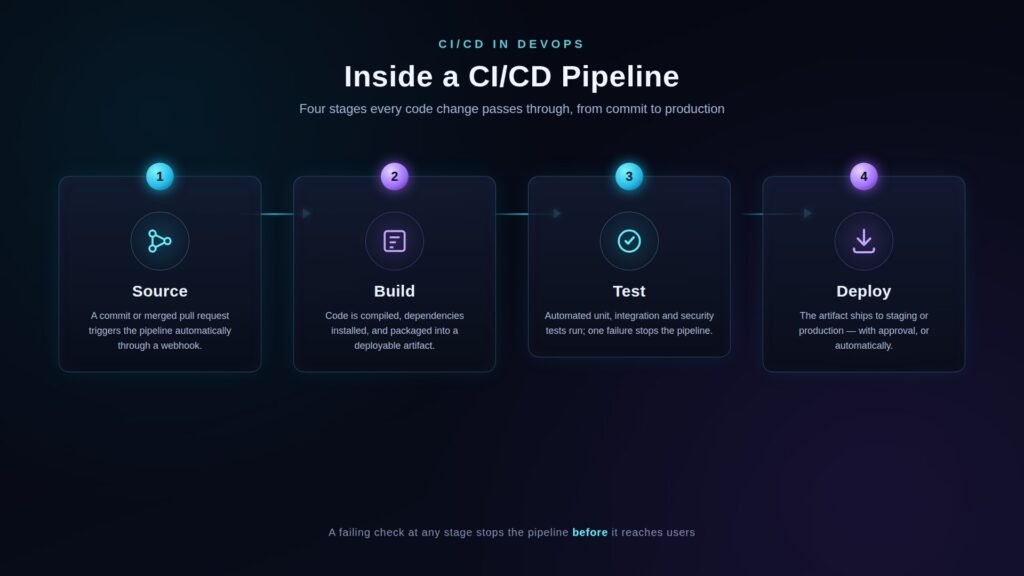
Each stage exists to catch a specific class of problem before a person has to, which is why skipping one rarely saves real time.
Building a Simple Jenkins Pipeline (Declarative Syntax)
Jenkins pipelines are usually written as a Jenkinsfile using declarative syntax, a structured, restricted format that keeps a pipeline’s definition easy to read and review. A basic Jenkins pipeline names a set of stages and the shell commands each one runs, following the structure laid out in the official Jenkins Pipeline Syntax documentation.
pipeline {
agent any
stages {
stage(‘Build’) {
steps {
sh ‘mvn clean package’
}
}
stage(‘Test’) {
steps {
sh ‘mvn test’
}
}
stage(‘Deploy’) {
steps {
sh ‘./deploy.sh staging’
}
}
}
}
The agent any line tells Jenkins to run this on any available worker. Each stage block maps to one step in the pipeline described above, and the steps inside it are the exact shell commands Jenkins executes, here a Maven build, a Maven test run, and a deployment script. Saving this as a Jenkinsfile at the root of the repository and committing it means the pipeline definition is version-controlled along with the code it builds, so a change to the pipeline goes through the same review process as any other code change.
Jenkins also supports scripted pipelines, written directly in Groovy, which allow loops, conditionals, and custom logic that declarative syntax restricts on purpose. That restriction is the point: a declarative Jenkinsfile cannot accidentally do something its stages do not describe, which matters when dozens of people can propose changes to it. Reach for scripted syntax only when a pipeline genuinely needs logic, such as branching behavior by environment, that declarative directives cannot express cleanly.
Two failures show up constantly in new Jenkins pipelines. The first is a missing or misconfigured Jenkins agent, which causes the pipeline to queue indefinitely with no clear error; check that at least one agent is online and labeled correctly under Manage Jenkins, Nodes. The second is a build that passes locally but fails in Jenkins because a required tool or environment variable exists on the developer’s machine but not on the build agent; pin exact tool versions in the Jenkinsfile itself rather than assuming the agent’s environment matches.
Choosing a CI/CD Tool: Jenkins vs GitHub Actions vs GitLab CI
Jenkins, GitHub Actions, and GitLab CI solve the same problem with different trade-offs: Jenkins gives full control at the cost of running your own server, while GitHub Actions and GitLab CI trade some flexibility for little to no infrastructure to maintain.
| Criteria | Jenkins | GitHub Actions | GitLab CI |
| Hosting | Self-hosted, you run the server | Hosted by GitHub; self-hosted runners optional | Hosted by GitLab; self-hosted runners optional |
| Configuration | Jenkinsfile, declarative or scripted Groovy | YAML workflow files | YAML pipeline files |
| Best fit | Teams needing custom plugins or on-prem control | Teams already hosting code on GitHub | Teams wanting CI/CD and source control in one platform |
| Maintenance | Ongoing: patching, plugins, and scaling are your job | Minimal; GitHub manages the runners | Minimal on GitLab’s hosted tier |
There is no universally correct pick here; it comes down to who has to maintain it. A team that already lives in GitHub gains little from running a separate Jenkins server, while a team with strict on-premises or compliance requirements often needs the control that only a self-hosted tool like Jenkins provides. Named alternatives worth knowing about beyond these three include CircleCI, which focuses on fast parallel builds, and Azure DevOps, which suits teams already standardized on Microsoft’s cloud.
Securing a CI/CD Pipeline
A CI/CD pipeline needs its own security practices because it has privileged access to source code, secrets, and production infrastructure; compromising the pipeline is often more valuable to an attacker than compromising the application it builds.
Two documented incidents show what happens when that access is abused: the 2020 SolarWinds breach involved malicious code inserted during the build process itself, and the 2021 Codecov compromise involved a modified CI script that exported customer secrets. Neither required breaking into the finished application; both attacks targeted the pipeline that built it.
A handful of practices address most of the risk:
- Store secrets in a dedicated secrets manager, never in pipeline configuration files or environment variables checked into the repository.
- Give each pipeline stage the minimum permissions it needs; a build step rarely needs the same access as a deploy step, so do not share one service account across both.
- Run static analysis (SAST) on every build so vulnerable code is flagged before it reaches a test environment, not after.
- Require code review for any change to the pipeline configuration itself, since a modified Jenkinsfile or workflow file can redirect what gets built or where it deploys.
- Log every pipeline run, including who triggered it, what changed, and what it deployed, so a compromise leaves a trail.
OWASP’s Top 10 CI/CD Security Risks project catalogs the specific ways pipelines get exploited beyond this list, and it is worth a read before hardening a pipeline that handles anything sensitive.
Common CI/CD Mistakes (and How to Avoid Them)
Most CI/CD problems trace back to a handful of repeatable mistakes rather than tooling failures.
- Treating CI/CD as build-and-release only, leaving out linting, security scanning, and monitoring; the fix is to treat every check the pipeline could run as part of the pipeline, not as a separate manual task.
- Letting the test suite grow slow and flaky, which trains developers to ignore failures; a pipeline that takes over ten minutes for feedback gets bypassed in practice, whatever the policy says.
- Automating deployment before automating testing, which just ships bugs faster instead of catching them sooner.
- Sharing one set of credentials across every environment, so a leak in staging becomes a production incident.
- Skipping a rollback plan because the tests passed; tests validate the code, not the deployment, and deployments fail for reasons tests never see.
Fixing the process usually matters more than switching tools, since a slow, unreliable pipeline on a new platform fails the same way it did on the old one.
What CI/CD Does Not Fix
CI/CD automates the mechanical steps of building, testing, and releasing code; it does not automate communication, ownership, or judgment, and teams that expect it to are usually disappointed.
A pipeline cannot decide whether a feature should ship this week; it can only tell you whether the code that implements it passes its tests. Organizational silos between development and operations do not dissolve because a configuration file now deploys automatically; someone still needs to be paged when that automatic deployment breaks something overnight. Teams that adopt CI/CD tooling without addressing on-call ownership, incident response, or cross-team communication typically end up with faster ways to ship problems, not fewer problems.
Conclusion
If nothing about your release process is automated yet, start small: an automated build and test run on every commit already delivers most of the early value with the least risk. Add continuous delivery once that test suite is trustworthy, and only consider continuous deployment after staging deployments have run cleanly for a stretch of time. If Jenkins pipelines are already part of your stack, a declarative Jenkinsfile committed alongside your code is the fastest way to make CI/CD in DevOps something your whole team can see and review, not just the person who set it up. The next practical step is auditing your current pipeline against the security checklist above, since most gaps get found there, not in the tooling itself.
Frequently Asked Questions
What is the difference between CI/CD and DevOps?
CI/CD is the automated pipeline that builds, tests, and releases code; DevOps is the broader set of cultural practices and team structures that CI/CD supports. A team can have one without fully having the other, though most mature DevOps practices rely on a working CI/CD pipeline.
Is Jenkins still worth learning?
Yes, especially for teams with on-premises infrastructure, custom plugin needs, or existing Jenkins pipelines to maintain. Newer hosted tools like GitHub Actions and GitLab CI have reduced Jenkins’s share for new projects, but its plugin ecosystem and self-hosted control still make it relevant for specific situations.
Can continuous delivery happen without continuous integration?
Not in any meaningful way, since continuous delivery depends on the automated build and test cycle that continuous integration provides. Without CI catching problems on every merge, there is nothing reliable to keep in a release-ready state, so CD is built on top of CI rather than replacing it.
What is a Jenkinsfile?
A Jenkinsfile is a text file, usually written in declarative syntax, that defines a Jenkins pipeline’s stages and steps as code. Storing it in the project’s repository means the pipeline definition is version-controlled and reviewed the same way as application code.
Does continuous deployment mean skipping testing?
No; continuous deployment actually requires more thorough automated testing than continuous delivery, not less, because there is no human checkpoint left to catch what the tests miss. Teams typically move to continuous deployment only once test coverage and monitoring are mature enough to replace manual review.
What is the difference between Jenkins and GitHub Actions?
Jenkins is self-hosted software that a team installs and maintains itself, while GitHub Actions is a hosted service built into GitHub with no server to manage. Jenkins offers more customization through plugins; GitHub Actions offers less setup overhead for teams already using GitHub for source control.